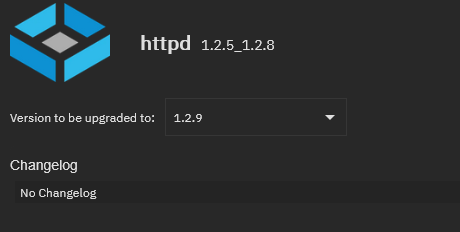
It seems like there’s a new ‘Update Available’ almost every week for all of my apps (as indicated by the ‘Updates’ column and the yellow exclamation point). However, the update usually appears to apply to the ‘Version’ of the app, as opposed to the official ‘App Version’ - which corresponds to the version of the App in the TrueNAS Apps Catalogue.
Can someone please explain to me what exactly this ‘Version’ is? As well as where I can view information about each ‘Version’ (i.e. the changelogs)?
I’ve tried to include screenshots of what I’m referring to, but the forum isn’t letting me, so I’ll do my best to describe what I’m talking about just using text…I’ll use Nginx-Proxy-Manager as an example, with version numbers that I reference being accurate as of this post date (09/08/2025).
I currently have the latest ‘App Version’ of NPM installed which is 2.12.6. This version number aligns with the latest version listed on the official TrueNAS Apps Catalogue. In addition to the ‘App Version’, however, there is also a ‘Version’ number - mine is currently 1.2.8. The Applications page on my TrueNAS web UI is indicating that there is an ‘Update Available’ and that is telling me that ‘Version’ 1.2.9 is that available update. However, when I actually go to apply this update, it says that there’s No Changelog available. I also can’t seem to find any information on what this ‘Version’ is actually referring to - let alone change logs.
Is anyone please able to help me understand what this ‘Version’ really is in reference to? As well as where I can view the change logs?
As a bonus question (if anyone knows) - how important is it that I apply these ‘Version’ updates when they become available, given they seem to be available on a pretty regular basis?
Again, I’m only using NPM as an example, but the same thing is true for virtually all of the apps that I have running.
In many cases when the update is to the Version and not the App Version, that particular app is just being bumped to keep it in line with the general app catalog (i.e. one or more other apps had a more significant change). In some cases a bump in Version might reflect an actual change to the install parameters of the app in the catalog, like when there was a problem that has been patched, and this doesn’t always line up with an updated App Version.
Hello @DjP-iX ,
Thank you for your response and for the link - this is very helpful!
It sounds like in most cases, if it’s just the ‘Version’ that’s been updated, there likely are minimal-to-no changes to the app itself, would you say that is accurate?
Given that’s the case, is there a general ‘good practice’ when it comes to determining which or how often these less impactful ‘Version’ updates should be applied?
@DjP-iX
Just so it is clear as mud, I too was thinking about why the heck I was having so many updates and what they were about. Additionally there is no changelog when you click on the changelog link which makes things less helpful as the end user ponders if they should update or not.
I have three examples: scrutiny, storj, and tailscale.
It appears that in most Apps, the App Version is the actual version number of the running application.
Scrutiny:
App Version v0.8.1 on the github site.
Version v1.2.8. looks like the version number of the build for the application in the app store.
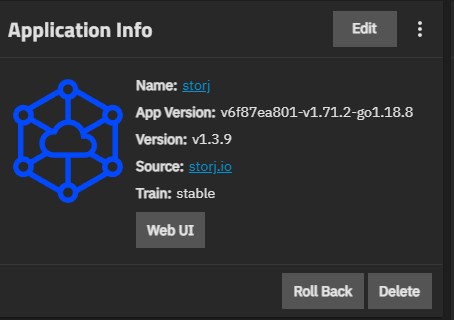
Storj is a mystery to me. I would expect the App Version to be the running node version yet it is not.
App Version is v6f87ea801-v1.71.2-go1.18.8 and I believe this does comes from the Storj build number.
Version is v1.3.9 looks like the version number of the build for the application in the app store.
The node version is running inside the app is 1.136.4 and I received an update last night from 1.135.5 without user interaction, so I don’t think the App Version changed here.
While I think I have it figured out as far as the versions go, having a changelog that can state what is changing would be extremely helpful. Even if all it said was “App Version Update” or “Container Version Update”. Anything to make it clear that either the core application build is changing or the container in which the application is run has an update.
And I apologize if I am using the term “container” incorrectly here.
I agree, i had a devil of a time with the figate app determining what if any thing chaged as the changelog remains empty and the frigate versions remains the same - so why the update
tbh if no one is going to fill chnange log in then it sholud just be removed, or the release management for apps needs to be stricter, no detail no release (even if its just a summary of commits and links to the commits - but the commits are less than clear too…)