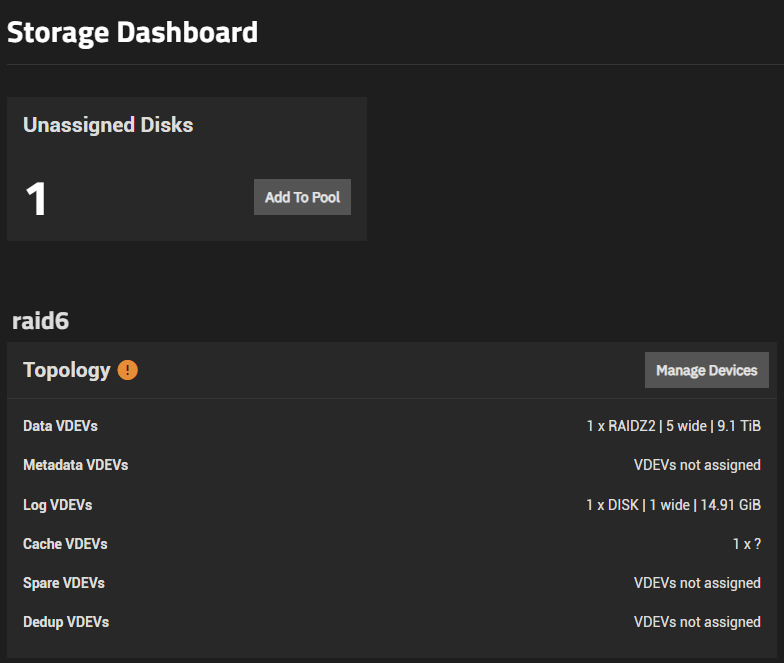
So I upgraded my TrueNAS mine to Scale according to the directions, and I received this alert after it rebooted.
•	Pool raid6 state is ONLINE: One or more devices could not be used because the label is missing or invalid. Sufficient replicas exist for the pool to continue functioning in a degraded state.
The following devices are not healthy:
o	Disk Micron_5300_MTFDDAK480TDS 2222388012E4 is UNAVAIL
As I look I don’t see any obvious warnings about the disk:
image deleted as I can’t embed media - says unavailable but no errors.
And it looks like I can simply add it to the pool if I like:
image deleted as I can’t embed media. Shows one unassigned disk, and the option to add it to a pool.
Is this a common error on upgrades from Core to Scale?
I’m assuming I should just click “Add to pool,” choose the relevant pool, and tell it to use the drive as a read cache?
Thanks.
What is your cache disk, L2ARC or SLOG?
You can use the CLI, command line, and post the results back using preformatted text (Ctrl + e) </> on bar above text box.
sudo zpool status -v
That should show what you are currently seeing.
Browse some other threads and do the Tutorial by the Bot to get your forum trust level up and post images.
TrueNAS-Bot
Type this in a new reply and send to bring up the tutorial, if you haven’t done it already.
@TrueNAS-Bot start tutorial
Before you add the cache disk back, it might be worth considering whether it is actually beneficial for your use case or whether you might be able to put it to better use.
Can you give us an overview of your hardware (especially memory and pool layouts) and what you use it for?
Nope. Let’s see what zpool status -v says - and I’ve also given you what should be the ability to post images. Sorry about that - anti-spam measures. 
Thanks for your patience, folks. And thanks for photo ability.
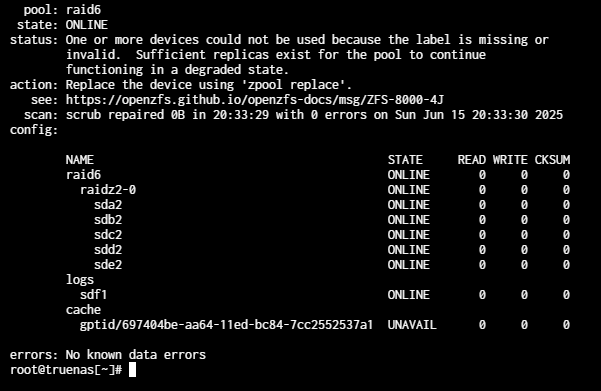
Here’s what I see:
That looks to me like the cache drive is likely fine but it got “lost” in the upgrade.
zpool status -v reports:
As far as use of this thing? I don’t know. I’d been using my other TrueNAS as an NFS share for a cluster, but I’ve almost finished migrating to a new clustering solution and I’m trying to do away with the single point off failure there. This machine was just used for backups, mostly, and as an “oh crap the primary NFS server went down restore to this thing instead” standby device.
Now? I’ll probably use this for limited backups, and if it’s easy to install on Scale I may run Emby and stream from it. Don’t know, really, but i like options and the cache can make a big difference on a slow RAID6 pool.
@HoneyBadger , curious if you will try to sort out ‘missing or invalid label’ from zpool status -v or just add the L2ARC back.
Maybe a SMART Long test first?
Well, that was uneventful.
Ran a long SMART test and all was fine. Removed it from the pool, and re-added it as a cache disk, and it’s up.
Odd that it happened. Happy the repair wasn’t more involved, and that I didn’t need to spend any money on it. Lord knows I’ve spend enough on this cluster this week!
Thanks all.
L2ARC isn’t critical to pool health, and the fastest resolve is indeed as @JustDerek did - drop the drive, re-add it back, and let it warm up again. It’ll now be a persistent L2ARC so at least it should stay warm between subsequent reboots.
But my plan - after the weekend - was to sort out which labels were missing and why. It’s not a common occurrence but I always like root-causing this kind of stuff as it’s not something that’s expected.