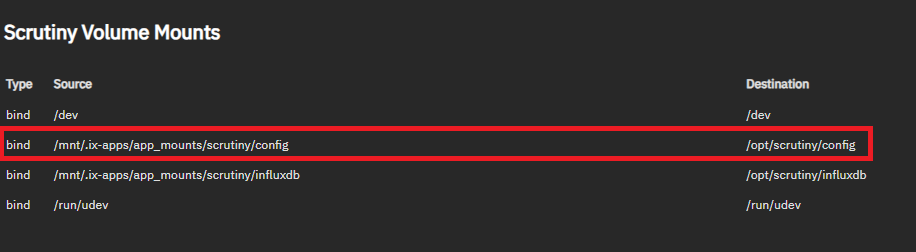
I have installed the provided Scrutiny app on all of my TrueNAS Community installations. I want to configure their notifications, but it’s not clear to me what the proper way to do that is, if by GUI, or what file(s) to edit via the shell.
Would someone point me in the right direction, please? Thanks.
This is the only app I have installed on any of my installations, so I’m a bit clueless about them on this platform. I don’t like the idea of my device doing anything other than being a NAS, but this is sort of like an extension to the OS, so seems reasonable to do.
The source path depends on what you selected during install. The above is if you used ixVolumes (which I don’t recommend).
Now that we know where to place the config files on the host in order for them to appear in the container.
I.e. we can place a file in /mnt/.ix-apps/app_mounts/scrutiny/config/scrutiny.yaml and it will appear in the container as /opt/scrutiny/config/scrutiny.yaml.
You can create that file in the shell if you want. Sudoedit is a easy & secure way to create files as root.
Thanks for your reply - I’ll give it a try shortly. I did take the defaults, during installation, so that location IS where my files are. Might I ask why you don’t recommend that location?
If the application data is of importance then you want to have control over it. For example you want to setup snapshots policies and backups. Sometimes you want to share it, configure permissions, etc.
If you choose ixVolumes as your data storage you get no control. ixVolumes are created on a hidden dataset. You can’t find them in the UI, you can’t create backups, you can’t create backups etc.
If your app data isn’t important, maybe you’re just testing the app, then ixVolumes are OK to use.
You might also be interested in this quote from the official documentation:
Use ixVolumes to allow TrueNAS to create a dataset on the apps storage pool. Like host paths, ixVolumes are mounted as Docker bind mounts and can be mounted read-only. In most use cases, ixVolume storage is better suited to app testing, while host volumes are better for production deployments.
Just be aware there is a bug in scrutiny in the way it reports command timeout for some drives, you will get a massive number over 4 or 8 billion which in actually means 1 in 65000 odd or 2 in 131000 odd when decoded. See Here