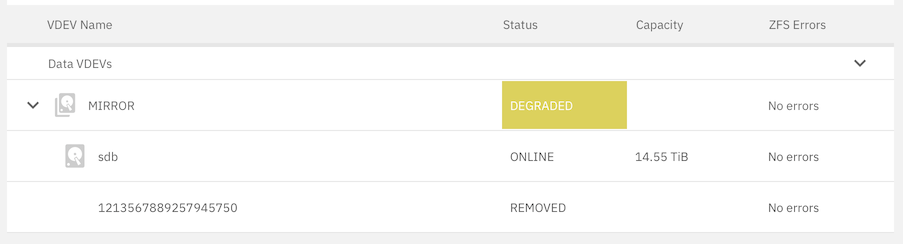
I got an email like this:
New alerts:
Is there a way to see, what triggered this?
The replacement drive failed, as well, within 12 h of being integrated into the (two-drive) pool. In the intervening time the pool was no longer degraded.
I looked at @joeschmuck’s flowchart, but it does not seem to cover this kind of case. There must be something in the logs somewhere that would indicate in greater detail why TrueNAS saw it fit to remove the VDEV from the pool. I just don’t have the knowledge of where to look.
Also, I am beginning to wonder, whether it is a problem with the hardware. Possibly, the SATA interface of my NAS (an AOOSTAR R1) is bad. I am going to see, what happens, when I shut it down and put the good drive into the other slot and power it back up. AOOSTAR offers a 1-year warranty, and I bought it from AliExpress ten months ago.
It is probably mechanical, I got the same message from a brand new drive the other day. i reseated my drives, ran a zpool clear and it has not returned.
How do I run zpool clear? From the command line, or is there somewhere in the GUI, where it can be executed?
Indeed using CLI through the shell. May have to ‘sudo’.
With zpool status I have to use sudo. So, yes, I expect I would have to with zpool clear, as well.
However, as it turns out, rebooting the server one more time and re-seating the drive, makes it available:
I will add it to the pool. Hopefully, that’s the last I had to deal with this issue!
Yeah reboot or zpool clear will both reset the errors.
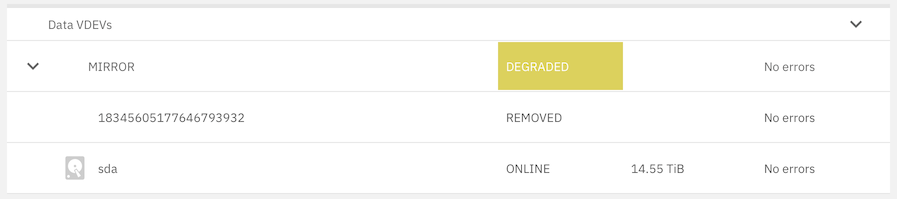
Back to Square 1:
REMOVED but “No errors.” What is going on?
If there are no errors, then I cannot get to the bottom of why it was removed. And, yet, there has to be something that triggered it.
Looking at /var/log/messages:
Nov 17 16:02:01 truenasmini syslog-ng[2388]: Disk-queue file contains possibly invalid record-length; rec_length='1330464061', filename='/audit/syslog-ng-00002.rqf', offset='126662'
Nov 17 16:02:01 truenasmini syslog-ng[2388]: Disk-queue file contains possibly invalid record-length; rec_length='1330464061', filename='/audit/syslog-ng-00002.rqf', offset='126662'
Nov 17 16:02:01 truenasmini syslog-ng[2388]: Reliable disk-buffer state saved; filename='/audit/syslog-ng-00002.rqf', qdisk_length='0'
Nov 17 16:02:01 truenasmini syslog-ng[2388]: Reliable disk-buffer state saved; filename='/audit/syslog-ng-00002.rqf', qdisk_length='0'
Nov 17 16:02:03 truenasmini syslog-ng[2388]: Reliable disk-buffer state saved; filename='/audit/syslog-ng-00002.rqf', qdisk_length='0'
Nov 17 16:02:03 truenasmini syslog-ng[2388]: Reliable disk-buffer state saved; filename='/audit/syslog-ng-00002.rqf', qdisk_length='0'
Nov 17 16:02:04 truenasmini syslog-ng[2388]: Reliable disk-buffer state saved; filename='/audit/syslog-ng-00002.rqf', qdisk_length='0'
Nov 17 16:02:04 truenasmini syslog-ng[2388]: Reliable disk-buffer state saved; filename='/audit/syslog-ng-00002.rqf', qdisk_length='0'
Nov 17 16:04:13 truenasmini kernel: ata2: hard resetting link
Nov 17 16:04:14 truenasmini kernel: ata2: SATA link down (SStatus 4 SControl 300)
Nov 17 16:04:19 truenasmini kernel: ata2: hard resetting link
Nov 17 16:04:19 truenasmini kernel: ata2: SATA link down (SStatus 4 SControl 300)
Nov 17 16:04:19 truenasmini kernel: ata2: limiting SATA link speed to <unknown>
Nov 17 16:04:24 truenasmini kernel: ata2: hard resetting link
Nov 17 16:04:24 truenasmini kernel: ata2: SATA link down (SStatus 4 SControl 3F0)
Nov 17 16:04:24 truenasmini kernel: ata2.00: disable device
Nov 17 16:04:24 truenasmini kernel: sd 1:0:0:0: [sdb] tag#19 FAILED Result: hostbyte=DID_OK driverbyte=DRIVER_OK cmd_age=11s
Nov 17 16:04:24 truenasmini kernel: sd 1:0:0:0: [sdb] tag#19 Sense Key : Illegal Request [current]
Nov 17 16:04:24 truenasmini kernel: sd 1:0:0:0: [sdb] tag#19 Add. Sense: Unaligned write command
Nov 17 16:04:24 truenasmini kernel: sd 1:0:0:0: [sdb] tag#19 CDB: Synchronize Cache(10) 35 00 00 00 00 00 00 00 00 00
Nov 17 16:04:24 truenasmini kernel: zio pool=Internal vdev=/dev/disk/by-partuuid/919ff403-938e-48f0-9f84-5e4c79511206 error=5 type=5 offset=0 size=0 flags=2098304
Nov 17 16:04:24 truenasmini kernel: ata2: EH complete
Nov 17 16:04:24 truenasmini kernel: ata2.00: detaching (SCSI 1:0:0:0)
Nov 17 16:04:24 truenasmini kernel: zio pool=Internal vdev=/dev/disk/by-partuuid/919ff403-938e-48f0-9f84-5e4c79511206 error=5 type=2 offset=192512 size=4096 flags=3146432
Nov 17 16:04:24 truenasmini kernel: zio pool=Internal vdev=/dev/disk/by-partuuid/919ff403-938e-48f0-9f84-5e4c79511206 error=5 type=2 offset=454656 size=4096 flags=3146432
Nov 17 16:04:24 truenasmini kernel: zio pool=Internal vdev=/dev/disk/by-partuuid/919ff403-938e-48f0-9f84-5e4c79511206 error=5 type=1 offset=270336 size=8192 flags=1245377
Nov 17 16:04:24 truenasmini kernel: zio pool=Internal vdev=/dev/disk/by-partuuid/919ff403-938e-48f0-9f84-5e4c79511206 error=5 type=2 offset=16000898232320 size=4096 flags=3146432
Nov 17 16:04:24 truenasmini kernel: zio pool=Internal vdev=/dev/disk/by-partuuid/919ff403-938e-48f0-9f84-5e4c79511206 error=5 type=1 offset=16000898048000 size=8192 flags=1245377
Nov 17 16:04:24 truenasmini kernel: zio pool=Internal vdev=/dev/disk/by-partuuid/919ff403-938e-48f0-9f84-5e4c79511206 error=5 type=2 offset=16000898494464 size=4096 flags=3146432
Nov 17 16:04:24 truenasmini kernel: zio pool=Internal vdev=/dev/disk/by-partuuid/919ff403-938e-48f0-9f84-5e4c79511206 error=5 type=1 offset=16000898310144 size=8192 flags=1245377
Nov 17 16:04:24 truenasmini kernel: zio pool=Internal vdev=/dev/disk/by-partuuid/919ff403-938e-48f0-9f84-5e4c79511206 error=5 type=1 offset=270336 size=8192 flags=1245889
Nov 17 16:04:24 truenasmini kernel: sd 1:0:0:0: [sdb] Synchronizing SCSI cache
Nov 17 16:04:24 truenasmini kernel: sd 1:0:0:0: [sdb] Synchronize Cache(10) failed: Result: hostbyte=DID_BAD_TARGET driverbyte=DRIVER_OK
Is there anything in those entries indicating the source of the problem? The entries at 16:04:24 are specifically about /dev/sdb, which is the failed drive.
This suggests a hardware issue, truenas can’t speak to the port; I’d suspect your theory on SATA port on the motherboard dying is most likely here.
This bit should mean that truenas has given up trying to speak to the drive, then disabling it
This then means it’s detached it from the pool from I understand.
There is also showing of I/O Issues in that suggesting that truenas tried to speak to the virtual device UUID but failed, so just assumed drive is unattached so marked it as unused when you rebooted it and it came up as unused it, you’ll just need to resilver it back in once you have either replaced the MB or got a new SATA HBA.