
All,
(I have added additional info below to this post, which I didn’t have time to collect for the original post.)
I recently tried to upgrade one of my HPE DL380 Gen7 servers, currently running Truenas Core 13.0-U6.8, to Scale 25.04 and encountered a Linux kernel boot problem. The hardware currently exhibits no issues while running BSD with Truenas 13.0-U6.8.
The HPE Proliant hardware is as follows:
HPE Proliant DL380 Gen7 Server w/2 - Xeon 5560 CPUs @ 2.8Ghz,
w/ 48Gb ECC memory
Avagio (LSI) SAS2308 SAS controller, w/ 8-HGST HUC10121CLAR1200 10k SAS drives using Firmware 20.00.07.00 (setup 2308 controller for JBOD)
The system is using legacy boot (…no UEFI available.)
I encountered this issue while following the recommended ‘online upgrade’ path (13.0-U6.8 => 24.04.2.5 => 24.10.2.4 => 25.04.2.4.) The system upgraded to 24.04 then rebooted without issue. I then upgraded to 24.10 and rebooted without issue. When I tried to upgrade the system from 24.10 to 25.04, the system hung during the upgrade reboot process.
At this point, I decided to try an ‘offline install/upgrade’ using the 25.04 ISO on a USB drive. I encountered the exact same results.
It appears that the Linux kernel used in version Truenas 25.04.2.4 (v6.12.15) is causing the boot process hang on my system while trying to load the “efi_pstore” module.
This issue seems to be related to kernel version v6.12.15, since I did not encounter this issue in the earlier kernel versions used in SCALE (kernel v6.6.32/v6.6.44 …used in 24.04/24.10 respectivly.) There also appears to be a documented history of boot problems over the past with this kernel version on certain hardware (…as noted by searching the web for Debian boot issues with this kernel version.)
In my case, the boot console displays “Starting modprobe@efi_pstore.service” when the kernel boot process hangs.
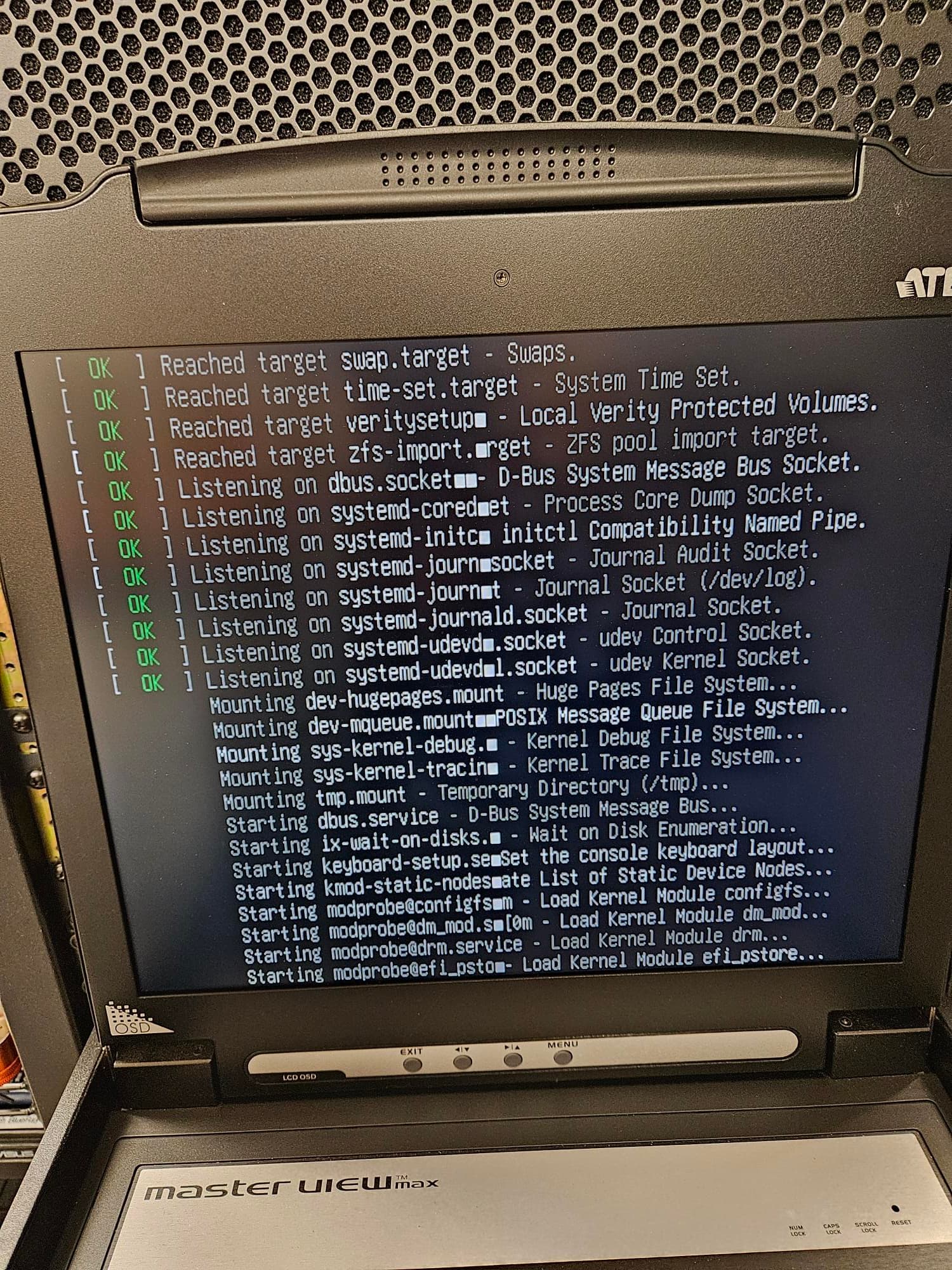
Fortunately, I was able to back out the changes, since I had previously saved my system config and also had a copy of the 13.0-U6.8 ISO ready to reload the system, so no lasting damage done at this point.
All the best,
Bill