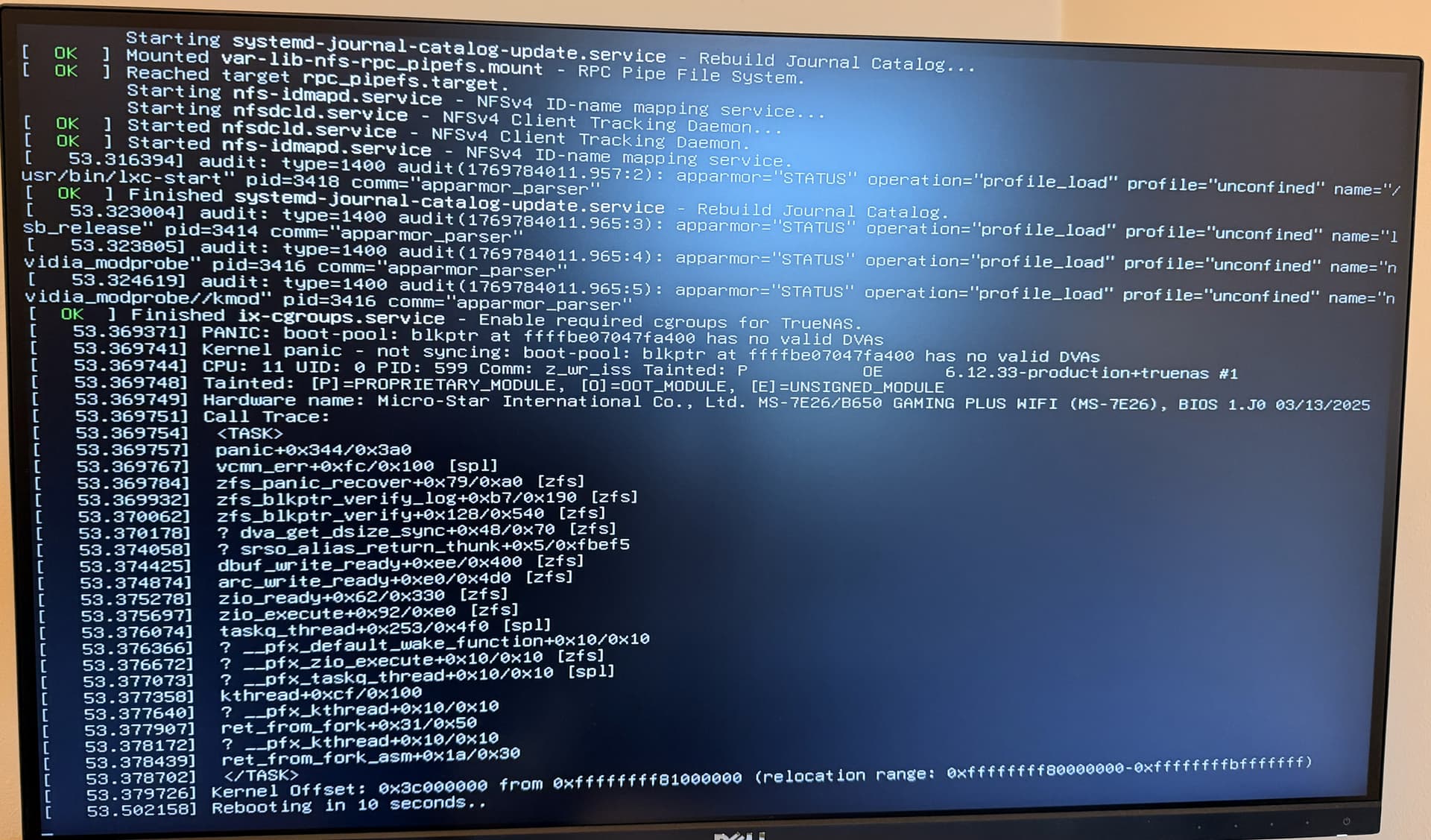
I’ve just tried to upgrade to 25.10.1 and get stuck in a boot loop when I try and boot into it, coming from 25.04.2.6.
The boot into 25.10.1 starts normally, but as soon as it hits [OK] Started nfs-idmapd.service, it pauses for around 5 seconds, the screen goes black, and then goes back to GRUB. This loop continues indefinitely. There’s no other errors that appear during the boot sequence.
Booting back into 25.04.2.6 works without any issues. I’ve tried mounting the /var/log dataset of the 25.10.1 boot environment but I can’t see anything notable in there.
Any ideas on where to start debugging this would be greatly appreciated!
Easiest is to boot 25.04.2.6. Make sure you have a system configuration download of that version. Go to the Boot Environments and remove 25.10 BE and try the upgrade again. There may be something that went wrong.
Maybe run scrubs on the Boot-pool and the data pools if those weren’t recently scrubbed before upgrade
Thanks for your reply. I should’ve mentioned that I’ve already tried that. I also tried doing the “Manual Update” by uploading the update file myself and that didn’t help either unfortunately. Scrubbing the boot pool comes back clean.
Okay, booting with nomodeset lets me see the kernel panic causing the crash. This points to there being some issue with boot-pool, but SMART all looks good, scrubs are passing with no issues, etc. My boot-pool is two SATA SSDs in a mirror, both connected directly to the motherboard.
Since you have mirrored boot. Can you try removing one or manually try booting from the secondary boot device? I am wondering if the main one is having problems
You might try running SMART Long tests on the boot drive and checking the results before anything else.
No luck there either unfortunately. Both drives did a scheduled extended SMART test a few days ago and came back fine. The symptoms are the same regardless of which drive I boot into. Thanks again for your help thus far!
I’ve solved this, but unfortunately didn’t get to the bottom of the root cause of the issue. Wiping my boot drives, installing 25.10.1 from scratch, and reimporting my configuration file has worked smoothly. Took less than 20 minutes.
If it is happening on a fresh install before you reload the system configuration, it is a problem with the boot devices or system hardware. If it happens after reloading the system configuration, it could be something is corrupted, like bad apps, etc
Booting from the 25.10.1 ISO works until proceeding with the installation, post password entry. It appears the hard drive is going to get formatted then things blow up.. resulting error is pointing to not being able to see/find the NVMe device.
Booting from the 25.04.2.6 ISO, installation works as expected.
I have downloaded the 25.10.1 ISO a few different times from different systems. Each installation attempt results in the same issue. Having an existing, functional system and upgrading to 25.10.1 results in the initramfs prompt during reboot.
This is not indicative of a hardware issue - happens on SuperMicro and Dell hardware.