Hello,
I attempted to upgrade form 25.04.2.6 to 25.10 but I’m currently running into an issue which I believe stems from one of my pools. Doing a clean install of 25.10 and attempting to import the pool fails (I have 2 pools, one imports fine).
The pool in question was created under FreeNAS and carried forward into TrueNAS Core, and have had it running under TrueNAS Scale for sometime. The pool has been upgraded twice (larger drive swaps and resilvered).
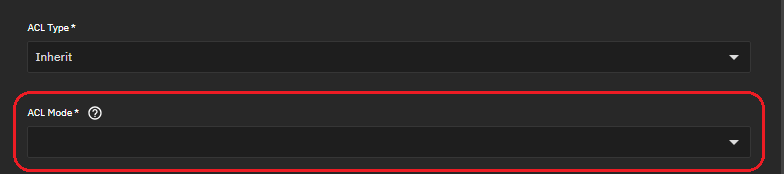
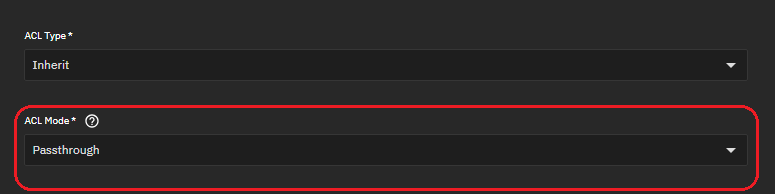
The error I’m receiving is “aclmode: failed to get property: . "
- this shows as an “alert” on the upgrade path
- this shows as a popup when attempting to import on a fresh install
Here’s the most recent on a clean install (that I’m currently working with):
truenas_admin@truenas[~]$ zpool status volume1
  pool: volume1
 state: ONLINE
status: Some supported and requested features are not enabled on the pool.
        The pool can still be used, but some features are unavailable.
action: Enable all features using 'zpool upgrade'. Once this is done,
        the pool may no longer be accessible by software that does not support
        the features. See zpool-features(7) for details.
  scan: scrub repaired 0B in 1 days 10:25:22 with 0 errors on Mon Oct 27 07:25:25 2025
config:

        NAME                                      STATE     READ WRITE CKSUM
        volume1                                   ONLINE       0     0     0
          raidz2-0                                ONLINE       0     0     0
            2bf14cb6-2fff-407d-a0c4-f57039958ca1  ONLINE       0     0     0
            47fd61db-8235-4346-9921-f56018160b06  ONLINE       0     0     0
            efbd3bca-e1c0-481b-8653-dc44519f766e  ONLINE       0     0     0
            86027ff4-2c15-4eb8-bcad-cdb412bde4fb  ONLINE       0     0     0
            bf20aa52-70af-4426-806b-94d2bb6e09db  ONLINE       0     0     0
            9e7f603e-22ec-46c5-b7e3-19f29de87634  ONLINE       0     0     0
            cfaea7cd-110b-4a92-b2ad-236ed536912e  ONLINE       0     0     0
            61cdd1b5-b67b-4b0f-afb8-00f1609ecc3b  ONLINE       0     0     0

errors: No known data error
And the data is visible:
truenas_admin@truenas[~]$ ls -lah /mnt/volume1
total 193K
drwxr-xr-x 11 root root 11 Nov 22 12:53 .
drwxr-xr-x  4 root root  4 Nov 22 12:23 ..
drwxr-xr-x 15 root root 17 Nov 22 12:53 .system
drwxr-xr-x 37 root root 37 Nov 19 20:18 docker-stacks
drwxr-xr-x 32 root root 32 Nov 19 20:20 docker-volumes
drwxrwx---  6 3001 3001  7 Nov 22 09:23 downloads
drwxr-xr-x  6 root root  6 Nov 22 11:41 home
drwxr-xr-x  7 root root 10 Jan 31  2024 ix-applications
drwxrwxr-x  7 3001 3001  7 Feb  3  2024 media
drwxr-xr-x  3 root root  5 Nov  1  2024 scripts
drwxr-xr-x  3 root root  3 Nov 22 12:53 vm
I’ve been trying leverage ChatGPT to get a pulse on understanding the aclmode error, and if it’s not providing AI hallucinations/fever dream answers, then it sounds like 25.10 may do stricter checking instead of ignoring ACL issues
This normally isn’t fatal, but in TrueNAS SCALE 25.10 Goldeneye, they changed middleware behavior and now TrueNAS fails import if a dataset/snapshot returns an unreadable ACL property
Running the following check, it looks like some things are missing with a “-” for value and being advised as the issue:
truenas_admin@truenas[~]$ zfs get -r aclmode,aclinherit,acltype volume1
NAME                                                                                               PROPERTY    VALUE          SOURCE
volume1                                                                                            aclmode     passthrough    local
volume1                                                                                            aclinherit  passthrough    local
volume1                                                                                            acltype     nfsv4          default
volume1/.system                                                                                    aclmode     passthrough    inherited from volume1
volume1/.system                                                                                    ...truncating output as it's rather larger...
volume1/.system/samba4                                                                             aclmode     passthrough    inherited from volume1
volume1/.system/samba4                                                                             aclinherit  passthrough    inherited from volume1
volume1/.system/samba4                                                                             acltype     off            inherited from volume1/.system
volume1/.system/samba4@wbc-1640290862                                                              aclmode     -              -
volume1/.system/samba4@wbc-1640290862                                                              aclinherit  -              -
volume1/.system/samba4@wbc-1640290862                                                              acltype     off            inherited from volume1/.system
volume1/.system/samba4@wbc-1640292422                                                              aclmode     -              -
volume1/.system/samba4@wbc-1640292422                                                              aclinherit  -              -
...truncating output as it's rather larger...
volume1/media                                                                                      aclmode     -              -
volume1/media                                                                                      aclinherit  passthrough    inherited from volume1
volume1/media                                                                                      acltype     nfsv4          default
volume1/scripts                                                                                    aclmode     passthrough    inherited from volume1
volume1/scripts                                                                                    aclinherit  discard        local
volume1/scripts                                                                                    acltype     posix          local
It also advised that “Snapshots cannot have their properties changed, but ZFS will fix them automatically once the LIVE dataset has a valid ACL property again” and that volume1/media is a culprit.
While I think ChatGPT can be insightful in diagnosing issues, I don’t trust it implicitly 
Following was recommended:
$ zfs set aclmode=passthrough volume1/media

and if that fails, then:

$ zfs set aclmode=discard volume1/media
some of the other wonkiness are things like dashboard widgets not having data, etc. on upgrade, or after trying to import the pool.
Thanks in advance!