7,000 checksum errors but smart data looks OK?

Got the alert about a week ago, and didn’t have time to investigate (I know.. :expressionless_face:). I ran a long smart test on the degraded drive, came back with passed. So I cleared the pool status, and now I can watch in realtime as the checksums increase again… Is smart not catching a problem? Could it be related to upgrading to 25.10.6? Updated on August 12th, first degraded status reported August 19th…

# zpool status -v                                                                                                                                                                                                    Tue01 [478/478]
[...]                                                                                                                                                                                                                        
                                                                                                                                                                                                                                                      
  pool: storage                                                                                                                                                                                                                                       
 state: DEGRADED                                                                                                                                                                                                                                      
status: One or more devices has experienced an unrecoverable error.  An                                                                                                                                                                               
        attempt was made to correct the error.  Applications are unaffected.                                                                                                                                                                          
action: Determine if the device needs to be replaced, and clear the errors                                                                                                                                                                            
        using 'zpool clear' or replace the device with 'zpool replace'.                                                    
   see: https://openzfs.github.io/openzfs-docs/msg/ZFS-8000-9P                                                             
  scan: scrub repaired 0B in 01:54:51 with 0 errors on Sun Aug 30 03:55:28 2026                                                                                                                                                                       
config:                                                                                                                    
                                                                                                                           
        NAME                                      STATE     READ WRITE CKSUM                                               
        storage                                   DEGRADED     0     0     0                                               
          raidz2-0                                DEGRADED     0     0     0                                               
            2bbb12b5-1324-4175-8689-0db7cc645686  ONLINE       0     0     0                                                                                                                                                                          
            76636398-d539-11ec-ae72-f04da2301444  ONLINE       0     0     0                                               
            7685394a-d539-11ec-ae72-f04da2301444  ONLINE       5     2 8.04K                                                                                                                                                                          
            76364ca6-d539-11ec-ae72-f04da2301444  DEGRADED     4     1 6.41K  too many errors                              
            76ad1bb6-d539-11ec-ae72-f04da2301444  ONLINE       0     0     0                                               
            7696e50e-d539-11ec-ae72-f04da2301444  ONLINE       0     0     0                                               
            c7e1c960-285c-46b2-a977-dc11751add17  ONLINE       0     0     0                                               
            76be36de-d539-11ec-ae72-f04da2301444  ONLINE       0     0     0                                               
                                                                                                                           
errors: No known data errors    

Ran long test and came back…

smartctl 7.4 2023-08-01 r5530 [x86_64-linux-6.12.99-production+truenas] (local build)
Copyright (C) 2002-23, Bruce Allen, Christian Franke, www.smartmontools.org

=== START OF INFORMATION SECTION ===
Model Family:     Western Digital Red
Device Model:     WDC WD80EFAX-68LHPN0
Serial Number:    7SGHRDSC
LU WWN Device Id: 5 000cca 252c725b2
Firmware Version: 83.H0A83
User Capacity:    8,001,563,222,016 bytes [8.00 TB]
Sector Sizes:     512 bytes logical, 4096 bytes physical
Rotation Rate:    5400 rpm
Form Factor:      3.5 inches
Device is:        In smartctl database 7.3/5528
ATA Version is:   ACS-2, ATA8-ACS T13/1699-D revision 4
SATA Version is:  SATA 3.2, 6.0 Gb/s (current: 6.0 Gb/s)
Local Time is:    Wed Sep  2 05:58:15 2026 CDT
SMART support is: Available - device has SMART capability.
SMART support is: Enabled
AAM feature is:   Unavailable
APM level is:     164 (intermediate level without standby)
Rd look-ahead is: Enabled
Write cache is:   Enabled
DSN feature is:   Unavailable
ATA Security is:  Disabled, NOT FROZEN [SEC1]
Wt Cache Reorder: Enabled

=== START OF READ SMART DATA SECTION ===
SMART overall-health self-assessment test result: PASSED

General SMART Values:
Offline data collection status:  (0x82) Offline data collection activity
                                        was completed without error.
                                        Auto Offline Data Collection: Enabled.
Self-test execution status:      (   0) The previous self-test routine completed
                                        without error or no self-test has ever 
                                        been run.
Total time to complete Offline 
data collection:                (   93) seconds.
Offline data collection
capabilities:                    (0x5b) SMART execute Offline immediate.
                                        Auto Offline data collection on/off support.
                                        Suspend Offline collection upon new
                                        command.
                                        Offline surface scan supported.
                                        Self-test supported.
                                        No Conveyance Self-test supported.
                                        Selective Self-test supported.
SMART capabilities:            (0x0003) Saves SMART data before entering
                                        power-saving mode.
                                        Supports SMART auto save timer.
Error logging capability:        (0x01) Error logging supported.
                                        General Purpose Logging supported.
Short self-test routine 
recommended polling time:        (   2) minutes.
Extended self-test routine
recommended polling time:        ( 958) minutes.
SCT capabilities:              (0x003d) SCT Status supported.
                                        SCT Error Recovery Control supported.
                                        SCT Feature Control supported.
                                        SCT Data Table supported.

SMART Attributes Data Structure revision number: 16
Vendor Specific SMART Attributes with Thresholds:
ID# ATTRIBUTE_NAME          FLAGS    VALUE WORST THRESH FAIL RAW_VALUE
  1 Raw_Read_Error_Rate     PO-R--   100   100   016    -    0
  2 Throughput_Performance  --S---   133   133   054    -    100
  3 Spin_Up_Time            POS---   161   161   024    -    370 (Average 447)
  4 Start_Stop_Count        -O--C-   100   100   000    -    271
  5 Reallocated_Sector_Ct   PO--CK   100   100   005    -    0
  7 Seek_Error_Rate         -O-R--   100   100   067    -    0
  8 Seek_Time_Performance   --S---   128   128   020    -    18
  9 Power_On_Hours          -O--C-   090   090   000    -    74475
 10 Spin_Retry_Count        -O--C-   100   100   060    -    0
 12 Power_Cycle_Count       -O--CK   100   100   000    -    271
 22 Helium_Level            PO---K   100   100   025    -    100
192 Power-Off_Retract_Count -O--CK   068   068   000    -    38881
193 Load_Cycle_Count        -O--C-   068   068   000    -    38881
194 Temperature_Celsius     -O----   203   203   000    -    32 (Min/Max 18/41)
196 Reallocated_Event_Count -O--CK   100   100   000    -    0
197 Current_Pending_Sector  -O---K   100   100   000    -    0
198 Offline_Uncorrectable   ---R--   100   100   000    -    0
199 UDMA_CRC_Error_Count    -O-R--   200   200   000    -    0
                            ||||||_ K auto-keep
                            |||||__ C event count
                            ||||___ R error rate
                            |||____ S speed/performance
                            ||_____ O updated online
                            |______ P prefailure warning

General Purpose Log Directory Version 1
SMART           Log Directory Version 1 [multi-sector log support]
Address    Access  R/W   Size  Description
0x00       GPL,SL  R/O      1  Log Directory
0x01           SL  R/O      1  Summary SMART error log
0x02           SL  R/O      1  Comprehensive SMART error log
0x03       GPL     R/O      1  Ext. Comprehensive SMART error log
0x04       GPL     R/O    256  Device Statistics log
0x04       SL      R/O    255  Device Statistics log
0x06           SL  R/O      1  SMART self-test log
0x07       GPL     R/O      1  Extended self-test log
0x08       GPL     R/O      2  Power Conditions log
0x09           SL  R/W      1  Selective self-test log
0x0c       GPL     R/O   5501  Pending Defects log
0x10       GPL     R/O      1  NCQ Command Error log
0x11       GPL     R/O      1  SATA Phy Event Counters log
0x12       GPL     R/O      1  SATA NCQ Non-Data log
0x13       GPL     R/O      1  SATA NCQ Send and Receive log
0x15       GPL,SL  R/W      1  Rebuild Assist log
0x21       GPL     R/O      1  Write stream error log
0x22       GPL     R/O      1  Read stream error log
0x24       GPL     R/O    256  Current Device Internal Status Data log
0x25       GPL     R/O    256  Saved Device Internal Status Data log
0x30       GPL,SL  R/O      9  IDENTIFY DEVICE data log
0x80-0x9f  GPL,SL  R/W     16  Host vendor specific log
0xe0       GPL,SL  R/W      1  SCT Command/Status
0xe1       GPL,SL  R/W      1  SCT Data Transfer

SMART Extended Comprehensive Error Log Version: 1 (1 sectors)
No Errors Logged

SMART Extended Self-test Log Version: 1 (1 sectors)
Num  Test_Description    Status                  Remaining  LifeTime(hours)  LBA_of_first_error
# 1  Extended offline    Completed without error       00%      8933         -
# 2  Short offline       Completed without error       00%      8908         -
# 3  Short offline       Completed without error       00%      8884         -
# 4  Short offline       Completed without error       00%      8860         -
# 5  Short offline       Completed without error       00%      8836         -
# 6  Short offline       Completed without error       00%      8812         -
# 7  Short offline       Completed without error       00%      8788         -
# 8  Short offline       Completed without error       00%      8764         -
# 9  Short offline       Completed without error       00%      8740         -
#10  Short offline       Completed without error       00%      8716         -
#11  Short offline       Completed without error       00%      8692         -
#12  Short offline       Completed without error       00%      8668         -
#13  Short offline       Completed without error       00%      8644         -
#14  Short offline       Completed without error       00%      8620         -
#15  Short offline       Completed without error       00%      8596         -
#16  Short offline       Completed without error       00%      8572         -
#17  Short offline       Completed without error       00%      8548         -
#18  Short offline       Completed without error       00%      8524         -
#19  Short offline       Completed without error       00%      8500         -

SMART Selective self-test log data structure revision number 1
 SPAN  MIN_LBA  MAX_LBA  CURRENT_TEST_STATUS
    1        0        0  Not_testing
    2        0        0  Not_testing
    3        0        0  Not_testing
    4        0        0  Not_testing
    5        0        0  Not_testing
Selective self-test flags (0x0):
  After scanning selected spans, do NOT read-scan remainder of disk.
If Selective self-test is pending on power-up, resume after 0 minute delay.

SCT Status Version:                  3
SCT Version (vendor specific):       256 (0x0100)
Device State:                        Active (0)
Current Temperature:                    32 Celsius
Power Cycle Min/Max Temperature:     28/37 Celsius
Lifetime    Min/Max Temperature:     18/41 Celsius
Under/Over Temperature Limit Count:   0/0

SCT Temperature History Version:     2
Temperature Sampling Period:         1 minute
Temperature Logging Interval:        1 minute
Min/Max recommended Temperature:      0/65 Celsius
Min/Max Temperature Limit:           -40/70 Celsius
Temperature History Size (Index):    128 (80)

Index    Estimated Time   Temperature Celsius
  81    2026-09-02 03:51    32  *************
 ...    ..(126 skipped).    ..  *************
  80    2026-09-02 05:58    32  *************

SCT Error Recovery Control:
           Read:     70 (7.0 seconds)
          Write:     70 (7.0 seconds)

Device Statistics (GP Log 0x04)
Page  Offset Size        Value Flags Description
0x01  =====  =               =  ===  == General Statistics (rev 1) ==
0x01  0x008  4             271  ---  Lifetime Power-On Resets
0x01  0x010  4           74475  ---  Power-on Hours
0x01  0x018  6    401373929325  ---  Logical Sectors Written
0x01  0x020  6      6227174283  ---  Number of Write Commands
0x01  0x028  6    793946674292  ---  Logical Sectors Read
0x01  0x030  6      4507915524  ---  Number of Read Commands
0x01  0x038  6    268110812000  ---  Date and Time TimeStamp
0x03  =====  =               =  ===  == Rotating Media Statistics (rev 1) ==
0x03  0x008  4           66483  ---  Spindle Motor Power-on Hours
0x03  0x010  4           66483  ---  Head Flying Hours
0x03  0x018  4           38881  ---  Head Load Events
0x03  0x020  4               0  ---  Number of Reallocated Logical Sectors
0x03  0x028  4        13990092  ---  Read Recovery Attempts
0x03  0x030  4               0  ---  Number of Mechanical Start Failures
0x04  =====  =               =  ===  == General Errors Statistics (rev 1) ==
0x04  0x008  4               0  ---  Number of Reported Uncorrectable Errors
0x04  0x010  4               1  ---  Resets Between Cmd Acceptance and Completion
0x05  =====  =               =  ===  == Temperature Statistics (rev 1) ==
0x05  0x008  1              32  ---  Current Temperature
0x05  0x010  1              32  N--  Average Short Term Temperature
0x05  0x018  1              31  N--  Average Long Term Temperature
0x05  0x020  1              41  ---  Highest Temperature
0x05  0x028  1              18  ---  Lowest Temperature
0x05  0x030  1              40  N--  Highest Average Short Term Temperature
0x05  0x038  1              20  N--  Lowest Average Short Term Temperature
0x05  0x040  1              36  N--  Highest Average Long Term Temperature
0x05  0x048  1              25  N--  Lowest Average Long Term Temperature
0x05  0x050  4               0  ---  Time in Over-Temperature
0x05  0x058  1              65  ---  Specified Maximum Operating Temperature
0x05  0x060  4               0  ---  Time in Under-Temperature
0x05  0x068  1               0  ---  Specified Minimum Operating Temperature
0x06  =====  =               =  ===  == Transport Statistics (rev 1) ==
0x06  0x008  4               0  ---  Number of Hardware Resets
0x06  0x010  4             220  ---  Number of ASR Events
0x06  0x018  4               0  ---  Number of Interface CRC Errors
0xff  =====  =               =  ===  == Vendor Specific Statistics (rev 1) ==
                                |||_ C monitored condition met
                                ||__ D supports DSN
                                |___ N normalized value

Pending Defects log (GP Log 0x0c)
No Defects Logged

SATA Phy Event Counters (GP Log 0x11)
ID      Size     Value  Description
0x0001  2            0  Command failed due to ICRC error
0x0002  2            0  R_ERR response for data FIS
0x0003  2            0  R_ERR response for device-to-host data FIS
0x0004  2            0  R_ERR response for host-to-device data FIS
0x0005  2            0  R_ERR response for non-data FIS
0x0006  2            0  R_ERR response for device-to-host non-data FIS
0x0007  2            0  R_ERR response for host-to-device non-data FIS
0x0008  2            0  Device-to-host non-data FIS retries
0x0009  2            0  Transition from drive PhyRdy to drive PhyNRdy
0x000a  2            1  Device-to-host register FISes sent due to a COMRESET
0x000b  2            0  CRC errors within host-to-device FIS
0x000d  2            0  Non-CRC errors within host-to-device FIS

smartctl looks OK to me, so I ran zpool clear…


        NAME                                      STATE     READ WRITE CKSUM                                                                                                                                                                          
        storage                                   ONLINE       0     0     0                                                                                                                                                                          
          raidz2-0                                ONLINE       0     0     0                                                                                                                                                                          
            2bbb12b5-1324-4175-8689-0db7cc645686  ONLINE       0     0     0                                                                                                                                                                          
            76636398-d539-11ec-ae72-f04da2301444  ONLINE       0     0     0                                                                                                                                                                          
            7685394a-d539-11ec-ae72-f04da2301444  ONLINE       0     0     2                                                                                                                                                                          
            76364ca6-d539-11ec-ae72-f04da2301444  ONLINE       0     0     2                                                                                                                                                                          
            76ad1bb6-d539-11ec-ae72-f04da2301444  ONLINE       0     0     0                                                                                                                                                                          
            7696e50e-d539-11ec-ae72-f04da2301444  ONLINE       0     0     0                                                                                                                                                                          
            c7e1c960-285c-46b2-a977-dc11751add17  ONLINE       0     0     0                                                                                                                                                                          
            76be36de-d539-11ec-ae72-f04da2301444  ONLINE       0     0     0                                                                                                                                                                          
                                                                                                                                                                                                                                                      
errors: No known data errors   

Then while writing this post 30 minutes later:

        NAME                                      STATE     READ WRITE CKSUM
        storage                                   ONLINE       0     0     0
          raidz2-0                                ONLINE       0     0     0
            2bbb12b5-1324-4175-8689-0db7cc645686  ONLINE       0     0     0
            76636398-d539-11ec-ae72-f04da2301444  ONLINE       0     0     0
            7685394a-d539-11ec-ae72-f04da2301444  ONLINE       0     0    28
            76364ca6-d539-11ec-ae72-f04da2301444  ONLINE       0     0    28
            76ad1bb6-d539-11ec-ae72-f04da2301444  ONLINE       0     0     0
            7696e50e-d539-11ec-ae72-f04da2301444  ONLINE       0     0     0
            c7e1c960-285c-46b2-a977-dc11751add17  ONLINE       0     0     0
            76be36de-d539-11ec-ae72-f04da2301444  ONLINE       0     0     0

errors: No known data errors

Any advice is appreciated!

What is your hardware? What is the PSU? Are you using an HBA?

That can also happen with a loose connection or bad cable. I would check the connections at every end and redo them or use a new cable.

yeah smart passing while zfs checksums keep climbing is usually cable/controller stuff in my experience. smart is looking at the drive internals, zfs is catching bits that got flipped on the path.

id start with what winnielinnie said. reseat every end of that drive cable, try another sata/sas port, swap the cable if youve got a spare. also peek at dmesg around the times the checksum counter jumps for ata link resets or controller timeouts.

if its hanging off an hba / backplane, flaky links and marginal psus can do that same “smart ok, zfs unhappy” pattern. less often the 25.10.6 bump itself, but a driver change can stress a marginal link.

… same, PLUS running a few passes of MemTest.

What’s the hardware?

Thank you all for the advice!

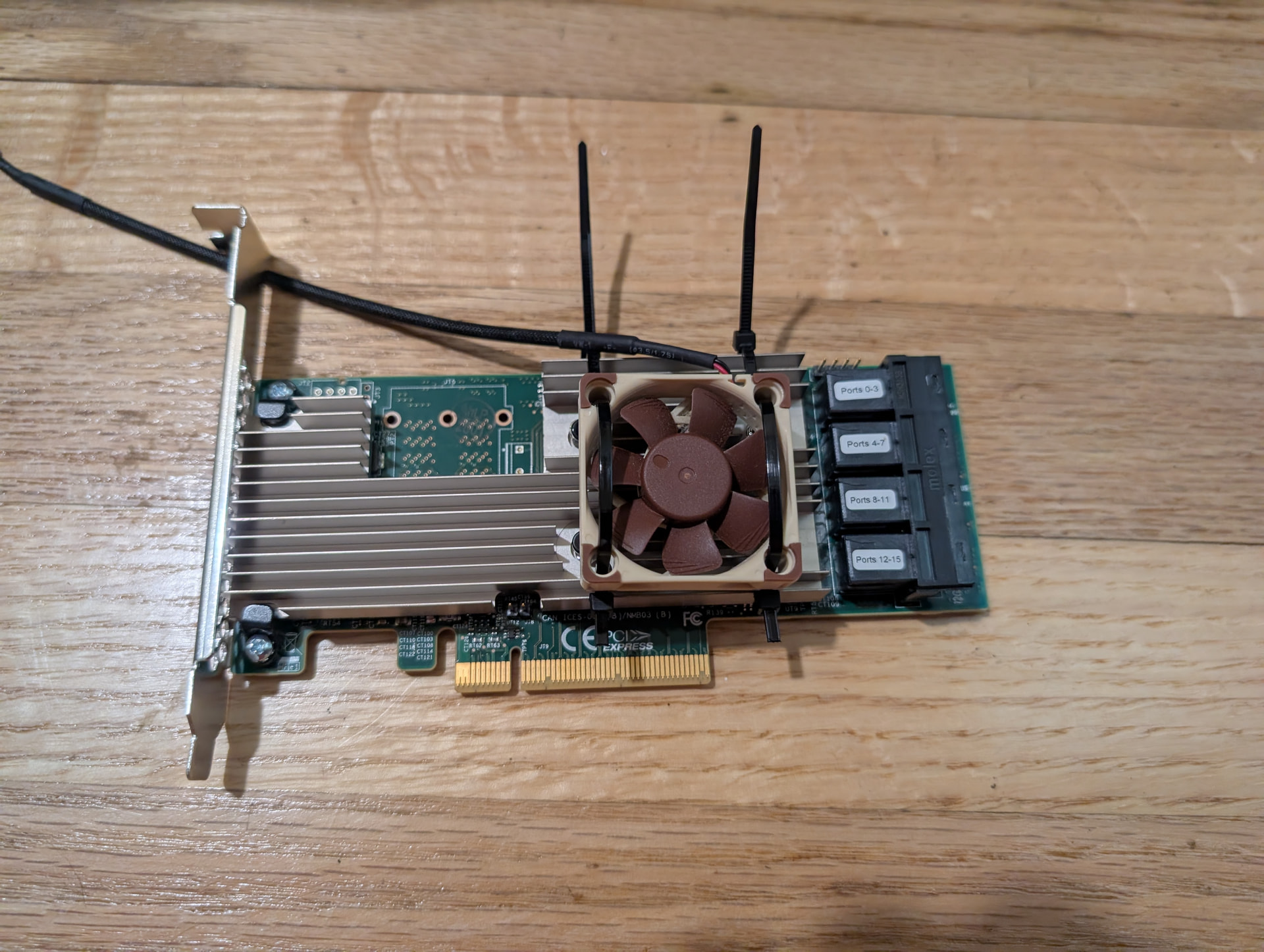
The hardware is an old Dell Precision T7500 with what I thought were identical SAS cards operating 8x WD Red HDDs:

# lspci | grep -i sas
03:00.0 Serial Attached SCSI controller: Broadcom / LSI SAS2008 PCI-Express Fusion-MPT SAS-2 [Falcon] (rev 03)
05:00.0 SCSI storage controller: Broadcom / LSI SAS1068E PCI-Express Fusion-MPT SAS (rev 08)

… PSU is the original one to the box I think.

When I get back to the rig I’ll go through and re-seat the HDD wires and run Memtest.

Might be good chance to check that the firmware is latest on the HBAs

Holy CoW! The 2008 is archaic (PCIe 2.0) but a 1068… I’m not sure it is even recommended.

What are the drives attached to? And what’s the firmware on these HBAs?

Ah, good to know… Suggestions for newer ones to get are welcome. Though maybe I should also update the whole PCI 3.0 system. But replacing the ECC RAM would suck right now.

I am not sure how to determine which disks are on which card without physically inspecting them.

# sas2flash -list
LSI Corporation SAS2 Flash Utility
Version 20.00.00.00 (2014.09.18) 
Copyright (c) 2008-2014 LSI Corporation. All rights reserved 

        Adapter Selected is a LSI SAS: SAS2008(B2)   

        Controller Number              : 0
        Controller                     : SAS2008(B2)   
        PCI Address                    : 00:03:00:00
        SAS Address                    : 590b11c-0-2f28-ed00
        NVDATA Version (Default)       : 14.01.00.08
        NVDATA Version (Persistent)    : 14.01.00.08
        Firmware Product ID            : 0x2213 (IT)
        Firmware Version               : 20.00.07.00
        NVDATA Vendor                  : LSI
        NVDATA Product ID              : SAS9211-8i
        BIOS Version                   : 07.39.02.00
        UEFI BSD Version               : 07.27.01.01
        FCODE Version                  : N/A
        Board Name                     : SAS9211-8i
        Board Assembly                 : ARTofSERVER
        Board Tracer Number            : 2CF02QM

        Finished Processing Commands Successfully.
        Exiting SAS2Flash.

sas2flash did not list the other card..

# sas2flash -listall
LSI Corporation SAS2 Flash Utility
Version 20.00.00.00 (2014.09.18) 
Copyright (c) 2008-2014 LSI Corporation. All rights reserved 

        Adapter Selected is a LSI SAS: SAS2008(B2)   

Num   Ctlr            FW Ver        NVDATA        x86-BIOS         PCI Addr
----------------------------------------------------------------------------

0  SAS2008(B2)     20.00.07.00    14.01.00.08    07.39.02.00     00:03:00:00

        Finished Processing Commands Successfully.
        Exiting SAS2Flash.
root@bns-citadel:~# sas2flash -listallboards
LSI Corporation SAS2 Flash Utility
Version 20.00.00.00 (2014.09.18) 
Copyright (c) 2008-2014 LSI Corporation. All rights reserved 

        Adapter Selected is a LSI SAS: SAS2008(B2)   

 Num   Ctlr       Board Name   Serial Number        
----------------------------------------------------

 0  SAS2008(B2)     SAS9211-8i       N/A 

        Finished Processing Commands Successfully.
        Exiting SAS2Flash.

Any chance you can fit all drives on 1 hba/motherboard for testing?

Better inspect… Also, since errors occur on the same two drives (by UUID), an obvious test would be to swap them with other drives and see whether errors follow the drives or the cables/bays. Obviously, it will help to make a list of serial numbers and UUIDs.
But if possible try putting all drives on the 2008. It is, at least, on the last IT firmware—and it matches your PCIe 2.0-era room heater.

I had a second to look at the system before having to head out of town. Found the two drives (they are neighbors in a carrier) and swapped them to two other sata and power cables. Errors appeared to follow them to the different cables… Will have to try swapping or replugging again when I am home.

After swapping cables:

  pool: storage
 state: DEGRADED
status: One or more devices has experienced an unrecoverable error.  An
        attempt was made to correct the error.  Applications are unaffected.
action: Determine if the device needs to be replaced, and clear the errors
        using 'zpool clear' or replace the device with 'zpool replace'.
   see: https://openzfs.github.io/openzfs-docs/msg/ZFS-8000-9P
  scan: scrub repaired 0B in 01:54:51 with 0 errors on Sun Aug 30 03:55:28 2026
config:

        NAME                                      STATE     READ WRITE CKSUM
        storage                                   DEGRADED     0     0     0
          raidz2-0                                DEGRADED     0     0     0
            2bbb12b5-1324-4175-8689-0db7cc645686  ONLINE       0     0     0
            76636398-d539-11ec-ae72-f04da2301444  ONLINE       0     0     0
            7685394a-d539-11ec-ae72-f04da2301444  ONLINE       0     0   537
            76364ca6-d539-11ec-ae72-f04da2301444  DEGRADED     0     0   422  too many errors
            76ad1bb6-d539-11ec-ae72-f04da2301444  ONLINE       0     0     0
            7696e50e-d539-11ec-ae72-f04da2301444  ONLINE       0     0     0
            c7e1c960-285c-46b2-a977-dc11751add17  ONLINE       0     0     0
            76be36de-d539-11ec-ae72-f04da2301444  ONLINE       0     0     0

errors: No known data errors

There was only one PCI SAS card in the system, I’m guessing the other one listed is integrated?

I took a quick look at prices online… And I’m not replacing the whole system as much as I’d like to. So I think my best bet currently is to find a better pci 3.0 SAS card and swap that in.

Checksum erroors following drives after a change to different cables? Then it must be the drives.

Unless they are on a controller on their own. What is attached to what?

Could be… Another question is how much airflow it gets. An overheating HBA would cause checksum errors, but then likely on all attached drives.

@joeschmuck any other idea?

If you want to replace, the natural candidate is a 9300-8i (LSI 3008)—or some corresponding OEM part—, or a 9305 if you need more ports.

Sorry, trying to unpack after moving.

My first thought is your hard drive looks fine. You are having ZFS errors, not hard drive errors.

Next: Have you done ANYTHING in the past 4 weeks to the system, example: Change firmware, software, TrueNAS versions? Looking to see if something caused this. I say 4 weeks as it can take time for a problem to manifest. And you did state you performed an upgrade.

You did not state what version of TrueNAS you upgraded from. This could be important.

Here is what I’d do, and I’m starting from scratch:

  1. Roll back to the previous TrueNAS version. Hopefully you did not upgrade ZFS feature set as that would prevent you from rolling back. This will likely resolve your current issues, however eventually you will want to use a more current version.

You have a ZFS error, not hard drive failure. I could be wrong but I doubt it.
2. Identify the drives UUIDs to Drive Serial Numbers lsblk -o NAME,PARTUUID,SERIAL
3. Now you should know what each drive serial number is, ALWAYS use the drive serial number for tracking the failure, even though you are cross-referencing using PARTUUID.
4. Record the drive serial number for PARTUUID 76364ca6-d539-11ec-ae72-f04da2301444 and 7685394a-d539-11ec-ae72-f04da2301444. These are the drives seeming causing the issues.
5. Power Off.
6. Note exactly which SATA connections are attached to these two drives.
7. Take one of these drives, AND ONLY ONE, and swap the SATA data connector with a non-affected drive, for example: 2bbb12b5-1324-4175-8689-0db7cc645686.
8. Power On.
9. Clear any ZFS errors and Scrub.
10. Monitor and watch for if the problem moves or remains the same. Note: The one suspect drive you left the SATA connector untouched should still show errors accumulating. That is expected.
11. If you see the drive related to 2bbb12b5-1324-4175-8689-0db7cc645686 starting to have problems, this is a good thing. You now know the HBA is the most suspect item.
12. If the problem remains with the original two drives… I can’t imagine that being the case if you swapped the SATA connectors that physically attach to the drives, not the SATA cable on the HBA end.

This is just something you can do. If you cannot roll back to the previous TrueNAS version, do what the folks here are telling you, this clearly looks like an HBA problem.

I hope this helps.

Thank you both for the advice!

I’m battling an HVAC issue since this past week. Hasn’t affected indoor air temperature much, but is taking my time up.

Speaking of temperature. I did notice that an auxiliary fan I had taped to the back of the rig had broken some time ago, which means less air flow through the drives. Will investigate and see if replacing it helps.

I upgraded from 25.10.5 to 25.10.6. Have not upgraded ZFS flags in more than a year. Just rolled back to 25.10.5 and cleared the pool status. Checksum errors have returned, so it’s unlikely the OS upgrade was the cause?

Status this morning:

  pool: storage
 state: DEGRADED
status: One or more devices has experienced an unrecoverable error.  An
        attempt was made to correct the error.  Applications are unaffected.
action: Determine if the device needs to be replaced, and clear the errors
        using 'zpool clear' or replace the device with 'zpool replace'.
   see: https://openzfs.github.io/openzfs-docs/msg/ZFS-8000-9P
  scan: scrub repaired 0B in 01:54:51 with 0 errors on Sun Aug 30 03:55:28 2026
config:

        NAME                                      STATE     READ WRITE CKSUM
        storage                                   DEGRADED     0     0     0
          raidz2-0                                DEGRADED     0     0     0
            2bbb12b5-1324-4175-8689-0db7cc645686  ONLINE       0     0     0
            76636398-d539-11ec-ae72-f04da2301444  ONLINE       0     0     0
            7685394a-d539-11ec-ae72-f04da2301444  ONLINE       0     0 1.48K
            76364ca6-d539-11ec-ae72-f04da2301444  DEGRADED     0     0 1.25K  too many errors
            76ad1bb6-d539-11ec-ae72-f04da2301444  ONLINE       0     0     0
            7696e50e-d539-11ec-ae72-f04da2301444  ONLINE       0     0     0
            c7e1c960-285c-46b2-a977-dc11751add17  ONLINE       0     0     0
            76be36de-d539-11ec-ae72-f04da2301444  ONLINE       0     0     0
            

Rolled back OS and cleared pool:

root@bns-citadel:~# zpool clear storage
root@bns-citadel:~# man zpool
root@bns-citadel:~# zpool status -v
[...]

  pool: storage
 state: ONLINE
  scan: scrub repaired 0B in 01:54:51 with 0 errors on Sun Aug 30 03:55:28 2026
config:

        NAME                                      STATE     READ WRITE CKSUM
        storage                                   ONLINE       0     0     0
          raidz2-0                                ONLINE       0     0     0
            2bbb12b5-1324-4175-8689-0db7cc645686  ONLINE       0     0     0
            76636398-d539-11ec-ae72-f04da2301444  ONLINE       0     0     0
            7685394a-d539-11ec-ae72-f04da2301444  ONLINE       0     0     0
            76364ca6-d539-11ec-ae72-f04da2301444  ONLINE       0     0     0
            76ad1bb6-d539-11ec-ae72-f04da2301444  ONLINE       0     0     0
            7696e50e-d539-11ec-ae72-f04da2301444  ONLINE       0     0     0
            c7e1c960-285c-46b2-a977-dc11751add17  ONLINE       0     0     0
            76be36de-d539-11ec-ae72-f04da2301444  ONLINE       0     0     0

errors: No known data errors

After starting scrub on 25.10.5:

  pool: storage
 state: ONLINE
status: One or more devices has experienced an unrecoverable error.  An
        attempt was made to correct the error.  Applications are unaffected.
action: Determine if the device needs to be replaced, and clear the errors
        using 'zpool clear' or replace the device with 'zpool replace'.
   see: https://openzfs.github.io/openzfs-docs/msg/ZFS-8000-9P
  scan: scrub in progress since Wed Sep  9 10:21:20 2026
        2.42T / 32.9T scanned at 4.29G/s, 99.9G / 32.9T issued at 177M/s
        240K repaired, 0.30% done, 2 days 06:02:57 to go
config:

        NAME                                      STATE     READ WRITE CKSUM
        storage                                   ONLINE       0     0     0
          raidz2-0                                ONLINE       0     0     0
            2bbb12b5-1324-4175-8689-0db7cc645686  ONLINE       0     0     0
            76636398-d539-11ec-ae72-f04da2301444  ONLINE       0     0     0
            7685394a-d539-11ec-ae72-f04da2301444  ONLINE       0     0    38  (repairing)
            76364ca6-d539-11ec-ae72-f04da2301444  ONLINE       0     0    22  (repairing)
            76ad1bb6-d539-11ec-ae72-f04da2301444  ONLINE       0     0     0
            7696e50e-d539-11ec-ae72-f04da2301444  ONLINE       0     0     0
            c7e1c960-285c-46b2-a977-dc11751add17  ONLINE       0     0     0
            76be36de-d539-11ec-ae72-f04da2301444  ONLINE       0     0     0

errors: No known data errors

Next I’ll do the careful SATA cable tests.