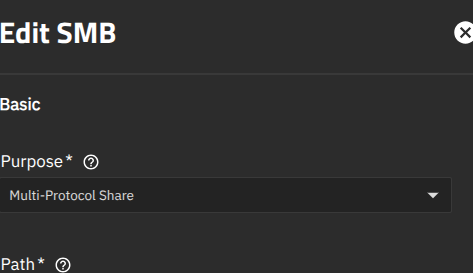
We have a truenas scale server hosting multiple multiprotocol shares. So they are used as both Unix NFS and Windows SMB shares.
After the recent update application from 26.04.0-MASTER-20251107-020728 to 26.04.0-MASTER-20251219-075007, it is noticed that the access for the SMB part of these shares is restricted to some subnets automatically.
I have not added any allow or deny for hosts or subnets before this.
Not sure where this information is being sourced from and I dont have any means of controlling it either.
Any ideas on this? This creates a lot of problem for users. Right now I booted into the previous BE and the issue is not seen. However I have to move on with updates at some point.
26.04, as the numbering suggests, has not been released yet. It’s in active development so breaking changes are to be expected.
I would never personally run the nightlies on my main machine, there is no guarantee of stability whatsoever.
Yes, I agree on that. However is there any way to fix what is been seen here? I think apart from this none of the changes have affected the use of the shares.
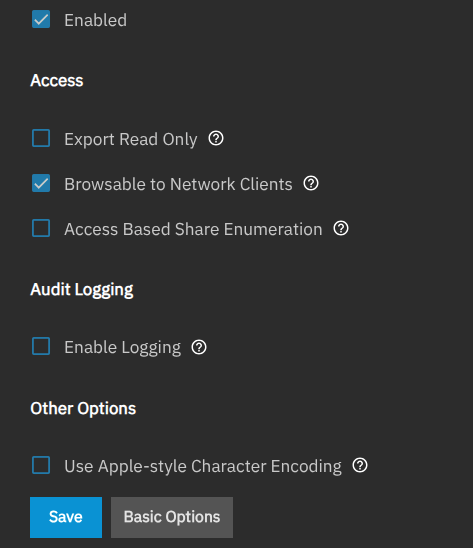
We added back in the hosts allow / deny parameter for some of the SMB share purposes. Maybe check UI configuration for it. That’s the only change related to networks that has occurred (and would only have an impact if you have some old stale config related to it that now gets applied to the running configuration.
Thanks for this explanation. Would you mind telling me how I can access this configuration? Should I be on the latest snapshot for this?
Currently my version is booted into the update from 26.04.0-MASTER-20251107-020728. When booted into this, the issue I described does not manifest. However once I boot to the snapshot from 26.04.0-MASTER-20251219-075007, the entries which restrict subnets turns up.
Any direction on how to access the allow/deny parameters in the UI would be helpful. I cannot seem to find it when I look in the UI myself. Also let me know if I need to be in the latest snapshot to access the parameters you told about.
Assuming they reimplemented it like in the previous version, you would edit the share and update Hosts Allow and Hosts Deny in Advanced Options. Here are the 25.04 docs that show the fields: SMB Shares Screens | TrueNAS Documentation Hub. We don’t have updated docs for 26.04 on this because, again, you’re running a pre-alpha development version.
You’d need to be on at least whatever nightly was built after the hosts change was merged, but I don’t know what that would be. 20251219–this is a date string, so the one you’re running is more than a month old and surely before that change.
Thank you for pointing me to this documentation. I will check in sometime and see if I can see this in the latest update. As you pointed out about the dates in the update string, I did figure that out.
Yes, I went this route because the last time I used 25.x before it became production, it quickly went into a stable state within a few months of use. I assumed this would be the case with 26.04 as well.
As I said previously this has worked flawlessly so far except for what I am reporting here now. I am not complaining, just reporting what I saw as changes that I could not figure out how to modify to work for my use case.
I find no reason to complain about this as it has given superb performance for the shares its hosting - even being used in a VM. This is after moving off from badly managed Netapp filers and older Unix based NFS shares. So thanks for making a great product actually.
I will give a try on the directions here and get back on this.
In the end you are saving your self stress and headaches if something does break, along with reading over release notes before upgrading to be sure you won’t be impacted.
We all love the “latest and greatest” but you will learn over the years, how many issues you can prevent entirely by staying on stable releases, or n+1 back if still supported.
Truenas 25.10 is still listed as for “Early Adopters”, and 25.04.2.6 for General use and the basis for the Enterprise version. So when 26.04. is “ready”, it likely also will be considered for Early adopters, and 25.10. will move up as being fit for general usage. So even if your experience has been positive, it might still be prudent to stay on a 25.xx version on a production server.
I’m new at this too but if I had this problem I’d consider a fresh install of the ‘stable’ version and then import the database rather than use the same configuration file. Don’t know what to expect doing this but your data should still be intact and so should be able to import to any system.
Hmm.. I don’t think that output is from a recent nightly build. It doesn’t have hostsallow or hostsdeny in it. I added that on 12/05. The share names look a lot like production data / things for $placeatwork. You really shouldn’t be running development nightlies on this. You can in theory update to a latest nightly, but that’s just continuing a dangerous practice.