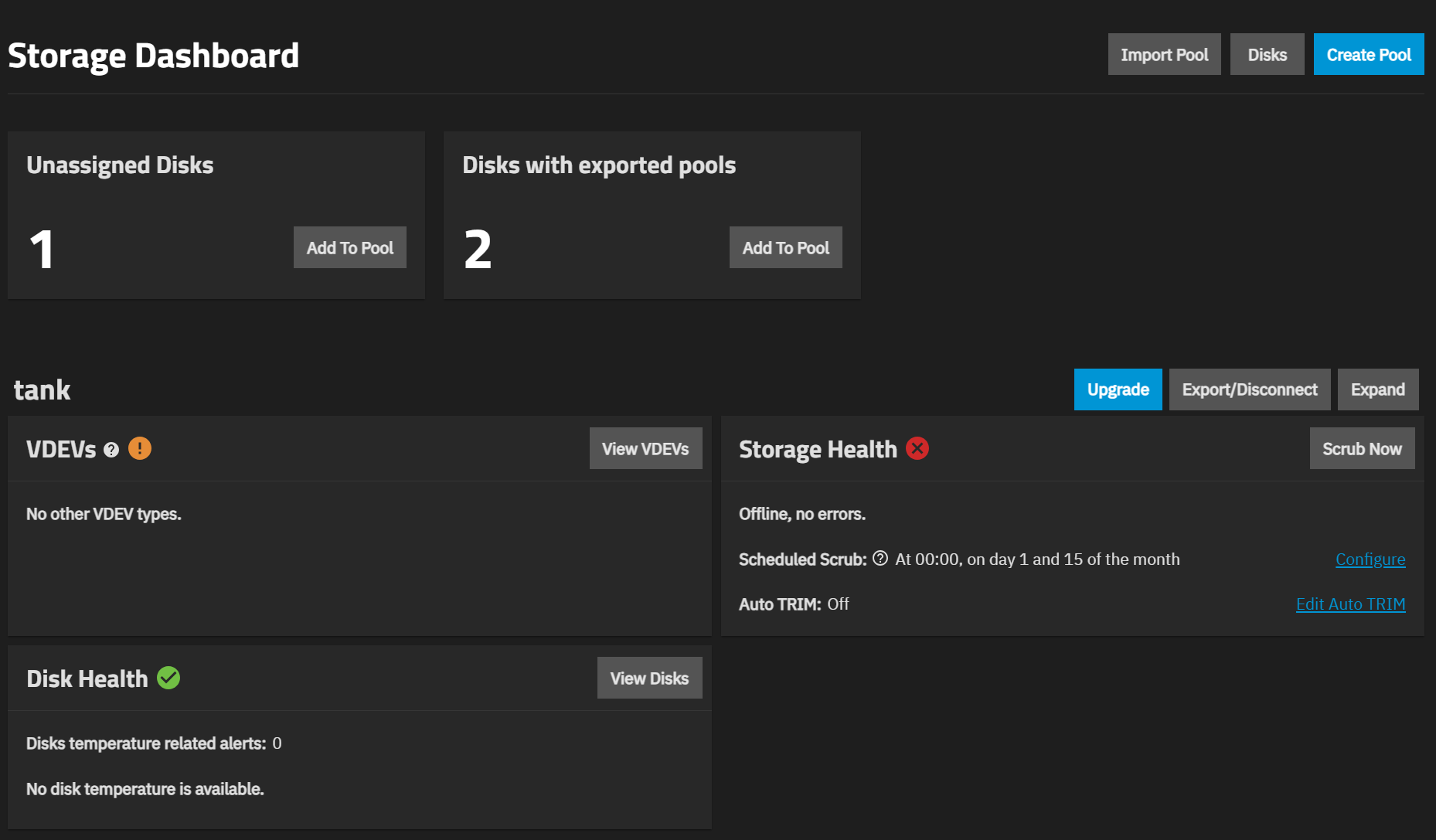
My pool was a mirror 2x2TB which was currently 70% full.
While I was doing some maintenance on the Scale (had to remove the erroring 2TB drive with a new one) I accidently, did something that expanded the pool size to 4TB. I immediately, backed up all my files, since, I searched there is no way to go back to mirror from an expanded stripe.
I have now placed an order for 2x4TB and one on which should arrive by the next 2 days while the other will take a week.
My plan is now to copy the pool from current disks into 1x4TB and then subsequently add another 1x4TB mirror to it.
Is this achievable without creating another pool where the current 2x2TB (expanded) pair mirror their data to 2x4TB (mirrored) pair?
Stripes and mirrors can be removed from a pool, as long as no RAIDZ vdevs exist. The data will be evacuated from the removed stripe or mirror and stored on the remaining vdevs. In your case, it will happen quickly since you probably did not save much new data after adding the stripe.
Alternatively you can use checkpoints as an added layer of safety. Make sure you understand their caveats.
Yes, but it’s risky because you will be dealing with non-redundancy.
Can you elaborate what your current setup is? You might have mixed up some terms.
Wrong. (AI slop maybe?)
If it’s all mirrors/single drives, you can remove vdevs. And you can always extend a single drive vdev to make it a 2-way mirror.
Specifically, we want to see the output of sudo zpool status
cleanly posted as formatted text (</> button), thank you for that!
Assuming you currently have a stripe of two 2 TB drives (one old, one new), that one old failing 2 TB drive was removed, and that your NAS has at least one free SATA port, your path to safety is:
Extend the old 2 TB with new 4 TB to make it a mirror.
Remove (from GUI!!!) the new 2 TB (single drive vdev).
Plug in the second 4 TB drive and replace (from GUI) the old 2 TB with it.
End result is the same pool, evolved into a 2-way mirror of 4 TB drives.
  pool: boot-pool
 state: ONLINE
  scan: scrub repaired 0B in 00:00:07 with 0 errors on Tue Nov 25 03:45:08 2025
config:

        NAME        STATE     READ WRITE CKSUM
        boot-pool   ONLINE       0     0     0
          vda3      ONLINE       0     0     0

errors: No known data errors

  pool: tank
 state: ONLINE
  scan: scrub repaired 0B in 03:45:04 with 0 errors on Sun Nov 23 03:45:11 2025
config:

        NAME                                    STATE     READ WRITE CKSUM
        tank                                    ONLINE       0     0     0
          473fb16f-30e0-490f-9f10-a367b651177c  ONLINE       0     0     0
          5dc2b4dc-54fd-4f9f-b021-5ea87e0561de  ONLINE       0     0     0
        logs
          038dcc50-004a-40bd-bd2e-3c53d1407294  ONLINE       0     0     0
        cache
          nvme0n1p1                             ONLINE       0     0     0

errors: No known data errors
I remember, instead of using “Replace” on the failing disk, I used “Remove”, which I presume converted the VDEV into a stripe from mirror. Then I proceeded to add the failing disk back into the same VDEV (my bad) using the automated disk selection.
You’ve understood your mistake. The above assumptions were right.
But you probably need neither a SLOG (any sync writes?) nor a L2ARC (how much RAM?).
Path to recovery is as outlined above (just hoping that nothing will happen until the 4 TB arrives), or alternatively remove the new 2TB drive from GUI, and then use it to extend the old 2 TB (which will hold everything without redundancy) into a 2-way mirror.
Do you have a full backup, just in case?
I had 2 spare NVMEs hence, I added SLOG and L2ARC.
Just when I tried to remove the bad 2TB from GUI (I made a note of its serial number), the pool went into degraded and ultimately suspended state all the while reporting read and write errors.
Unfortunately, I only ran cloud backup but replication to another ZFS target, so in a sense I still have the data but not as thorough as file system preservation.
Will it be still possible to simply ‘Replace’ the bad 2TB with new 4TB and recover the pool?
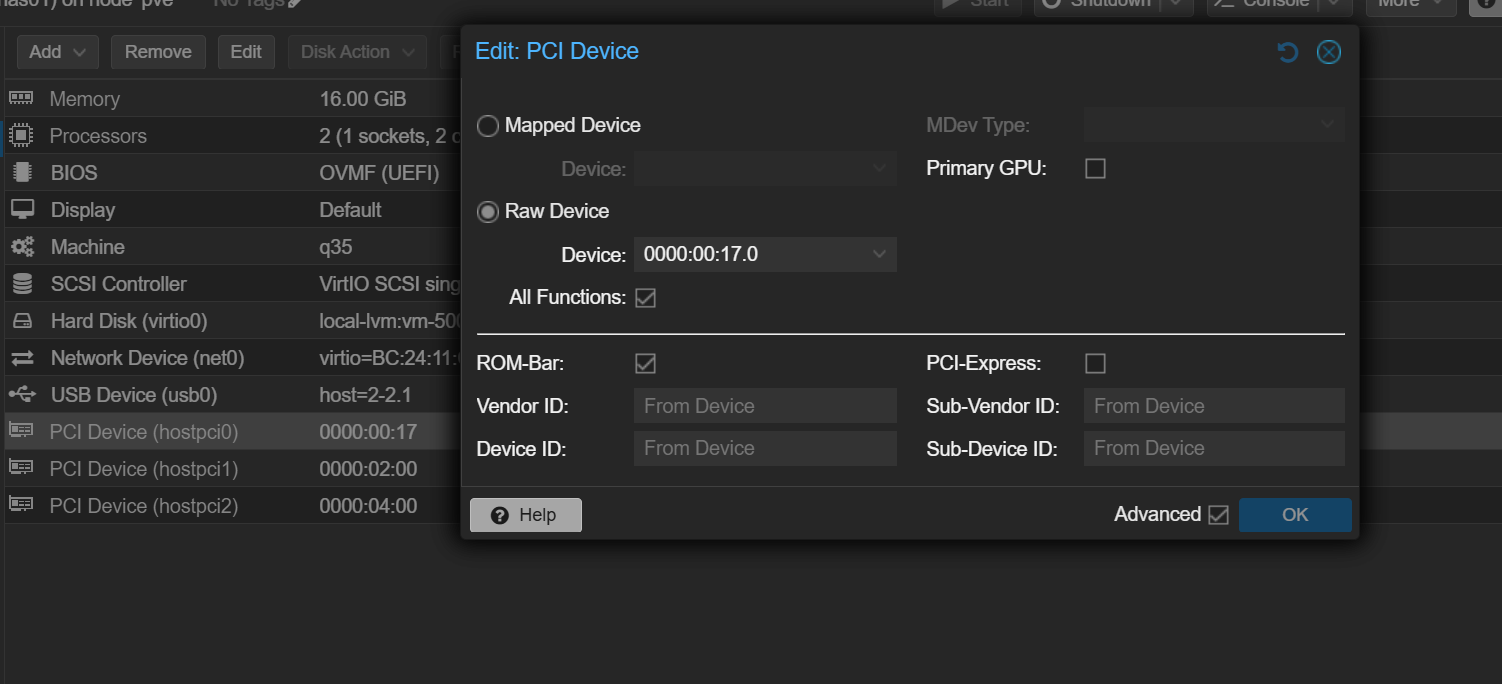
Tell us more about your hardware and how the drives are connected. The boot pool being on vda hints that you are running TrueNAS in some kind of hypervisor. If yes, how exactly are the drives passed to the virtual machine?
root@nas01[~]# sudo zpool import
  pool: tank
    id: 2328891851706075588
 state: UNAVAIL
status: One or more devices contains corrupted data.
action: The pool cannot be imported due to damaged devices or data.
   see: https://openzfs.github.io/openzfs-docs/msg/ZFS-8000-5E
config:

        tank                                    UNAVAIL  insufficient replicas
          473fb16f-30e0-490f-9f10-a367b651177c  ONLINE
          5dc2b4dc-54fd-4f9f-b021-5ea87e0561de  UNAVAIL
        logs
          038dcc50-004a-40bd-bd2e-3c53d1407294  ONLINE
root@nas01[~]#
Miraculously, after I reattached power and SATA cables, teh failing drive appeared but in degraded state. I was able to copy my most important data.
So my best course of action is to attach the new 4TB pairs, use the ‘Extend” button to add disks one by one into the VDEV. I should NOT neither use ‘Add VDEV nor “Replace” as this would add more HDDs into the Stripe layout. Am I right? Exactly, at what point will I select to make a Mirror layout into the same Pool with newly added 4TB pairs?
  pool: boot-pool
 state: ONLINE
  scan: scrub repaired 0B in 00:00:07 with 0 errors on Tue Nov 25 03:45:08 2025
config:

        NAME        STATE     READ WRITE CKSUM
        boot-pool   ONLINE       0     0     0
          vda3      ONLINE       0     0     0

errors: No known data errors

  pool: tank
 state: DEGRADED
status: One or more devices has experienced an error resulting in data
        corruption.  Applications may be affected.
action: Restore the file in question if possible.  Otherwise restore the
        entire pool from backup.
   see: https://openzfs.github.io/openzfs-docs/msg/ZFS-8000-8A
  scan: scrub repaired 0B in 03:45:04 with 0 errors on Sun Nov 23 03:45:11 2025
remove: Removal of /dev/disk/by-partuuid/5dc2b4dc-54fd-4f9f-b021-5ea87e0561de canceled on Sun Nov 30 10:18:27 2025
config:

        NAME                                    STATE     READ WRITE CKSUM
        tank                                    DEGRADED     0     0     0
          473fb16f-30e0-490f-9f10-a367b651177c  ONLINE       0     0     0
          5dc2b4dc-54fd-4f9f-b021-5ea87e0561de  DEGRADED    11     0     1  too many errors
        logs
          038dcc50-004a-40bd-bd2e-3c53d1407294  ONLINE       0     0     0
        cache
          nvme1n1p1                             ONLINE       0     0     0

errors: 1 data errors, use '-v' for a list
Let’s get the terminology right: In your current stripe each drive is a vdev (single drive vdev, which can be considered as a “one-way” mirror).
“Add vdev” adds yet another vdev to the stripe, which you do not want.
tank
  sda
  sdb
  sdc
“Extend” widens a vdev; here it can turn a single drive vdev into a 2-way mirror, as you want
tank
  mirror
    sda
    sdc
  sdb
(Above example is a mirror of sda and new drive sdc, striped with sdb; sdX drive identifiers are easier to type than UUIDs…)
“Remove” (from GUI) can remove a vdev from a stripe of mirrors/single drive vdevs.
Use sudo zpool status -v tank to find the damaged file and delete it, scrub again, sudo zpool clear tank to remove errors in status if scrub was sucessful, remove the newly added drive and extend the other data drive to get back to a 2-way mirror.