
I’m a new TrueNAS user and want to use my APC B-700G-UK UPS to protect my newly constructed TrueNAS. But this model of UPS is not listed in the System>Services>UPS>Edit options. I tried contacting APC, but they referred me back to TrueNAS. It’s possible one of the other drivers will work or there may be a way to find the specific driver for this quite common model of UPS. Can anyone point me in the right direction? Thanks.
How are you connecting the UPS to TrueNAS?
go to the console and check with
sudo nut-scanner -U
Which driver the ups expects
Hi LarsR, Thanks.
I’ve done that and the response is:-
Driver = “usbhid - ups”
Port = “Auto”
Vendor ID = “051D”
Product id = “0002”
Product = “Back-UPS ES 700G FW:871.03.I USB FW:03”
Serial = “SB1431T04484”
Vendor = “APC”
Bus = " 003"
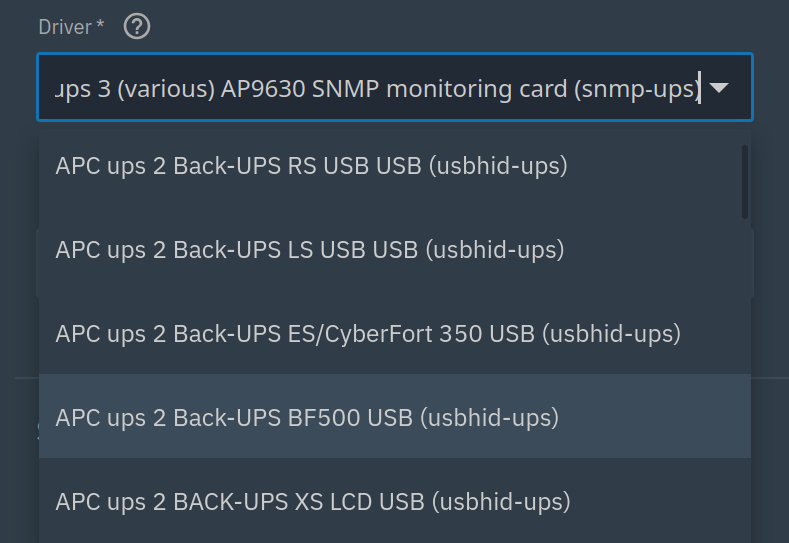
But that driver isn’t in the dropdown list for APC UPSes in System>Services>UPS>Edit
Do I have to download it from somewhere online and then upload it into the TrueNAS?
no,since you cant intall anything to truenas (appliance os blablabla…). You can simply pick any ups vendor that lists the upshid-ups driver and it should work
1 Like
Hi NugentS,
The UPS has a USB connection to the TrueNAS. Directly onto one of the motherboard USB3 slots.
I used to have a Netgear ReadyNAS, which is now obsolete, but when I connected it to the UPS the same way the ReadyNAS recognised the UPS and it showed up in the Amin pages of the firmware.
When I tried to enable the UPS in the TrueNAS firmware it sent me an email error report saying the UPS wasn’t connected - which I think means I need to install the correct driver on the TrueNAS.
As mentioned that is what you need to do. Any vendor option from the list that uses the upshid-ups driver should work. The dropdown list does have an APC Back UPS ES selection that does use that driver and t should work if setup properly.
Hi PhilD,
Brilliant, thanks. I got it working without tearing out too much hair!
1 Like
That’s good!