Can I make a mixed capacity vdev mirror? (2tb+4tb) + 6tb mirror

I’ve fallen victim to one of the amateurs classic blunders. I did not plan ahead, and misunderstood the given documentation.

I started my true nas with a small system just to try it out. I grabbed a 2tb SSD and a 4tb HDD.
This was my first mistake, but I started by mirroring the 2tb to the 4tb, knowing i was wasting 2tb in a mixed capacity vdev.

Then I ran out of space, and changed the mirror to a stripe to have access to all 6tb, and took the risk of having no redundancy while I waited to buy more storage.

Since I have a 6tb pool, i figured I could get a 6tb drive and just mirror the 6tb I already had. But when I added the 6tb HDD, it mirrored the 4tb HDD and did not include the 2tb.

I believe what I needed to do was extend the pool, and then make the new 6tb a mirror of the existing vdev?

How do I go from my 2tb + 4tb (6tb mirror) to (2tb+4tb) with 6tbHDD mirror?

OS Version:25.10.3.1

Product:System Product Name

Model:AMD Ryzen 5 9600X 6-Core Processor

Memory:31 GiB

That’s not supported, until we get “AnyRAID”.

Unraid supports that setup, but you loose out on ZFS features.

Did you already save important data? If you did, you’re at risk of losing everything.

Ah, I was afraid that would be the case.

Thanks for answering!

This needs to be addressed now, before something bad happens. Your current pool is at risk of total data loss.

If your 2TB SSD fails or gets too many errors, you will lose the entire pool.

2 Likes

General ZFS answer: Backup-Destroy-Restore

You need more 6 TB drives (or larger… but try to harmonise).

Yeah, I definitely need another 4tb or 6tb drive.

Until then, is there a good way to back up my 2tb ssd onto the 6tb HDD which is currently mirroring the 4tb drive. Effectively moving everything to the one 6tb drive, and then I can use the other two drives to back up specific data sets? That way I can at least protect my important stuff? Some stuff can just be redownloaded and isnt as important.

example:

6tb general pool

2tb ssd apps

4tb back up of certain datasets on the 6tb drive.

I think your only choice is to remove the 6TB from the Mirror and then add it back as a third, stripe VDEV of the original pool. You would then go through the process of removing the 2TB VDEV, allowing it to move data and then the same with the 4TB VDEV. This can only happen with stripes or Mirror VDEVs.

Another option is to replace the 4TB with a new 6TB and make sure to EXPAND that VDEV to get as much space as you can out of a 2x Mirror VDEV of 6TB drives and then remove the 2TB VDEV and allow it to move the data.

You are stuck on options due to having 4.15TiB used as shown in your screenshots. That’s not even that good of an option as 4.15 TiB is 76% of 5.46 TiB (6TB drive capacity as showing in screenshots.)

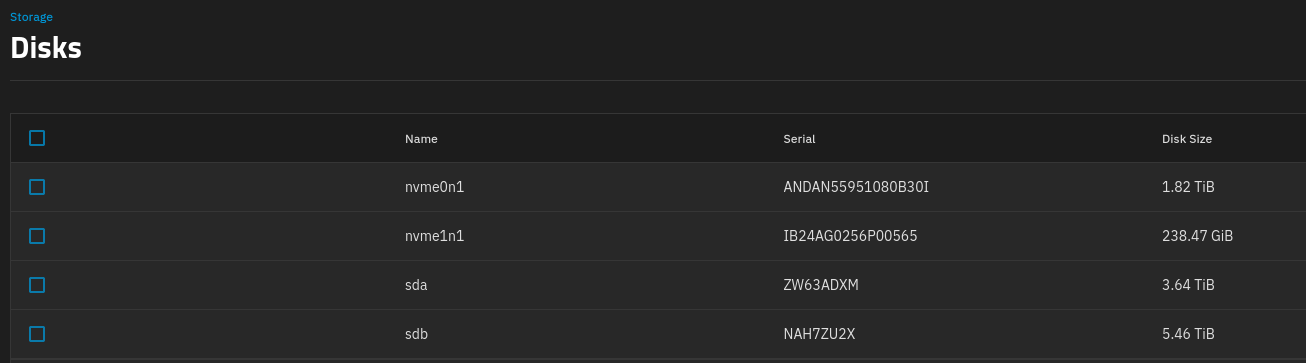
Yeah, I’m definitely suffering from a complete lack of foresight and planning here.

So if im understanding you correctly, my course of action is

  1. remove the 6tb from the mirror setup which shouldnt matter, as the data is on the 4tb one.
  2. Add the 6tb back as a strip vdev to my original pool making it a 12tb pool.
  3. remove both the 2tb and 4tb drives from the vdev which will move all the data to the remaining 6tb drive.
  4. Then I can buy another 6tb and expand the vdev to two 6tb drives in mirror.
  5. do whatever with the 2tb and 4tb drives after the fact.

Do I have that correct?

That is pretty much correct. In number 3 you are actually removing VDEVs ( 2TB & 4TB) from the pool with three VDEVs total.

Perfect,

Thanks for the helpful instructions!

Can’t you just keep the 2 & 4TB striped, have the 6TB also stripped and then use RSYNC to mirror back onto the 6TB at what ever interval you want.

I started similar to you and had a similar setup where twice a week Cron will run a script that initiates rsync to backup onto other HDDS.