a bit of a noob here, I’m posting just to double check that I’m doing everything correctly. I’m trying to set up ARM through Truenas Apps, and not understanding why it won’t work. I did add the BD drive through the interface (CDROM Devices - Host device ->/dev/sr0 Container Device → /dev/sr0) and also added the relative “sg” found through lsscsi -g from truenas, but ARM doesn’t detect any drive. If i open the container shell i do see them both mapped in /dev.
Is there anything I’m overlooking?
thanks in advance
Did you ever get this to work? I have not gotten it to work and have the exact same problem with the exact same devices. My Jailmaker ‘ripper’ app works just fine passing /dev/sr0:/dev/sr0 and /dev/sg9:/dev/sg9.
I have passed both sr0 and sg9 and it says no drives detected. Also added apps to the cdrom group to no avail.
Running 25.04.2.3.
I ejected the blue ray disk and got an arm.log file ...with a lot of these messages ..
Fri Sep  5 17:26:26 EDT 2025 [ARM] Not CD, Blu-ray, DVD or Data. Bailing out on sr0
Fri Sep  5 17:26:26 EDT 2025 Entering docker wrapper
Opened the drive, tried to close it … the drive just opens again. Rinse …repeat.
Changed it for a DVD … same behavior same logs … not sure what it means but … something is hapening and it is seeing sr0.
Restarted ARM and this is the App log at startup …
2025-09-05 21:30:00.328499+00:00*** Running /etc/my_init.d/10_syslog-ng.init...
2025-09-05 21:30:00.389424+00:00Sep  5 17:30:00 42f1fc99aa5e syslog-ng[13]: syslog-ng starting up; version='3.35.1'
2025-09-05 21:30:01.369201+00:00*** Running /etc/my_init.d/arm_user_files_setup.sh...
2025-09-05 21:30:01.373012+00:00Updating arm user id from 1000 to 568...
2025-09-05 21:30:01.481396+00:00Updating arm group id from 1000 to 568...
2025-09-05 21:30:01.526136+00:00Adding arm user to 'render' group
2025-09-05 21:30:06.343030+00:00Checking ownership of /home/arm
2025-09-05 21:30:06.343073+00:00[OK]: ARM UID and GID set correctly, ARM has access to '/home/arm' using 568:568
2025-09-05 21:30:06.343343+00:00Removing any link between music and Music
2025-09-05 21:30:06.345950+00:00Checking ownership of /etc/arm/config
2025-09-05 21:30:06.345989+00:00[OK]: ARM UID and GID set correctly, ARM has access to '/etc/arm/config' using 568:568
2025-09-05 21:30:06.347400+00:00Checking location of abcde configuration files
2025-09-05 21:30:06.347532+00:00/etc/abcde.conf link doesnt exist
2025-09-05 21:30:06.349205+00:00Setting ARM Timezone info: America/New_York
2025-09-05 21:30:06.580756+00:002025-09-05T21:30:06.580756643Z
2025-09-05 21:30:06.580808+00:00Current default time zone: 'America/New_York'
2025-09-05 21:30:06.583243+00:00Local time is now:      Fri Sep  5 17:30:06 EDT 2025.
2025-09-05 21:30:06.583267+00:00Universal Time is now:  Fri Sep  5 21:30:06 UTC 2025.
2025-09-05 21:30:06.583284+00:002025-09-05T21:30:06.583284622Z
2025-09-05 21:30:06.612552+00:00*** Running /etc/my_init.d/start_udev.sh...
2025-09-05 21:30:06.613985+00:00/etc/my_init.d/start_udev.sh: 0: can't access tty; job control turned off
2025-09-05 21:30:06.613985+00:00Trying to start udev
2025-09-05 21:30:07.908635+00:00udev Started successfully
2025-09-05 21:30:07.908683+00:00# # # # # #
2025-09-05 21:30:07.910499+00:00*** Booting runit daemon...
2025-09-05 21:30:07.910848+00:00*** Runit started as PID 103
2025-09-05 21:30:07.940140+00:00Starting web ui
2025-09-05 21:30:08.115417+00:00Sep  5 17:30:08 42f1fc99aa5e cron[106]: (CRON) INFO (pidfile fd = 3)
2025-09-05 21:30:08.116029+00:00Sep  5 17:30:08 42f1fc99aa5e cron[106]: (CRON) INFO (Running @reboot jobs)
2025-09-05 21:30:08.705214+00:00[2025-09-05 17:30:08,705] INFO ARM: __init__.<module> Setting log level to: INFO
2025-09-05 21:30:08.955743+00:00[2025-09-05 17:30:08,955] INFO ARM: runui.<module> Starting ARM-UI on interface address - 172.16.6.2:8080
2025-09-05 21:30:08.960235+00:00[2025-09-05 17:30:08,960] INFO ARM: runui.startup Updating Optical Drives
2025-09-05 21:30:08.991768+00:00[2025-09-05 17:30:08,991] INFO ARM: wasyncore.log_info Serving on http://172.16.6.2:8080
2025-09-05 21:30:10.685304+00:00[2025-09-05 17:30:10,685] INFO ARM: settings.check_hw_transcode_support Handbrake call successful
2025-09-05 21:30:23.630123+00:00[2025-09-05 17:30:23,629] INFO ARM: settings.check_hw_transcode_support Handbrake call successful
2025-09-05 21:30:29.467263+00:00[2025-09-05 17:30:29,467] INFO ARM: settings.check_hw_transcode_support Handbrake call successful
2025-09-05 21:30:30.956481+00:00fatal: invalid object name 'origin/HEAD'.
2025-09-05 21:30:31.146514+00:00[2025-09-05 17:30:31,146] INFO ARM: settings.check_hw_transcode_support Handbrake call successful
2025-09-05 21:30:32.621574+00:00fatal: invalid object name 'origin/HEAD'.
2025-09-05 21:30:32.739748+00:00[2025-09-05 17:30:32,739] INFO ARM: settings.check_hw_transcode_support Handbrake call successful
2025-09-05 21:30:40.835485+00:00[2025-09-05 17:30:40,835] INFO ARM: settings.check_hw_transcode_support Handbrake call successful
I believe my issue was slightly different that yours, my ARM couldn’t see the BD drive at all, not even eject it from the web interface.
I did try pretty much everything i could (adding /dev/cdrom, adding the drive by id), even changed SATA cable, SATA port, but couldnt make my BD drive work. I wanted to try with a different drive to see if there was any difference and… It did work first try. The one that worked is a random ASUS DVD drive I had lying in an old pc at work (it didnt make any difference for me because I just needed to rip an audio cd).
So, I thought that was the end of it, right? Simple - one drive works, the other doesn’t. Nope. It gets better.
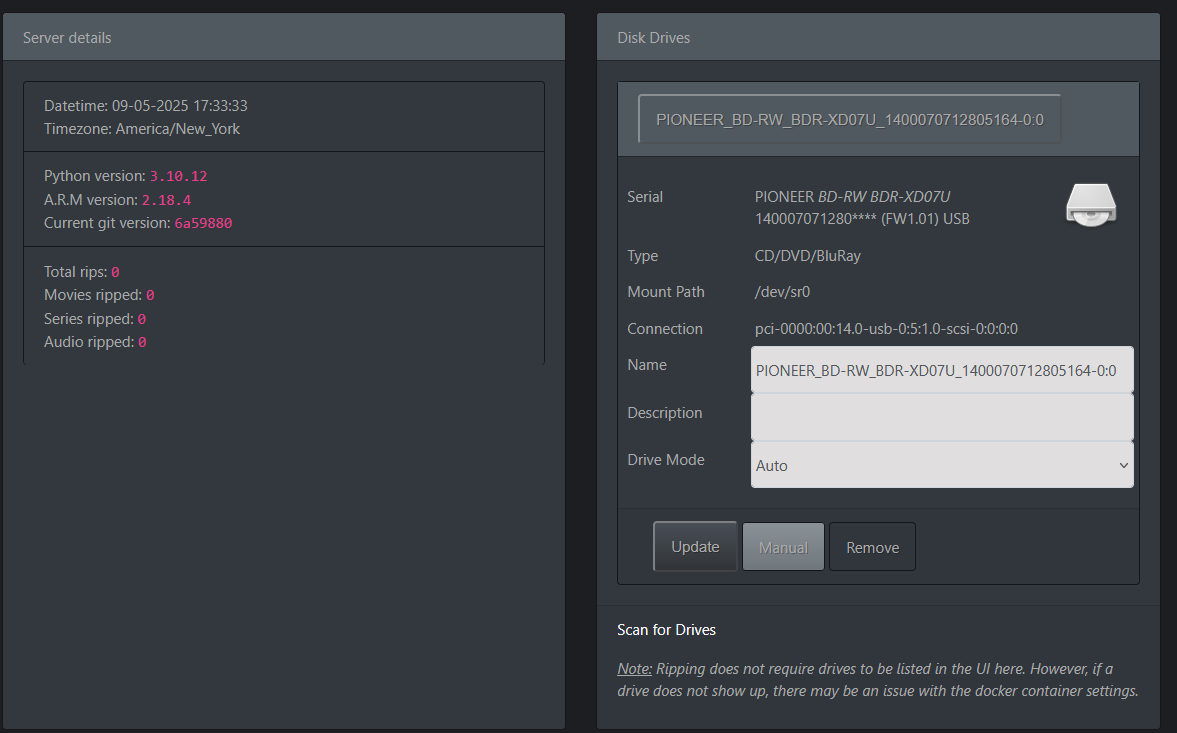
With the ARM container still running and the same devices mapped (/dev/sr0 and /dev/sg10) I unplugged the DVD drive SATA and connected it back the BD drive and… IT WORKED! I could see the drive in ARM! I have no idea why. For reference, my BD drive is an old LG H20L, the DVD drive is an ASUS DVD RAM GH95N.
In the end I was so frustrated with the whole thing that I just left the DVD drive plugged in and I hope it will eventually get fixed in a future version of the app. I found in the original ARM website someone with my same BD drive so I’m assuming the dockerized version of ARM on a different OS works with my drive, and there maybe a bug somewhere in the TN implementation.
It doesn’t really make sense to me. Even if it will never get fixed I’d be really curious as to why this happens. Hopefully someone will be able to shed some light on the matter?
Holy moly, that worked for me as well! With the app running, I power cycled the drive and boom, it showed up immediately. Now the fun of figuring out why my first rip failed begins. Thanks for the tip!