First post so please be gentle. I’ve set up a TrueNAS currently running 25.04.2.4 using old hardware that was doing nothing and it’s replacing a Synology DS218play from which I’m currently copying Plex media to my new Pool. I’ve followed Hardware Haven’s rather good seup video and I’ve got Plex up and running fine.
I have however hit a wall in regard to MakeMKV. I would like to add Handbrake and ARM (auto ripping machine) at some point but getting MakeMKV working first will be best for the moment as I can just take the ripped files and encode seperately on my much more powerful main PC before adding them to Plex manually. Will take longer, but it is less complicated.
The following bit is however crucial before you offer solutions. I am a complete and total moron when it comes to Linux, Git Hub, Dockers and the multitude of other terms I’ve read in the last few hours. I’m obviously not a complete idiot or I’d not be able to get as far as I have but in regard to Linux, I’ve as little understanding as a duck with a head injury!
I cannot stress this enough. Whatever help you can give will have to work through that filter
I’ve spent a fruitless few hours of googling for help and advice and everything I’ve found so far has been a bust. If its a top 20 hit on Google, chances are I’ve already tried it.
My setup is simple enough.
128 GB 2.5’ SATA SSD as the Boot drive running TrueNAS
128 GB M.2 in a PCIE adapter for Apps
8TB 3.5 Hard Drive for the main pool
LibreDrive Compatible BluRay Drive which is detected by the bios and from I’ve managed to determine from using the Shell is I think listed as sr0. But I could be wrong.
I’ve no redundancy for the drives for the moment but will get another 8TB drive when funds allow.
Thank you in advance for what ever help or guides you can point me to. I’d post a couple of links I’ve already tried to save time but It’s not letting me.
How do you want to setup makemkv? truenas app or custom app?
If you want to use the truenas app there are some steps you should do before starting the app install
Create a Dataset for the makemkv config and output folder, use the apps preset so that permissions automatically get set for user 568 which makemkv runs as
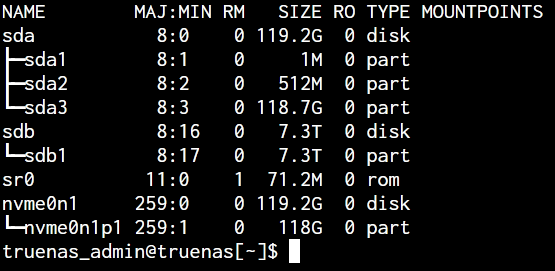
make sure that sr0 really is your dvd drive
Now you should start the install process.
Below the Timezone is an option to add devices, here you should add your dvd drive like this
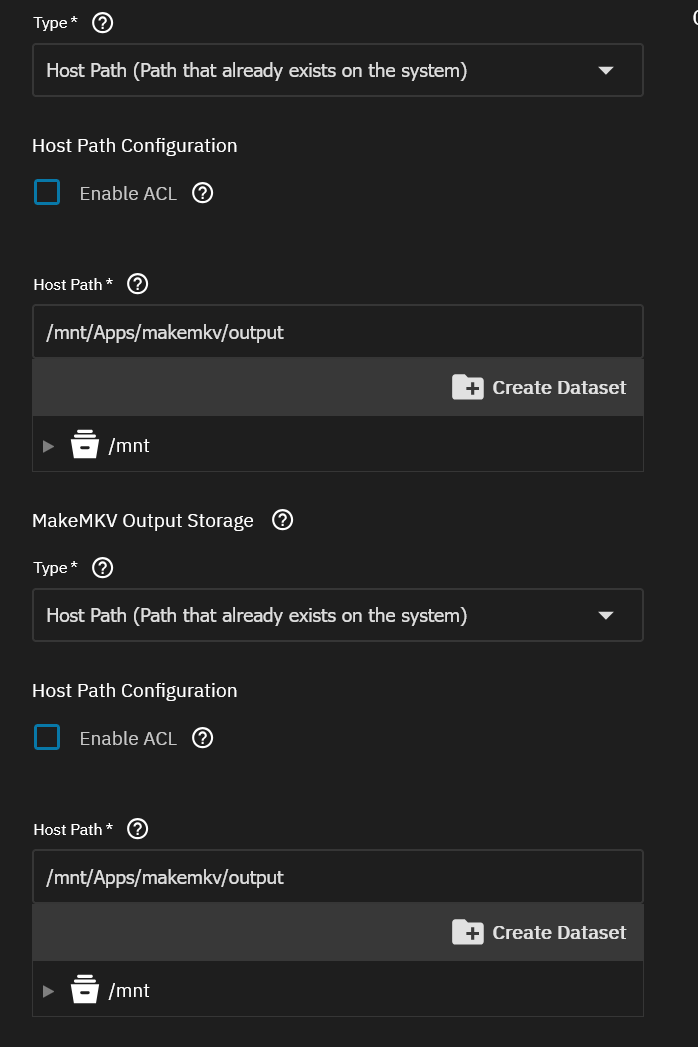
At the storage section change from iXVolume to hostpaths and enter the path on your pool where you want the config and output folder to live, see example screenshot
Figured out that I could just direct it to the dataset using the folder with the triangle to the side, but that still doesnt work. Just get the missing error again.
Tried not adding the optical drive to see if that was the problem, still got the same error. Then I tried installing with just adding the optical drive instruction, which did install but not showing the optical drive once I opened makemkv via the web ui. So back to square one really.
Have learnt that ‘lsblk’ lists all the drives however and I’m assuming that the one with rom next to it is the blu-ray drive so sr0 is right.
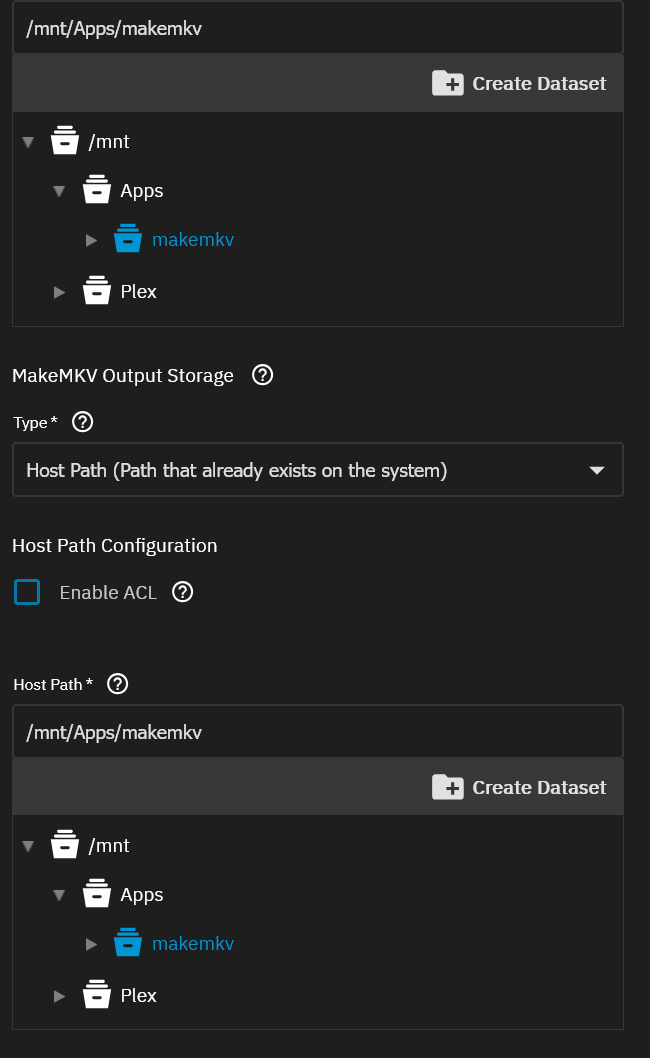
please post a screenshot of the storage section of the app setup and the Truenas Datasets screen so we can compare the paths you’ve entered in the app setup
So the wierdest thing. It worked this time. The previous install attempets seem to have created the folders, but they were not there last night when I checked.
I pointed the path as shown and it installed this time. However, MakeMKV isn’s seeing the blu-ray drive for some reason. I’ve attached the lsblk for the system.
You’ve skipped step 1 from my steps an did not create the dataset makemkv before starting the instlalation. Now the setup has created folders inside the root dataset which is not good. You should remove those folders, create a dataset called makemkv and then redeploy the app…
i would make one dataset for makemkv and then let the app setup create the config and output folder inside the makemkv dataset. Other option would be to use an ssh session or the webshell, navigate to the makemkv dataset and manually create folders for config and output.
The app isn’t creating the folders. I don’t know how to navigate within the shell to do . I know what the shell is, I have no clue as to how to use it.
I’ve created the makemkv dataset as you can see. I’ve chosen it as a file path, as is in the screenshot below, hoping it will create the folders, which it doesn’t, I’ve tried adding config and output to the path, that doesnt work either. I just get the following error.
using the webshell you can use this command to navigate to the dataset
cd /mnt/Apps/makemkv
after using that command to navigate to the makemkv dataset you can create the folders with the mkdir command e.g.
mkdir config
and
mkdir output
you can then check with ls -a from the shell if the folder were actually created.
Or if you’re uncomfortable with using the shell you can also create an smb share for the mkdir dataset, map that to your file explorer as a network share and create the folders from windows/mac explorer
Ok. That didnt work first time but I then removed the device information and it did then work. But of course its not seeing the optical drive now. I’ve tried updating the app info to add the drive and it just fails on clicking update. How do I find out for certain what has been allocated to the blu-ray drive?
There was another post on reddit that mentioned about the app not seeing a drive and pointed to where to look in the logs, and I found it was sg2 so added /dev/sg2 and it worked.
Now hopefully, I can try to rip something now. Thanks you for your help.
MakeMKV on TrueNAS can feel intimidating at first, especially if you’re new to jails or apps. What helped me was breaking it down step by step: get the container running, confirm the optical drive is visible inside it, then test a simple rip. Permissions and device passthrough are usually where things go sideways, so I’d double-check those first.
I’ve always had back luck trying to get TrueNAS to see my optical drives - I just gave up & backup on one pc & them copy/paste over smb like a pleb. In some ways it is easier as I can organize my shows & rename files faster.