I’m ready to make the core to scale plunge (gulp). My media management has been working perfecto for several years now, so I guess it’s about time to break things…
Have backed up the core U6 config file and all my data to a secure location. Will be doing a clean install of 25.10 iso then upload the U6 config file backup.
1. I’m confused about the Truecharts chatter. Are the built-in plex, sabzbd, sonaar, radarr apps still available in 25.10 and just not supported? Or do they simply not exist any longer? My preference is to use the built-in apps to get back up and running fast, then switch over to dockers in the longer term.
2. Not clear on how to port over my existing plex/sabzbd/sonaar/radarr settings. Do I need to copy over ALL the files in the ../iocage/jails/sonarr folder (for example) to the new app /config folder? Or can I get away with just the .json files? The jail folders are alot larger than I thought they would be.
Truecharts is history as far as TrueNAS is concerned. But it was only a third party/community app catalog, not something fundamentally different.
All your apps are still available as TrueNAS apps. TrueNAS apps are based on Docker. So I do not quite understand what you mean by “switch over to dockers”. Apps are Docker containers.
As for what to move over:
make sure to use host paths for all app storage options
for what to copy where refer to the documentation of the app in question - this is not really a TrueNAS topic
By any chance do you know if I need to copy over ALL the files in the ../iocage/jails/sonarr folder (for example) to the new app /config folder? Or can I get away with just the .json files? If you don’t know, or if you don’t want to help, pls, I insist, just ignore.
I did the migration from Core to Scale in Spring, 2024. You will want to review the Plex instructions for migrating to a new server as none of your jails will transfer over. Treat it like a server migration. Fortunately, your media libraries should be fine, although some remapping with be required for the libraries. Follow these suggestions:
THIS IS EXTREMELY IMPORTANT! Before beginning the migration, it is extremely important to disable the Empty trash automatically after every scan preference prior to the migration. This is even before you make the backup of the configuration.
You should backup your databases prior to the migration by going to your Library/Application Support directory and then running the following command: tar –verbose --exclude=Plex\ Media\ Server/Cache --exclude=Plex\ Media\ Server/Logs --exclude=Plex\ Media\ Server/Plug-in\ Support/Caches -cf <path to storage directory> .
It is very important to test that backup and store it in two locations on your server.
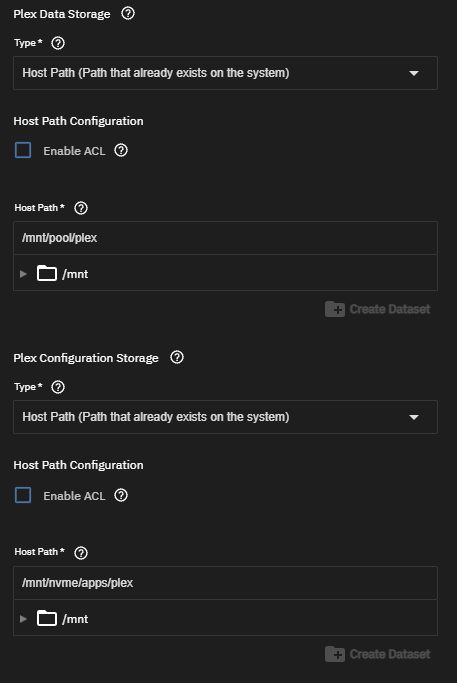
Once the migration is complete, re-install the Plex application. I set up my storage as follows:
/mnt/pool/plex is on my slower HDDs and is where I have my media stored. /mnt/nvme/apps/plex is where I store my configuration and DBs on my faster NVMe mirror.
Once you have verified that you can access your media from the Plex Docker instance, stop Plex and go to the Library/Application Support directory. Remove the Plex Media Server then extract the tar backup here.
You will need to go to each library, establish the new directory path, rescan the library, then remove the old directory path.
One bonus feature: Because CORE ran under FreeBSD, the sonic analysis feature for music was not available… but it’s available under Scale because it is running under Debian.
Also, once you complete your migration, you may want to consider installing the Tautulli application, which will give you even more data analysis of your Plex server. Also, if you have audiobooks, consider installing and using Audiobookshelf.
Thank you MarkHoltz, much appreciated! I’ll be doing this tomorrow, will post back. Did you also migrate sonaar, radarr, and/or sabzbd configurations? I was hoping that just coping the .json files to the new scale apps folders would do the trick, but what is best practice?
No, I don’t use those applications. I just was concerned about my Plex data. The other app that I used with Core, qbittorrent, was set back up from scratch.
Sonarr/Radarr/Prowlarr each have their own backup function. It’s in the System section.
Of course! I should have thought of that. I’d been reading some other threads suggesting to move files from the jails, so was headed down that rabbit hole.
I don’t see a backup function in sabnzbd, but looks like I can copy files from windows folders rather than from the jail. Many thanks!!
You didn’t say how you originally installed Plex in TrueNAS Core, but if you used pkg-ng to install the server you want to look in /mnt/tank/iocage/jails/plex/usr/local
Personally I just take the entire plexdata-plexpass folder when I move an install from one jail to another.
Thanks for all your help! Plex is back up an running and my users are happy campers!
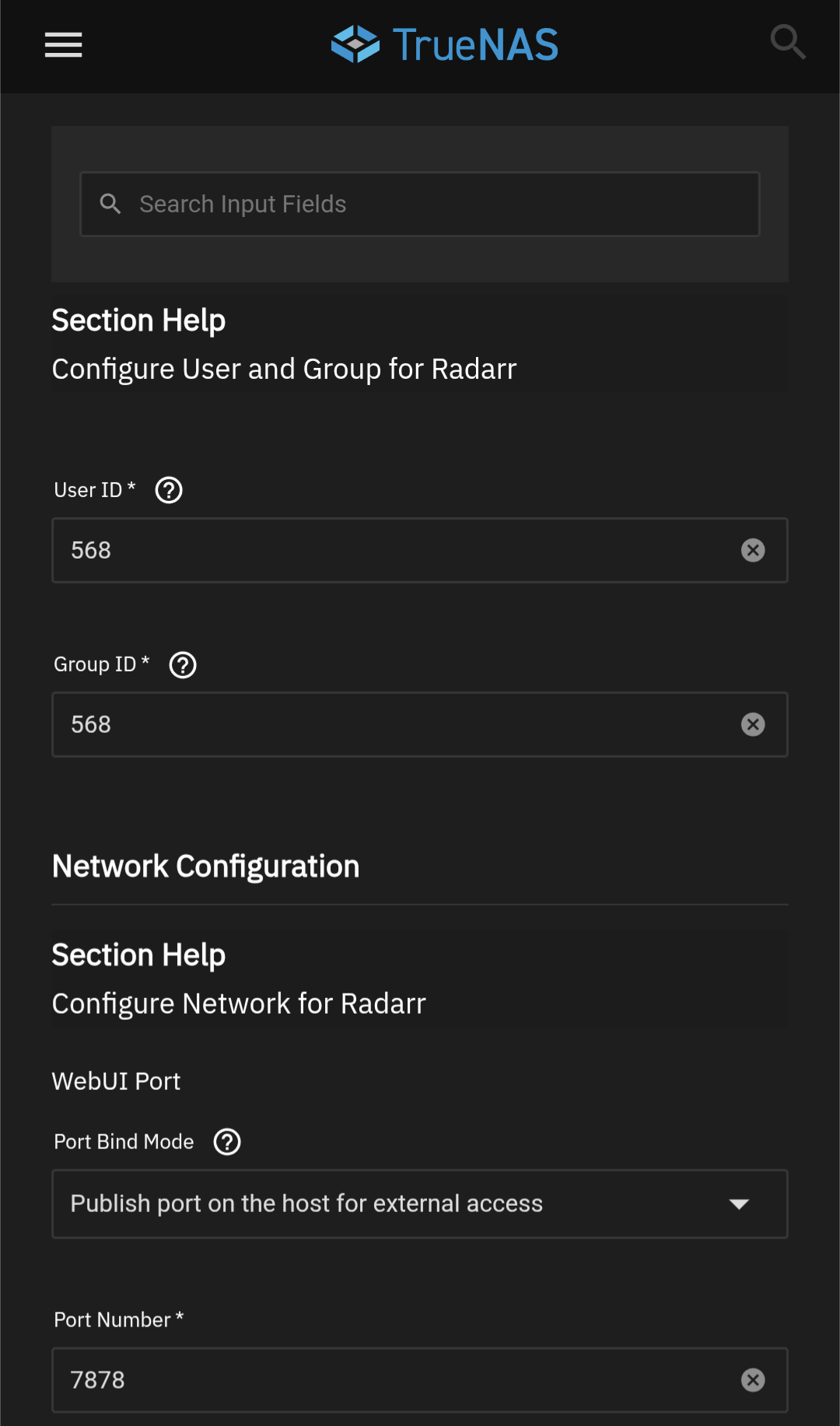
I thought Plex would be the hard one, but….sonarr & radarr are stuck in deploying. I’ve tried deleting and reinstalling a few times. There is not much to set up there, so I don’t get it. I have a dedicated nvme drive for the apps so storing them on /mnt/apps/sonarr and …./radarr.
The sabnbzd toggles between deploying and stopped for a bit then just stops. When I restart it same behavior.
I recently made the same plunge. In addition to Plex/Radarr/Sonarr/Transmission I also had a Nextcloud instance, reverse proxy, WordPress site, a Grafana instance and an Adguard instance I had to migrate. Its been a journey, to say the least.
Regarding your app containers that won’t start, I’ve also experienced that and got pretty frustrated with the fact that they would just restart with little feedback.
I eventually settled on initially doing as little setup as possible, and making sure the apps actually boot and are working, before adding custom storage locations, changing network settings, fiddling with app ownership, and doing other tweaks.
I documented my experiences on my blog. For your reference I also added my app setup here. It might give you a clue on where you’re going wrong.
Wow! That’s a great write up, thanks for sharing. I’m surprised it didn’t come up in my google searches.
It didn’t quite solve my problem, but did get me thinking in the right direction. Before I set up plex, I created an app dataset first. Then while I was setting up plex I noticed that you could create the app data set from withing the app installation routine. So I used that technique with radarr and sonarr. What I didn’t realize is that technique does not apply the correct permissions. After reading your blog this occurred to me and I was able to fix it up right away. Really strange though that the app set up does not spit out an error or generate a log to help poor newbies like me. It just went into endless deploying which was very misleading.
On another subject I have some strange behavior from plex since the move over. I’ll start a separate post for this, but the plex app on my android tablet, my android television, and my apple ios tablet will not connect to my plex server (all on the local network). On all three of those devices I can find the server and run plex no problem using a browser and the web app. wtf?!? Troubleshooting has been extremely frustrating!
Totally get that hesitation — moving from CORE to SCALE feels way bigger than a normal update, especially when everything’s been running fine for years.
The main thing to remember is that apps don’t migrate automatically. CORE uses FreeBSD jails, while SCALE runs container-based apps, so Plex, Radarr, Sonarr, SABnzbd, etc. all need to be reinstalled on SCALE. The good news is they’re all available and work well once set up — it’s just not a one-click upgrade.
Most people approach it like a small server migration:
Back up Plex’s database, reinstall Plex on SCALE, then restore the data
Use the built-in backup/restore options in Sonarr and Radarr instead of copying jail folders
Recreate your datasets first and carefully map them into the new apps
If something won’t start after installation, it’s almost always down to permissions or incorrect path mappings rather than a broken app. Taking the time to set up datasets and ACLs ahead of time saves a lot of trial and error.
Once you get past that initial setup, SCALE is actually very comfortable to run, especially if you’re planning to expand later. The mindset shift is similar to validating other infrastructure changes — the same way you’d double-check routing before deciding to buy premium uk proxies — once it’s solid, everything just works.