
I cannot post this as a new topic from macOS Safari. I also tested it in Windows 11 Edge. Hovering the curser over the + Create Topic button does not the pointer into a pointing hand. I will post this using iOS Safari after saving this as a draft and bringing this up from the listing of drafts in my user profile.
Can you ‘Inspect’ the button to see what the web page says is there? Web Developer Tools on Firefox. Not sure what all the other browsers call it.
I was having trouble in Firefox with the Reply and “usercentrics” privacy settings or something blocking the button when I had my bookmarks open. The item was invisable and on top of the underlying button I was trying to click. If you can provide info and screenshots to attempt reproduction, that may assist. Full page screenshots may be best instead of trimming or snipping.
Adding screenshot. My REPLY button blocked while I have bookmarks open. Blocked by privacy_notice. I can bypass by right clicking that item in developer tools and ‘delete element’

<div class="cmp-wrapper privacyNotice  cb left desktop zoom-lg   ">
        <div id="uc-main-dialog" class="privacyNotice left desktop ltr us " style="" role="dialog" aria-modal="true" aria-labelledby="uc-privacy-title" aria-describedby="uc-privacy-description" tabindex="0">
        </div>
</div>
That’s what I see, when I inspect the button in macOS Safari.
It looks like I have the same issue. No idea, however, how to solve this. I have cleared the cookie for truenas.com, hoping that it would make the privacy notice go away.
Upon clearing my cookies, I had something that looked like a purple thumbprint on the lower right. It was a privacy notice relatated to Usercentrics and looked to be added to comply with European requirements or something. I have DuckDuckGo Privacy Essentials, EFF Privacy Badger and uBlock Origin extensions in my Firefox and I wasn’t sure if they were causing issues after I selected my privacy choices for Usercentrics. I will have to try to reproduce it by clearing cookies or logging in again to get screenshots. There looks to be usercentrics.eu being blocked for some requests on my extensions. I don’t think the usercentrics.com in the US is though.
I have problems with the invisible box covering my Reply button if I have the preview open. It also puts the box over the items if I have my Bookmarks tool bar on the left side of the page.
Tested with Google Chrome and made a screenshot with the object showing and Developer Tools open. I have no add ons in browser as this was a fresh version. Cleaned cookies, etc.

I’ll bring it up with our internal IT team. I think something was changed with regards to the consent/cookie provider recently.
And a lot of browsers have been stepping up or making changes for “browser fingerprinting resilience” which they might be interpreting the cookie consent (or some other scripting here) as.
Thank you very much!
Having the same problem here, and this is on Firefox/Windows.
I saved my topic as a Draft and opened MS Edge. I was not logged in on it, so I had to do that. But I was not able to post the topic from Edge, either.
I also can’t post replies to existing topics. I had to get on my phone to post this reply.
If you look at my posts and screenshots you should be able to try to figure out what the invisible box is over the buttons you are trying to use. I right click the problem area and then bring up Developer tools. I have learned I can’t have by Bookmarks toolbar open when replying and I can’t have the Preview window showing for replies. If I do, that invisible window is over the buttons like, Reply & Close.
You can chose to Delete Node in the Developer Tools and make it, temporarily, disappear. If that helps for now.
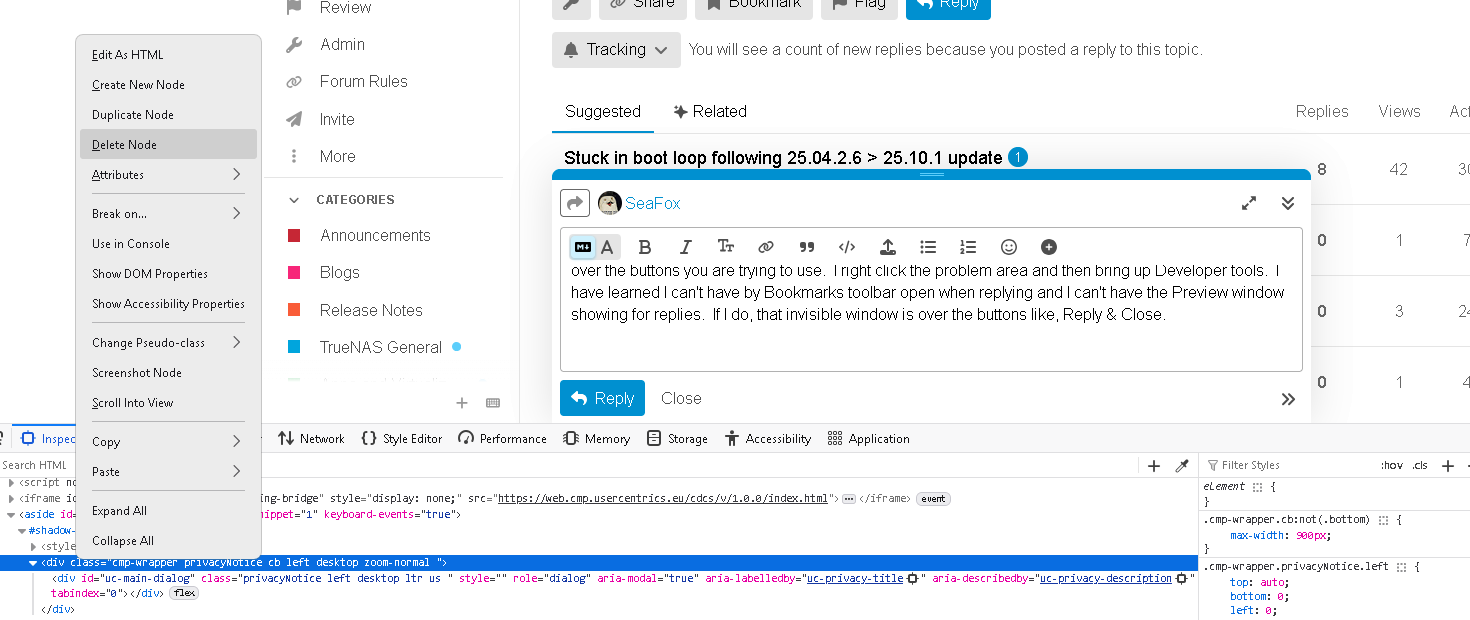
Thank you, but I was really just posting to note the issue is impacting other browsers and replies as well. A forum isn’t rocket science in the modern Internet, so you’ll have to forgive me for not wanting to bug test a commercial product for free.
I don’t post very often so I think I can get by on mobile for now.
It would be nice to have this problem solved. This is the ONLY website I have a problem with.
I use the TAB button until I highlight the Reply button, then hit Enter. Just like I’m doing now.
If this is a fingerprint thing, it seems pretty easy to get around it by using TAB.
It was an pop up or icon that looked like a fingerprint. I only saw it once and it appears to be related to consent / privacy. I got it to come up after I erased all my cookies and logged in.
1 Like
I am hearing complaints from other users as well about not being able to click the Reply button.
@HoneyBadger
I may have identified the line of code in the html data.
See the attached screen capture. When I delete this element, the Reply box works again.
I am not an HTML expert by any means.
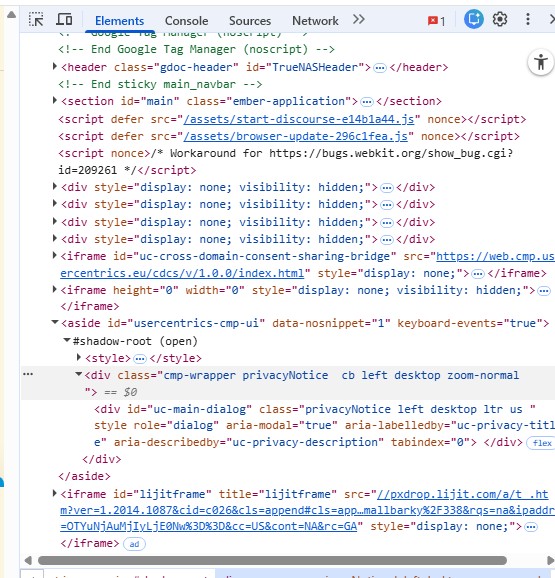
How did I get here? In Chrome, once I have started entering a reply, I right click and select ‘Inspect’, and the image I provided opens up. Now if I click on the three dots on the left, I can select ‘Delete’ and then the webpage works as it once did before.
Here is the odd thing… Once I delete this element, so long as I do not open another window, I can use the Reply button for any additional threads. But if I open a new browser tab, it looks to reload the webpage and the element is back.
I have no idea what the real fix is, that is for your IT Web folks to figure out. They added something at the beginning of the weekend. A new Update I suspect.
1 Like
Let’s see, whether I can do the same thing in macOS Safari. — Yup, I can. Thanks @joeschmuck for this workaround! This is better than having to bring up the draft on my phone and then hitting the Reply button there.
My posts with the cause and, temp, solution must be invisible too 
Let the one who reads every post in a thread before posting his response throw the first stone…

Yes, my phone app works perfectly fine, it is only the web browser on my computer that gives me trouble.
Stone? What Stone? 
It’s a reference to Jn 8:3–11, specifically Verse 7.