
I haven’t replaced the text between < …>
What goes in between these? I thought the value goes after the :
I am trying to delete the broken custom apps I’ve made and I get an error. Here is what I do, step by step


This is the config
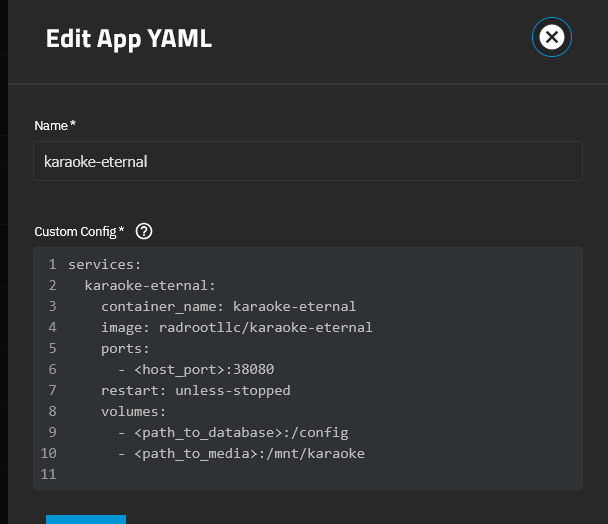
I tried it on 2 custom apps and the log shows the port error
[2025/10/16 22:01:49] (ERROR) app_lifecycle.compose_action():56 - Failed 'down' action for 'karaoke-eternal' app: invalid hostPort: <host_port>\n
[2025/10/16 22:03:56] (ERROR) app_lifecycle.compose_action():56 - Failed 'down' action for 'paul-test2' app: invalid hostPort: <host_port>\n
the value before the : is the port on the host , the one after is the port inside the container.
So it should be like in the yaml i posted above
9080:8080 for example
So the code supplied from the Karaoke Eternal had the value after the : as 8080
If I want to reference my host e.g. 192.168.0.10:30080 is it then
30080:8080
?
yes
Thank you, now I am beginning to learn! 
The bad app won’t delete now because of the following error
[2025/10/16 22:13:34] (ERROR) app_lifecycle.compose_action():56 - Failed 'down' action for 'karaoke-eternal' app: service "karaoke-eternal" refers to undefined volume <path_to_database>: invalid compose project\n
So I guess the path_to_database and path_to_media have to have host values (correct or fake?).
I’ll try and work it out and then hopefully delete the two I’ve created and start again!
Thank you all for your patience, it is very much appreciated.
Thank you, I’ve seen you added code below the screenshot so I have tried those and one of the apps now works.
in my yaml i did not map any media storage, so you’d have to add the path to your media to my yaml…And i hope you’ve adjusted /mnt/Plugins/test to the path on your pool …
Slowly working that out 
For Storage it’s the same as for port mapping.
The part before the : is the path on the host and after inside the container
ok… so next stupid question
Where would my Plugins folder be? I’ve gone to /mnt and I just have my main disk set which is where my Apps POOL is also set.
In /mnt/WDEARS20/ I’ve got a load of folders Appconfig, MEDIA, db, files, ix-applications, scripts
I’d Propably set it up to be
/mnt/WDEARS20/Appconfig/karaoke-eternal-config:/config
But that is totally up to you. You could also set up one dataset per app to use for the config, so you can set up different snapshot policies for each app.
If the media you want to be accessible by karaoke eternal is stored in the Media directory, your second volume mapping should look like this
/mnt/WDEARS20/Media:/mnt/Media
Brilliant thank you. The Appconfig seems to be an old dataset I used for Truecharts Apps so I think I’ll keep that going for custom ones, makes sense.
you are a 
Naaah, i’ve just been where you are right now about 1 1/2 years ago when i started to learn docker and had to google everything myself. I know how frustrating it can be if you don’t make progress as fast as you’d like. And since i now know at least enough to be helpful, i try to help where i can.