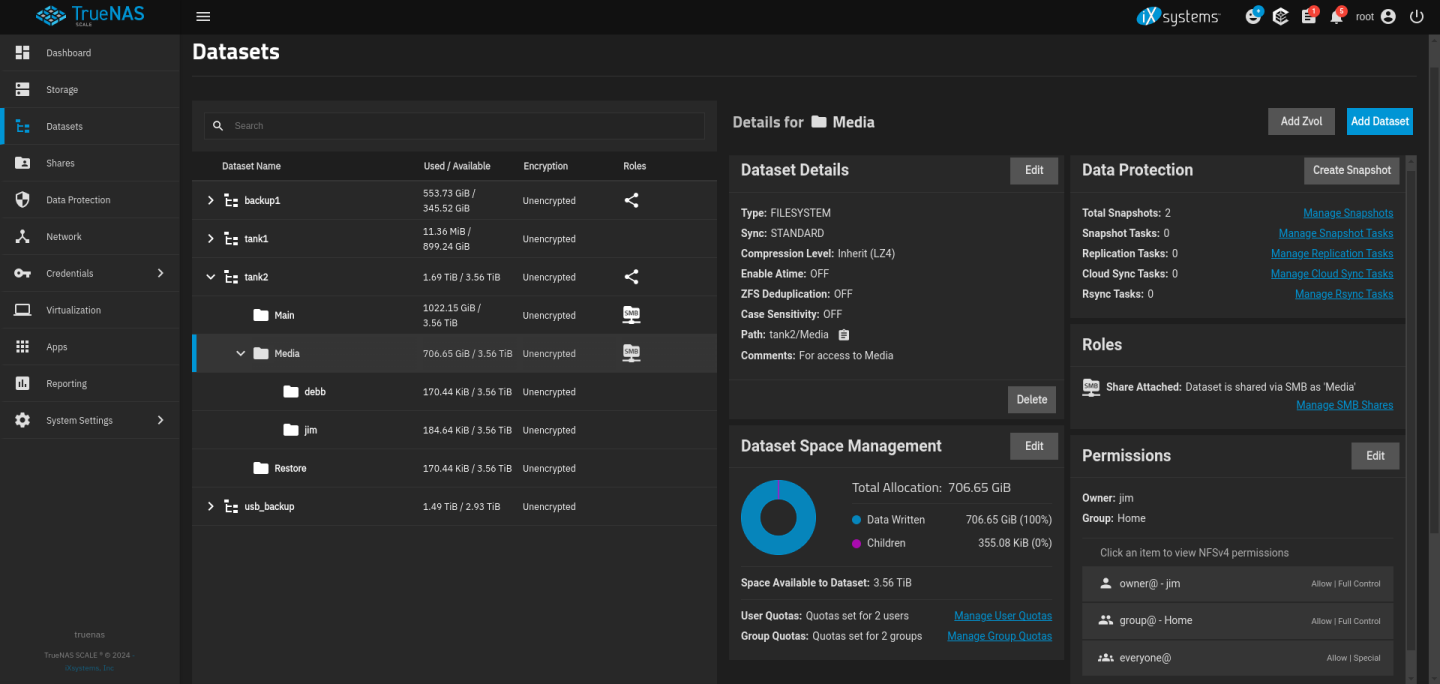
Well I jacked one of my datasets. I was attempting to provide access to a new user and it didn’t go well. I stripped the ACL and started over adding in myself and the existing users. That is when I lost access to files and directories within that dataset. I’ve since learned that one must restart the Samba service after making changes.
I’m looking for help on how to gain access to those directories and files. Here is some info:
Truenas Scale 24.04
Dataset: /tank2/
Within the tank2 dataset I have two datasets (/tank2/Main and /tank2/Media)
Missing folders: /tank2/Media/Share Movies/, /tank2/Media/Shared Music/, /tank2/Media/Shared TV Shows/, /tank2/Media/Shared Pictures/ and after the issue, I now have /tank2/Media/jim and /tank2/Media/debb/ showing up as new datasets.
Logging into the shell I can still see the directories under:/mnt/tank2/Media/
and all of the files are still there.
When this all happened, I noticed two addition datasets showed up under that dataset in question, that were named previous users (/tank2/Media/jim ( I suspect it was .trash directories and the like??
Several months ago, I did replicate the tank2 complete dataset to a usb drive. Because the tank2 dataset includes another dataset called /tank2/Main and it is working fine, I didn’t wan to try to copy or restore the whole tank2 dataset.
I also have a snapshot from three months ago. I attempted to rolled it back but nothing changed. I was able to re-establish access to the SMB share on a linux PC. However the files are directories are not showing up. I created a new folder using my linux desktop called test (/tank2/Media/test/ and I can read/write to it fine.
So, I’m not sure how to proceed without creating more issues. Any advice would be appreciated. I’ve read through the Documents Hub website on Managing Datasets but it just created more confusion for me.
Understood, and thank you for taking the time to help me!
My intent was to simply provide a new user access to /tank2/Media/. However, when I modified the ACL to include the new user, that user still didn’t have access via SMB shares. Additional reading has lead me to believe that maybe I needed to restart the smb service?? After attempting to make additional changes including stripping the ACL, I lost access to those directories.
I’m really confused how the datasets and shares work together. I believe that ACLs are only applied to datasets correct? If I intend to share these datasets via smb, does the dataset ACL type need to be SMB/NFSV4? Currently, the Media dataset " ACL type"is set to Inherit. However, under the permissions settings under GUI, it shows “NFSv4” permissions. Is this because it’s being inherited from the “tank2” dataset? Or are we talking about apples and oranges?
root@truenas[/mnt/tank2/Media]# ls -lh
total 186K
drwxrwx--- 236 jim Home 236 Feb  5  2024 'Shared Movies'
drwxrwx--- 349 jim Home 349 Apr 29 07:57 'Shared Music'
drwxrwx---   2 jim Home   2 May 29 18:46 'Shared Pictures'
drwxrwx---  14 jim Home  14 Mar 16  2024 'Shared TV Shows'
I first tried a reboot and several attempts to strip the file system ACL and reset share permissions to no avail.
I found it odd that I had access to the share and could write data to it but the directories and files did not show up in the file structure /mnt/tank2/Media/
I finally decided to just delete the share /tank2/Media then rebooted the server. I then recreated the share and the directories and files returned. I added in the user permissions and all seems to be working fine.
One thing I learned was to make sure anytime users are added or changed to restart the SMB service. Maybe this cause some data corruption? Not sure.
Adding users shouldn’t require restarting the SMB server.
Changing user group membership will require a new SMB session for already-logged-in users since the user token that defines group memberships is generated when connecting to the share. A shortcut to achieving this goal is to restart the SMB server, but it’s generally less painful to just remount the share on the client.
It’s hard to say what the original problem was without detailed configuration details of the SMB share.