iFive
November 24, 2025, 7:34am
1
I have a Lenovo M720q miniPC with this disk configuration:
- 1 Toshiba 1TB HDD for Plex media
- 2 Seagate Exos 1TB HDDs for my personal files, mirrored and encrypted with a password
- 1 Kingston 256GB SSD for the boot pool
*The HDDs are connected via an M.2 to 5x SATA connector
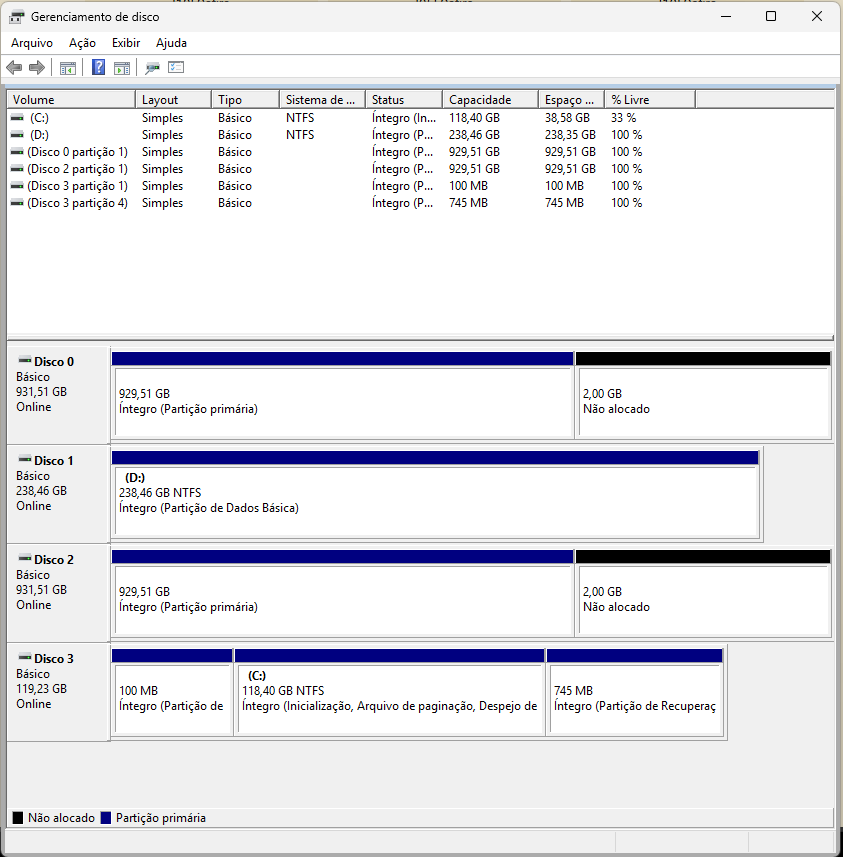
One of the Exos HDDs had been malfunctioning for a week and has now failed completely. I tried to remove it and disconnected it from the pool, but I got confused and removed the one that wasn’t faulty. I plugged it back in, and after that, TrueNAS didn’t recognize the disks. The system works normally, but the disks don’t appear in the Shell. I put the disks in Windows, and it recognized them (they are not accessible because of ZFS; I didn’t format them to avoid data loss). I also tried another SSD I have lying around, with Windows, but it wasn’t recognized either.
How can I fix this problem? I found it strange that even the Plex pool stopped appearing, and I didn’t change anything in it.
Farout
November 24, 2025, 7:48am
2
What does
sudo zpool status -v show ?
How did you fit 3 HDDs and an SDD in that sff case ? Are the discs now external ?
iFive
November 24, 2025, 12:12pm
3
Hello,
Yes, the discs are external. Some dude made a fantastic 3D case for this (and others) mini PC.
I can`t put link here, so search for “ThinkNAS - 4x HDD NAS enclosure for Lenovo M920q” on makerworld . com.
Farout
November 24, 2025, 12:42pm
4
Farout:
sudo zpool status -v
This will give us more info.
iFive
November 26, 2025, 12:11am
5
pool: boot-pool
state: ONLINE
scan: scrub repaired 0B in 00:00:09 with 0 errors on Sat Nov 8 03:45:10 2025
config:
NAME STATE READ WRITE CKSUM
boot-pool ONLINE 0 0 0
sdb3 ONLINE 0 0 0
errors: No known data errors
Farout
November 26, 2025, 4:55am
6
The pool is not there.
So check with
sudo zpool import if it is exported.
And check with
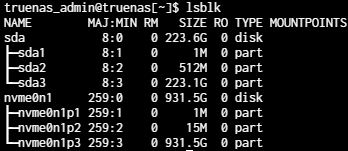
lsblk if the discs are even recognised.
1 Like
iFive
November 26, 2025, 11:36pm
7
Thanks for help me. I think it’s not working:
truenas_admin@truenas[~]$ sudo zpool import
[sudo] password for truenas_admin:
Sorry, try again.
[sudo] password for truenas_admin:
no pools available to import
truenas_admin@truenas[~]$ lsblk
NAME MAJ:MIN RM SIZE RO TYPE MOUNTPOINTS
sdb 8:16 0 223.6G 0 disk
├─sdb1 8:17 0 1M 0 part
├─sdb2 8:18 0 512M 0 part
└─sdb3 8:19 0 223.1G 0 part
truenas_admin@truenas[~]$
Arwen
November 27, 2025, 12:01am
8
Could your M.2 SATA adapter have come loose, or failed?
That listing of sdb seems to indicate it is the boot pool, (which of course would be needed for any functionality). So this also implies that sdb is not wired to the M.2 SATA adapter, (and per your original post’s comment “The HDDs are connected via a M.2…”).
The M.2 standard was not really intended for general purpose expansion. The M.2 slot and length can cause board bending for expansion devices that have connectors. Like a M.2 SATA adapter card.
2 Likes
Looks potentially electrical. Had a similar issue here where a single connector came loose and the pool decided it was time to take a vacation. Double-check all connections, apply DeOxit if you have it.
1 Like
etorix
November 27, 2025, 7:23am
10
iFive:
I can`t put link here
Take the tutorial by the forum bot and post the link. Do not make us search de tailed specifications to help you (and likely find that the case is not suitable for ZFS).
1 Like
iFive
November 27, 2025, 10:07am
11
I connected the M.2 adapter to my Windows PC, and it’s working. The power to run the drives is coming from the NAS. I also connected another M.2 drive to the NAS to test its connector, and it worked as well. It doesn’t seem to be a hardware problem.
iFive
November 27, 2025, 10:08am
12
I connected the M.2 adapter to my Windows PC, and it’s working. The power to run the drives is coming from the NAS. I also connected another M.2 drive to the NAS to test its connector, and it worked as well. It doesn’t seem to be a hardware problem.
You might want to stop here.
This my friend means your data is gone for good if you really ran zpool detach on the good disk because with what you did is basically destroy any kind of integry on the healthy disk while the faulty disk already died a full death.
Consequences to learn from that:
take backups
label your drives
if you see faulty sectors on a disk replace it immedately and dont wait for several days thinking things will turn out fine
make double sure what you are doing before you act, if in doubt take back a seat and double tap before you act
Chances are that you in panic removed / force stopped the process, as such it could be very well left over pool data in TrueNas itself that you need to clean up too … sounds like it.
Aka it won’t matter if you reformat the data now - as the disk is dead unless you used `zfs offline` to detach the healthy disk.
1 Like
iFive
November 27, 2025, 10:29am
14
Thanks for your comment.
Is there a chance the boot process got messed up by removing the disk, causing it to not recognize new disks? If so, should rebuilding the boot pool resolve the issue and make the disks reappear?
Most likely that is related to the controller no longer being recognized correctly.
Why that is I have no clue but I would honestly replace it with a reliable brand/replacement and try that first, then look further. As others noted out that it`s not listed in lsblk is usually a hardware failure indicator to some extend.
Could be the Mainboard too, e.g. a short that caused the m2 connection to tilt, or like outlined above - connection comming loose / pins not connecting from errosion or something .. that would be next thing to try.
2 Likes
iFive
November 27, 2025, 12:02pm
16
I’ll wait for other responses and then I’ll rebuild the boot pool. Thanks for sharing.
Farout
November 27, 2025, 12:14pm
17
What does zpool history show ?
1 Like
etorix
November 27, 2025, 12:39pm
18
If the drives are recognised there might be a way to force import. Probably no need to reisntall. (And it is a a “password”, right? Not a keyfile stored on the present boot pool. You have backups of THAT secret.)
But set this M.2 adapter away. Use another computer and plug the drives directly to motherboard ports.
Since you have a Windows, PC, as a last resort you could attach the drives to this and use Klennet ZFS Recovery to scan. (Not sure how it deals with encrypted data though.) The bad news is that IF Klennet were able to recover data, this would cost you the price of a license…
So keep calm, make no hasted move, and let’s try to solve it “the ZFS way”.
1 Like
iFive
November 27, 2025, 10:13pm
19
I ran the command and the response was lengthy. According to ChatGPT, there are no other pools besides the boot pool, only a history of the “General” pool which was not found.
sudo zpool history
History for ‘boot-pool’:
2025-11-01.22:12:48 zpool create -f -o ashift=12 -o cachefile=none -o compatibility=grub2 -O acltype=off -O canmount=off -O compression=on -O devices=off -O mountpoint=none -O normalization=formD -O relatime=on -O xattr=sa boot-pool /dev/sda3
2025-11-01.22:12:48 zfs create -o canmount=off boot-pool/ROOT
2025-11-01.22:12:48 zfs create -o canmount=off -o mountpoint=legacy boot-pool/grub
2025-11-01.22:12:48 zfs create -o mountpoint=legacy -o truenas:kernel_version=6.12.15-production+truenas -o zectl:keep=False boot-pool/ROOT/25.04.2.4
2025-11-01.22:12:48 zfs create -u -o mountpoint=legacy -o canmount=noauto -o setuid=off -o devices=off -o exec=off -o acltype=off -o aclmode=discard -o atime=off boot-pool/ROOT/25.04.2.4/audit
2025-11-01.22:12:49 zfs create -u -o mountpoint=legacy -o canmount=noauto -o setuid=off -o devices=off -o exec=off -o acltype=off -o aclmode=discard boot-pool/ROOT/25.04.2.4/conf
2025-11-01.22:12:49 zfs create -u -o mountpoint=legacy -o canmount=noauto -o setuid=off -o devices=off -o exec=off -o acltype=off -o aclmode=discard -o atime=off boot-pool/ROOT/25.04.2.4/data
2025-11-01.22:12:49 zfs create -u -o mountpoint=legacy -o canmount=noauto -o setuid=off -o devices=off -o exec=off -o acltype=off -o aclmode=discard -o atime=off boot-pool/ROOT/25.04.2.4/mnt
2025-11-01.22:12:49 zfs create -u -o mountpoint=legacy -o canmount=noauto -o setuid=off -o devices=off -o acltype=off -o aclmode=discard boot-pool/ROOT/25.04.2.4/etc
2025-11-01.22:12:49 zfs create -u -o mountpoint=legacy -o canmount=noauto -o setuid=off -o devices=off -o exec=off -o acltype=off -o aclmode=discard boot-pool/ROOT/25.04.2.4/home
2025-11-01.22:12:49 zfs create -u -o mountpoint=legacy -o canmount=noauto -o setuid=off -o devices=off -o acltype=off -o aclmode=discard boot-pool/ROOT/25.04.2.4/opt
2025-11-01.22:12:49 zfs create -u -o mountpoint=legacy -o canmount=noauto -o setuid=off -o devices=off -o acltype=off -o aclmode=discard boot-pool/ROOT/25.04.2.4/root
2025-11-01.22:12:49 zfs create -u -o mountpoint=legacy -o canmount=noauto -o acltype=off -o aclmode=discard -o atime=off boot-pool/ROOT/25.04.2.4/usr
2025-11-01.22:12:49 zfs create -u -o mountpoint=legacy -o canmount=noauto -o setuid=off -o devices=off -o acltype=off -o aclmode=discard -o atime=off boot-pool/ROOT/25.04.2.4/var
2025-11-01.22:12:49 zfs create -u -o mountpoint=legacy -o canmount=noauto -o setuid=off -o devices=off -o exec=off -o acltype=off -o aclmode=discard boot-pool/ROOT/25.04.2.4/var/ca-certificates
2025-11-01.22:12:49 zfs create -u -o mountpoint=legacy -o canmount=noauto -o setuid=off -o devices=off -o acltype=off -o aclmode=discard -o atime=off boot-pool/ROOT/25.04.2.4/var/lib
2025-11-01.22:12:49 zfs create -u -o mountpoint=legacy -o canmount=noauto -o setuid=off -o devices=on -o acltype=off -o aclmode=discard -o atime=off boot-pool/ROOT/25.04.2.4/var/lib/incus
2025-11-01.22:12:49 zfs create -u -o mountpoint=legacy -o canmount=noauto -o setuid=off -o devices=off -o exec=off -o acltype=off -o aclmode=discard -o atime=off boot-pool/ROOT/25.04.2.4/var/log
2025-11-01.22:12:49 zfs create -u -o mountpoint=legacy -o canmount=noauto -o setuid=off -o devices=off -o exec=off -o acltype=posixacl -o aclmode=discard -o atime=off boot-pool/ROOT/25.04.2.4/var/log/journal
2025-11-01.22:14:50 zpool set bootfs=boot-pool/ROOT/25.04.2.4 boot-pool
2025-11-01.22:14:54 zfs set readonly=off boot-pool/ROOT/25.04.2.4/audit
2025-11-01.22:14:54 zfs set mountpoint=/audit boot-pool/ROOT/25.04.2.4/audit
2025-11-01.22:14:54 zfs set org.zectl:bootloader=“” boot-pool/ROOT/25.04.2.4/audit
2025-11-01.22:14:54 zfs set readonly=on boot-pool/ROOT/25.04.2.4/conf
2025-11-01.22:14:54 zfs snapshot boot-pool/ROOT/25.04.2.4/conf@pristine
2025-11-01.22:14:54 zfs set mountpoint=/conf boot-pool/ROOT/25.04.2.4/conf
2025-11-01.22:14:54 zfs set org.zectl:bootloader=“” boot-pool/ROOT/25.04.2.4/conf
2025-11-01.22:14:54 zfs set readonly=off boot-pool/ROOT/25.04.2.4/data
2025-11-01.22:14:54 zfs set mountpoint=/data boot-pool/ROOT/25.04.2.4/data
2025-11-01.22:14:54 zfs set org.zectl:bootloader=“” boot-pool/ROOT/25.04.2.4/data
2025-11-01.22:14:54 zfs set readonly=off boot-pool/ROOT/25.04.2.4/mnt
2025-11-01.22:14:54 zfs set mountpoint=/mnt boot-pool/ROOT/25.04.2.4/mnt
2025-11-01.22:14:54 zfs set org.zectl:bootloader=“” boot-pool/ROOT/25.04.2.4/mnt
2025-11-01.22:14:54 zfs set readonly=off boot-pool/ROOT/25.04.2.4/etc
2025-11-01.22:14:54 zfs snapshot boot-pool/ROOT/25.04.2.4/etc@pristine
2025-11-01.22:14:54 zfs set mountpoint=/etc boot-pool/ROOT/25.04.2.4/etc
2025-11-01.22:14:54 zfs set org.zectl:bootloader=“” boot-pool/ROOT/25.04.2.4/etc
2025-11-01.22:14:54 zfs set readonly=off boot-pool/ROOT/25.04.2.4/home
2025-11-01.22:14:54 zfs set mountpoint=/home boot-pool/ROOT/25.04.2.4/home
2025-11-01.22:14:54 zfs set org.zectl:bootloader=“” boot-pool/ROOT/25.04.2.4/home
2025-11-01.22:14:54 zfs set readonly=on boot-pool/ROOT/25.04.2.4/opt
2025-11-01.22:14:54 zfs snapshot boot-pool/ROOT/25.04.2.4/opt@pristine
2025-11-01.22:14:54 zfs set mountpoint=/opt boot-pool/ROOT/25.04.2.4/opt
2025-11-01.22:14:54 zfs set org.zectl:bootloader=“” boot-pool/ROOT/25.04.2.4/opt
2025-11-01.22:14:54 zfs set readonly=off boot-pool/ROOT/25.04.2.4/root
2025-11-01.22:14:54 zfs set mountpoint=/root boot-pool/ROOT/25.04.2.4/root
2025-11-01.22:14:54 zfs set org.zectl:bootloader=“” boot-pool/ROOT/25.04.2.4/root
2025-11-01.22:14:54 zfs set readonly=on boot-pool/ROOT/25.04.2.4/usr
2025-11-01.22:14:54 zfs snapshot boot-pool/ROOT/25.04.2.4/usr@pristine
2025-11-01.22:14:54 zfs set mountpoint=/usr boot-pool/ROOT/25.04.2.4/usr
2025-11-01.22:14:54 zfs set org.zectl:bootloader=“” boot-pool/ROOT/25.04.2.4/usr
2025-11-01.22:14:54 zfs set readonly=off boot-pool/ROOT/25.04.2.4/var
2025-11-01.22:14:54 zfs snapshot boot-pool/ROOT/25.04.2.4/var@pristine
2025-11-01.22:14:54 zfs set mountpoint=/var boot-pool/ROOT/25.04.2.4/var
2025-11-01.22:14:54 zfs set org.zectl:bootloader=“” boot-pool/ROOT/25.04.2.4/var
2025-11-01.22:14:54 zfs set readonly=off boot-pool/ROOT/25.04.2.4/var/ca-certificates
2025-11-01.22:14:54 zfs set mountpoint=/var/local/ca-certificates boot-pool/ROOT/25.04.2.4/var/ca-certificates
2025-11-01.22:14:54 zfs set org.zectl:bootloader=“” boot-pool/ROOT/25.04.2.4/var/ca-certificates
2025-11-01.22:14:54 zfs set readonly=off boot-pool/ROOT/25.04.2.4/var/lib
2025-11-01.22:14:54 zfs snapshot boot-pool/ROOT/25.04.2.4/var/lib@pristine
2025-11-01.22:14:54 zfs set mountpoint=/var/lib boot-pool/ROOT/25.04.2.4/var/lib
2025-11-01.22:14:54 zfs set org.zectl:bootloader=“” boot-pool/ROOT/25.04.2.4/var/lib
2025-11-01.22:14:54 zfs set readonly=off boot-pool/ROOT/25.04.2.4/var/lib/incus
2025-11-01.22:14:54 zfs set mountpoint=/var/lib/incus boot-pool/ROOT/25.04.2.4/var/lib/incus
2025-11-01.22:14:54 zfs set org.zectl:bootloader=“” boot-pool/ROOT/25.04.2.4/var/lib/incus
2025-11-01.22:14:54 zfs set readonly=off boot-pool/ROOT/25.04.2.4/var/log
2025-11-01.22:14:54 zfs set mountpoint=/var/log boot-pool/ROOT/25.04.2.4/var/log
2025-11-01.22:14:54 zfs set org.zectl:bootloader=“” boot-pool/ROOT/25.04.2.4/var/log
2025-11-01.22:14:54 zfs set readonly=off boot-pool/ROOT/25.04.2.4/var/log/journal
2025-11-01.22:14:54 zfs set mountpoint=/var/log/journal boot-pool/ROOT/25.04.2.4/var/log/journal
2025-11-01.22:14:54 zfs set org.zectl:bootloader=“” boot-pool/ROOT/25.04.2.4/var/log/journal
2025-11-01.22:14:54 zfs set readonly=on boot-pool/ROOT/25.04.2.4
2025-11-01.22:14:54 zfs snapshot boot-pool/ROOT/25.04.2.4@pristine
2025-11-01.22:14:54 zfs set org.zectl:bootloader=grub boot-pool/ROOT
2025-11-01.22:14:55 zpool export -f boot-pool
2025-11-01.22:16:24 zpool import -N -f boot-pool
2025-11-01.22:16:59 py-libzfs: zfs create -o mountpoint=legacy -o readonly=off -o snapdir=hidden -o xattr=sa boot-pool/.system
2025-11-01.22:16:59 py-libzfs: zfs create -o mountpoint=legacy -o readonly=off -o snapdir=hidden -o quota=1G -o xattr=sa boot-pool/.system/cores
2025-11-01.22:16:59 py-libzfs: zfs create -o mountpoint=legacy -o readonly=off -o snapdir=hidden -o xattr=sa boot-pool/.system/nfs
2025-11-01.22:16:59 py-libzfs: zfs create -o mountpoint=legacy -o readonly=off -o snapdir=hidden -o xattr=sa boot-pool/.system/samba4
2025-11-01.22:16:59 py-libzfs: zfs create -o mountpoint=legacy -o readonly=off -o snapdir=hidden -o xattr=sa boot-pool/.system/configs-ae32c386e13840b2bf9c0083275e7941
2025-11-01.22:16:59 py-libzfs: zfs create -o mountpoint=legacy -o readonly=off -o snapdir=hidden -o canmount=noauto -o xattr=sa boot-pool/.system/netdata-ae32c386e13840b2bf9c0083275e7941
2025-11-01.22:17:45 py-libzfs: zfs snapshot boot-pool/.system/samba4@wbc-1762046264
2025-11-01.22:19:39 zfs set readonly=off boot-pool/ROOT/25.04.2.4
2025-11-01.22:20:22 zfs set readonly=on boot-pool/ROOT/25.04.2.4
2025-11-01.22:20:59 zpool import -N -f boot-pool
2025-11-01.23:21:43 zpool import -N -f boot-pool
2025-11-08.03:45:02 py-libzfs: zpool scrub boot-pool
2025-11-10.00:27:32 zpool import -N -f boot-pool
2025-11-10.00:38:58 zpool import -N -f boot-pool
2025-11-10.00:47:03 zfs create -o mountpoint=legacy -o truenas:kernel_version=6.12.15-production+truenas -o zectl:keep=False boot-pool/ROOT/25.04.2.6
2025-11-10.00:47:03 zfs snapshot boot-pool/ROOT/25.04.2.4/audit@install-2025-11-10-03-47-03
2025-11-10.00:47:03 zfs clone -o mountpoint=legacy -o canmount=noauto -o setuid=off -o devices=off -o exec=off -o acltype=off -o aclmode=discard -o atime=off boot-pool/ROOT/25.04.2.4/audit@install-2025-11-10-03-47-03 boot-pool/ROOT/25.04.2.6/audit
2025-11-10.00:47:03 zfs create -u -o mountpoint=legacy -o canmount=noauto -o setuid=off -o devices=off -o exec=off -o acltype=off -o aclmode=discard boot-pool/ROOT/25.04.2.6/conf
2025-11-10.00:47:03 zfs snapshot boot-pool/ROOT/25.04.2.4/data@install-2025-11-10-03-47-03
2025-11-10.00:47:03 zfs clone -o mountpoint=legacy -o canmount=noauto -o setuid=off -o devices=off -o exec=off -o acltype=off -o aclmode=discard -o atime=off boot-pool/ROOT/25.04.2.4/data@install-2025-11-10-03-47-03 boot-pool/ROOT/25.04.2.6/data
2025-11-10.00:47:03 zfs create -u -o mountpoint=legacy -o canmount=noauto -o setuid=off -o devices=off -o exec=off -o acltype=off -o aclmode=discard -o atime=off boot-pool/ROOT/25.04.2.6/mnt
2025-11-10.00:47:03 zfs create -u -o mountpoint=legacy -o canmount=noauto -o setuid=off -o devices=off -o acltype=off -o aclmode=discard boot-pool/ROOT/25.04.2.6/etc
2025-11-10.00:47:03 zfs snapshot boot-pool/ROOT/25.04.2.4/home@install-2025-11-10-03-47-03
2025-11-10.00:47:03 zfs clone -o mountpoint=legacy -o canmount=noauto -o setuid=off -o devices=off -o exec=off -o acltype=off -o aclmode=discard boot-pool/ROOT/25.04.2.4/home@install-2025-11-10-03-47-03 boot-pool/ROOT/25.04.2.6/home
2025-11-10.00:47:03 zfs create -u -o mountpoint=legacy -o canmount=noauto -o setuid=off -o devices=off -o acltype=off -o aclmode=discard boot-pool/ROOT/25.04.2.6/opt
2025-11-10.00:47:03 zfs snapshot boot-pool/ROOT/25.04.2.4/root@install-2025-11-10-03-47-03
2025-11-10.00:47:03 zfs clone -o mountpoint=legacy -o canmount=noauto -o setuid=off -o devices=off -o acltype=off -o aclmode=discard boot-pool/ROOT/25.04.2.4/root@install-2025-11-10-03-47-03 boot-pool/ROOT/25.04.2.6/root
2025-11-10.00:47:03 zfs create -u -o mountpoint=legacy -o canmount=noauto -o acltype=off -o aclmode=discard -o atime=off boot-pool/ROOT/25.04.2.6/usr
2025-11-10.00:47:03 zfs create -u -o mountpoint=legacy -o canmount=noauto -o setuid=off -o devices=off -o acltype=off -o aclmode=discard -o atime=off boot-pool/ROOT/25.04.2.6/var
2025-11-10.00:47:03 zfs create -u -o mountpoint=legacy -o canmount=noauto -o setuid=off -o devices=off -o exec=off -o acltype=off -o aclmode=discard boot-pool/ROOT/25.04.2.6/var/ca-certificates
2025-11-10.00:47:03 zfs create -u -o mountpoint=legacy -o canmount=noauto -o setuid=off -o devices=off -o acltype=off -o aclmode=discard -o atime=off boot-pool/ROOT/25.04.2.6/var/lib
2025-11-10.00:47:03 zfs create -u -o mountpoint=legacy -o canmount=noauto -o setuid=off -o devices=on -o acltype=off -o aclmode=discard -o atime=off boot-pool/ROOT/25.04.2.6/var/lib/incus
2025-11-10.00:47:03 zfs snapshot boot-pool/ROOT/25.04.2.4/var/log@install-2025-11-10-03-47-03
2025-11-10.00:47:03 zfs clone -o mountpoint=legacy -o canmount=noauto -o setuid=off -o devices=off -o exec=off -o acltype=off -o aclmode=discard -o atime=off boot-pool/ROOT/25.04.2.4/var/log@install-2025-11-10-03-47-03 boot-pool/ROOT/25.04.2.6/var/log
2025-11-10.00:47:03 zfs create -u -o mountpoint=legacy -o canmount=noauto -o setuid=off -o devices=off -o exec=off -o acltype=posixacl -o aclmode=discard -o atime=off boot-pool/ROOT/25.04.2.6/var/log/journal
2025-11-10.00:47:41 zpool set bootfs=boot-pool/ROOT/25.04.2.6 boot-pool
2025-11-10.00:48:25 zfs set readonly=off boot-pool/ROOT/25.04.2.6/audit
2025-11-10.00:48:25 zfs set mountpoint=/audit boot-pool/ROOT/25.04.2.6/audit
2025-11-10.00:48:25 zfs set org.zectl:bootloader=“” boot-pool/ROOT/25.04.2.6/audit
2025-11-10.00:48:25 zfs set readonly=on boot-pool/ROOT/25.04.2.6/conf
2025-11-10.00:48:25 zfs snapshot boot-pool/ROOT/25.04.2.6/conf@pristine
2025-11-10.00:48:25 zfs set mountpoint=/conf boot-pool/ROOT/25.04.2.6/conf
2025-11-10.00:48:25 zfs set org.zectl:bootloader=“” boot-pool/ROOT/25.04.2.6/conf
2025-11-10.00:48:25 zfs set readonly=off boot-pool/ROOT/25.04.2.6/data
2025-11-10.00:48:25 zfs set mountpoint=/data boot-pool/ROOT/25.04.2.6/data
2025-11-10.00:48:25 zfs set org.zectl:bootloader=“” boot-pool/ROOT/25.04.2.6/data
2025-11-10.00:48:25 zfs set readonly=off boot-pool/ROOT/25.04.2.6/mnt
2025-11-10.00:48:25 zfs set mountpoint=/mnt boot-pool/ROOT/25.04.2.6/mnt
2025-11-10.00:48:25 zfs set org.zectl:bootloader=“” boot-pool/ROOT/25.04.2.6/mnt
2025-11-10.00:48:25 zfs set readonly=off boot-pool/ROOT/25.04.2.6/etc
2025-11-10.00:48:25 zfs snapshot boot-pool/ROOT/25.04.2.6/etc@pristine
2025-11-10.00:48:25 zfs set mountpoint=/etc boot-pool/ROOT/25.04.2.6/etc
2025-11-10.00:48:25 zfs set org.zectl:bootloader=“” boot-pool/ROOT/25.04.2.6/etc
2025-11-10.00:48:25 zfs set readonly=off boot-pool/ROOT/25.04.2.6/home
2025-11-10.00:48:25 zfs set mountpoint=/home boot-pool/ROOT/25.04.2.6/home
2025-11-10.00:48:25 zfs set org.zectl:bootloader=“” boot-pool/ROOT/25.04.2.6/home
2025-11-10.00:48:25 zfs set readonly=on boot-pool/ROOT/25.04.2.6/opt
2025-11-10.00:48:25 zfs snapshot boot-pool/ROOT/25.04.2.6/opt@pristine
2025-11-10.00:48:25 zfs set mountpoint=/opt boot-pool/ROOT/25.04.2.6/opt
2025-11-10.00:48:25 zfs set org.zectl:bootloader=“” boot-pool/ROOT/25.04.2.6/opt
2025-11-10.00:48:25 zfs set readonly=off boot-pool/ROOT/25.04.2.6/root
2025-11-10.00:48:25 zfs set mountpoint=/root boot-pool/ROOT/25.04.2.6/root
2025-11-10.00:48:25 zfs set org.zectl:bootloader=“” boot-pool/ROOT/25.04.2.6/root
2025-11-10.00:48:25 zfs set readonly=on boot-pool/ROOT/25.04.2.6/usr
2025-11-10.00:48:25 zfs snapshot boot-pool/ROOT/25.04.2.6/usr@pristine
2025-11-10.00:48:25 zfs set mountpoint=/usr boot-pool/ROOT/25.04.2.6/usr
2025-11-10.00:48:25 zfs set org.zectl:bootloader=“” boot-pool/ROOT/25.04.2.6/usr
2025-11-10.00:48:25 zfs set readonly=off boot-pool/ROOT/25.04.2.6/var
2025-11-10.00:48:25 zfs snapshot boot-pool/ROOT/25.04.2.6/var@pristine
2025-11-10.00:48:25 zfs set mountpoint=/var boot-pool/ROOT/25.04.2.6/var
2025-11-10.00:48:25 zfs set org.zectl:bootloader=“” boot-pool/ROOT/25.04.2.6/var
2025-11-10.00:48:25 zfs set readonly=off boot-pool/ROOT/25.04.2.6/var/ca-certificates
2025-11-10.00:48:26 zfs set mountpoint=/var/local/ca-certificates boot-pool/ROOT/25.04.2.6/var/ca-certificates
2025-11-10.00:48:26 zfs set org.zectl:bootloader=“” boot-pool/ROOT/25.04.2.6/var/ca-certificates
2025-11-10.00:48:26 zfs set readonly=off boot-pool/ROOT/25.04.2.6/var/lib
2025-11-10.00:48:26 zfs snapshot boot-pool/ROOT/25.04.2.6/var/lib@pristine
2025-11-10.00:48:26 zfs set mountpoint=/var/lib boot-pool/ROOT/25.04.2.6/var/lib
2025-11-10.00:48:26 zfs set org.zectl:bootloader=“” boot-pool/ROOT/25.04.2.6/var/lib
2025-11-10.00:48:26 zfs set readonly=off boot-pool/ROOT/25.04.2.6/var/lib/incus
2025-11-10.00:48:26 zfs set mountpoint=/var/lib/incus boot-pool/ROOT/25.04.2.6/var/lib/incus
2025-11-10.00:48:26 zfs set org.zectl:bootloader=“” boot-pool/ROOT/25.04.2.6/var/lib/incus
2025-11-10.00:48:26 zfs set readonly=off boot-pool/ROOT/25.04.2.6/var/log
2025-11-10.00:48:26 zfs set mountpoint=/var/log boot-pool/ROOT/25.04.2.6/var/log
2025-11-10.00:48:26 zfs set org.zectl:bootloader=“” boot-pool/ROOT/25.04.2.6/var/log
2025-11-10.00:48:26 zfs set readonly=off boot-pool/ROOT/25.04.2.6/var/log/journal
2025-11-10.00:48:26 zfs set mountpoint=/var/log/journal boot-pool/ROOT/25.04.2.6/var/log/journal
2025-11-10.00:48:26 zfs set org.zectl:bootloader=“” boot-pool/ROOT/25.04.2.6/var/log/journal
2025-11-10.00:48:26 zfs set readonly=on boot-pool/ROOT/25.04.2.6
2025-11-10.00:48:26 zfs snapshot boot-pool/ROOT/25.04.2.6@pristine
2025-11-10.00:49:08 zpool import -N -f boot-pool
2025-11-10.00:49:40 py-libzfs: zfs promote boot-pool/ROOT/25.04.2.6/audit
2025-11-10.00:49:40 py-libzfs: zfs promote boot-pool/ROOT/25.04.2.6/data
2025-11-10.00:49:40 py-libzfs: zfs promote boot-pool/ROOT/25.04.2.6/home
2025-11-10.00:49:40 py-libzfs: zfs promote boot-pool/ROOT/25.04.2.6/root
2025-11-10.00:49:40 py-libzfs: zfs promote boot-pool/ROOT/25.04.2.6/var/log
2025-11-10.22:12:08 zpool import -N -f boot-pool
2025-11-10.22:27:08 zpool import -N -f boot-pool
2025-11-10.22:45:57 zpool import -N -f boot-pool
2025-11-10.22:48:37 zpool import -N -f boot-pool
2025-11-13.01:27:36 zpool import -N -f boot-pool
2025-11-25.21:00:43 zpool import -N -f boot-pool
2025-11-26.19:15:10 zpool import -N -f boot-pool
2025-11-27.06:37:02 zpool import -N -f boot-pool
2025-11-27.06:44:46 zpool import -N -f boot-pool
2025-11-27.19:01:24 zpool import -N -f boot-pool
iFive
November 27, 2025, 10:16pm
20
Yes, it’s a password and I have it. If I can’t find a solution, I’ll try your suggestion.
I wanted to build a NAS with a small, low-power device, so I got this miniPC, but I needed more storage and ran out of options.
1 Like