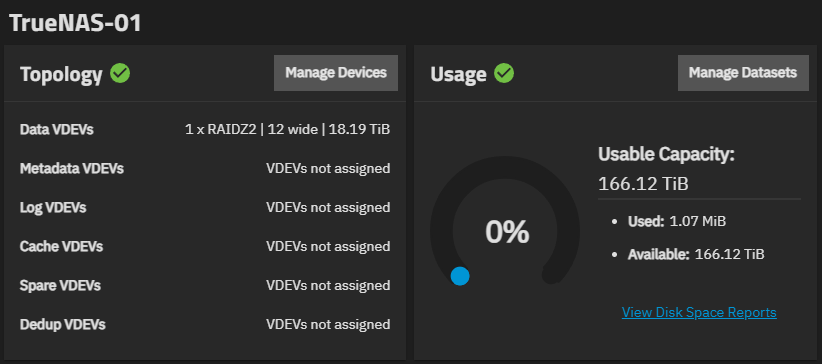
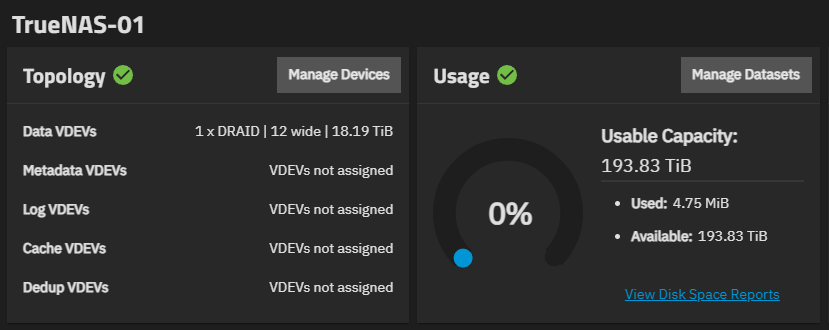
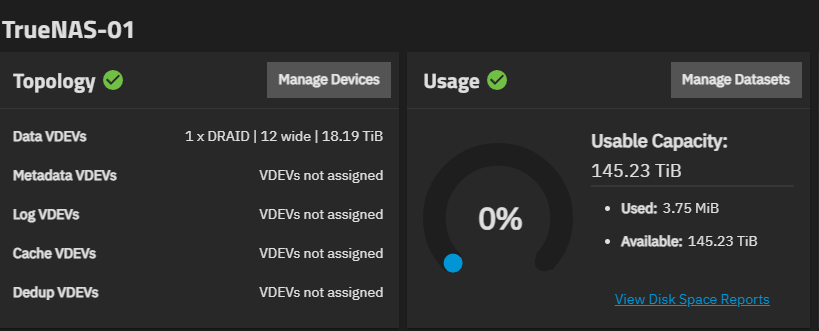
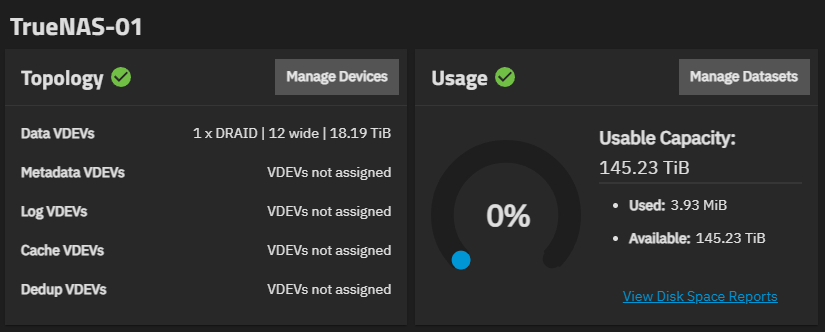
Bug Description:
When creating a dRAID2 pool (or a dRAID1 pool with a spare) on TrueNAS SCALE 25.04.2 with these 12 disks, the actual usable capacity is much less than expected, even though the GUI initially shows a correct estimate during setup.
Example:
dRAID2:9d:12c:1s (double parity, 9 data, 1 spare)
GUI estimates: 163.7 TiB raw (matches 9×18.19 TiB)
Actual zfs list reports: only 145 TiB usable!
This is only ~66% of raw capacity, much less than normal for RAIDZ2 or expected dRAID2 overhead.
CLI Proof:
swift
CopyEdit
$ sudo /sbin/zpool status -v TrueNAS-01
  pool: TrueNAS-01
 state: ONLINE
config:

        NAME                          STATE     READ WRITE CKSUM
        TrueNAS-01                    ONLINE       0     0     0
          draid2:9d:12c:1s-0          ONLINE       0     0     0
            (12 disks listed, all ONLINE)
        spares
          draid2-0-0                  AVAIL

errors: No known data errors

$ sudo /sbin/zfs list TrueNAS-01
NAME         USED  AVAIL  REFER  MOUNTPOINT
TrueNAS-01  3.93M   145T   767K  /mnt/TrueNAS-01
What I expected:
For dRAID2:9d:12c:1s, I expected at least ~154–156 TiB usable after ZFS overhead
(9 data × 18.19 TiB = 163.7 TiB, minus typical ZFS metadata/overhead)
What I got:
Only 145 TiB usable.
This is true for dRAID2 with/without spares, and dRAID1 with a spare.
Only dRAID1 with 0 spares gives the expected high usable space (~193 TiB, as it should).
If I go from DRAID1 to DRAID2 (no spares either way), I lose ~50TB vs DRAID1(!).
Other notes:
Disks were wiped (CLI: sgdisk --zap-all), no partitions, clean start.
Pool was created via GUI, but the same thing happens with CLI pool creation.
Reboots/export/import do not change result.
The problem seems to be in the dRAID layout logic, not just the GUI estimate.
No disk errors, no SMART issues, all hardware detected.
Request:
Is this a known bug in TrueNAS SCALE 25.04.2, dRAID, or the ZFS implementation?
Is there a workaround or fix?
If more debug output is needed, I can provide logs/commands as requested.
I’m not very familiar with DRAID but I’m fairly sure how it uses spare drives is very different to RAIDZ and impacts space when the pool is created as it’s distributed across the entire pool. This also applies to parity where some configs are optimised and others not so much and in non optimised configurations padding may be necessary thus reduction in space.
Out of interest DRAID with 12 drives feels a little on the small side. Why did you choose that config over RAIDZ2/3?
From all I’ve read, the resilvering times are an order magnitude faster with DRAID, even for 12-disk DRAID2.
When I tried DRAID1 on 12 disks TrueNAS gave me ~193TiB usable space. When I went to DRAID2, usable space went down to ~145TiB… no spares invoked in either case.
This may well be true but I can’t see it being that significant at that scale tbh. I would guess the difference on a close to full pool would be something like a few hours vs half a day to a day so not worth designing your entire pool around that one small benefit IMO.
Depending on your system requirements I’d be tempted to do 2 x 6 disk Z2s. DRAID is still quite new and the knowledge around it is still very limited in comparison to mirrors and RAIDZ so bear that in mind.
All good points. I think ultimately I’m going to be forced to go with RAIDZ because my system, either due to TrueNAS’s DRAID implementation, or in spite of it, erroneously loses too much usable space with DRAID. At $400/disk, TrueNAS’s DRAID is (inexplicably, especially at the “estimated” to “reality” stage) penalizing me about $800 here, not to mention the lost space and needing to buy more $400 disks, in the future, on account.
You’d be making the right decision to go with RAIDZ. The DRAID Primer that @joeschmuck posted above is very explicit about the limited situations in which we’d recommend a DRAID layout:
Due to concerns with storage efficiency, dRAID vdev layouts are only recommended in very specific situations where the TrueNAS storage array has numerous (>100) attached disks that are expected to fail frequently and the array is storing large data blocks. If deploying on SSDs, dRAID can be a viable option for high-performance large-block workloads, such as video production and some HPC storage, but test the configuration thoroughly before putting it into production.
Current investigations between dRAID and RAIDz vdev layouts find that RAIDZ layouts store data more efficiently in all general use case scenarios and especially where small blocks of data are being stored. dRAID is not suited to applications with primarily small-block data reads and writes, such as VMware and databases that are better suited to mirror and RAIDz vdevs.
In general, consider dRAID where having greatly-reduced resilver time and returning pools to a healthy state faster is needed. The implementation of dRAID is very new and has not been tested to the same extent as RAIDZ. If your storage project cannot tolerate risk, consider waiting until dRAID becomes more well-established and widely tested.
In addition to the capacity concerns laid out, I would almost always suggest dRAID pools leverage metadata vdevs with properly configured small block sizes.
One of the major trade offs for faster resilvering is that small writes, with 9 data disks using 4k sectors “small writes” would be anything smaller than 36k, always take a full stripe width padded by zeros, which can eat into usable capacity very quickly depending on the workload.