
Stripe Pool, one Dataset.
Exchanged 0,5tb Ssd with 4Tb ssd using “Replace” button.
Removed the 0,5Tb ssd (put the 4Tb in the slot of 0,5Tb)
Dataset shows only allocated size of 0,5tb Ssd.
How to expand it to max capacity of new ssd?
I’ll take a guess… You won’t get the extra space on the new disk until all drives in the pool are of the same size (i.e. 4TB in your case).
Welcome to the forum BTW. As a hint, responses to your post will be proportional to the amount of info about your system that you provide. You could at least tell us which version of TrueNAS (or FreeNAS, or FreeBSD) you are on. Also the pool size, no. of drives, and ZFS redundancy being used.
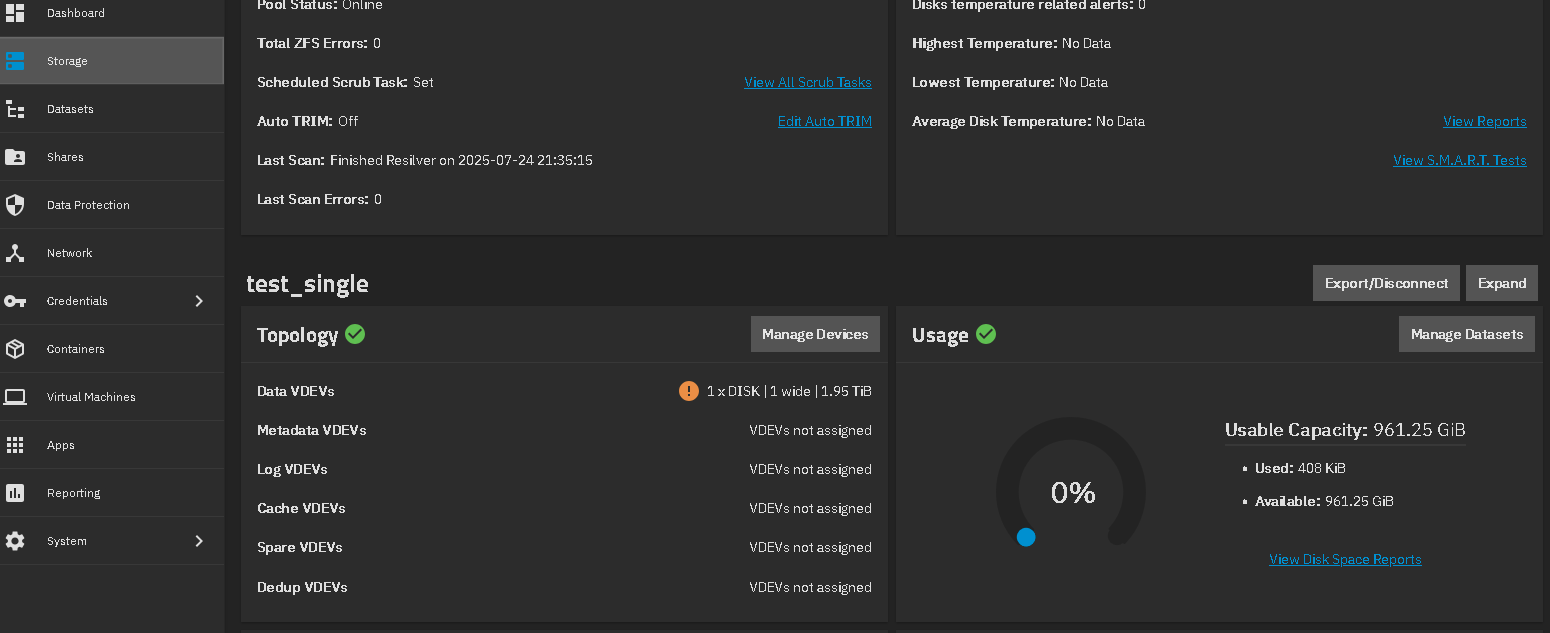
Recent versions of SCALE now want you to press a button to expand.
I use latest TrueNas Community edition.
Only one ssd, which was previously 500gb, and I replaced by 4tb.
Under storage I see a new size of 4tb ssd, but under dataset I see old allocation size (something like 290gb used and 180 available - real size might differ a bit since I am not near my PC right now, but it’s clear the size of previous ssd)
So the question is- is it possible to extend the size of the dataset?
Hit the Expand button in the GUI for that pool you just replaced the SSD. I just tested and confirmed in a VM for test_single pool. Created a 1 TB pool, did a disk replacment with a 2TB and then did the Expand. See Expand button on far right where test_single pool is on GUI.
thank you very much! it worked also for me 