
I’ve seen this come up a couple of times and wanted to share some of what I’ve tested and found. Should you try any of this, I’m not responsible for any configuration or modifications you do to your system or setup. With that said, I hope you find this information useful.
Can you use TrueNAS shares to play Steam games and/or others?
The answer is Yes and No as it is dependent on the title. Generally, almost all of my Steam games ran successfully over SMB shares barring compatibility issues between games and the OS. In Linux, out of 81 titles, two games would not run out of the box and required legacy components not found in Ubuntu 25.10 (Dirt Rally & Assetto Corsa). I’m sure it’s fixable, but that’s another topic.
My thoughts for this setup:
Games require high I/O operations and generally low latency to the data set. You can either use symlinks to direct the game installs to your shares, mount the share as a local drive, or use iSCSI/NVMe-oF zvols.
Raids:
Raidz - great for sequential reads
Mirrors/stripe - great for high I/O
Special vdevs - improves I/O and general small file/folder performance for existing pools on traditional HDDs
Setup:
TrueNAS 26.04.0-MASTER-20260202-020144 - Halfmoon
256 GB DDR4 ECC
3x 2TB SATA 7200 rpm HDDs stripe vdevs default 128k
4x 1TB SATA SSD strip special vdev 64k
10 & 40 Gbe connection
Test workstations:
System 1
AMD 5950X, Nvidia 4070ti Super, 128 GB DDR4, 40 Gbe NIC, 1TB NVMe Samsung 990 Pro, 2TB 2.5 Samsung SATA SSD, 500GB 2.5 SATA SSD, 500GB 2.5 SATA HDD 5400 rpm, Windows 10 x64, Ubuntu 25.10 Desktop
System 2
AMD 5700x, Nvidia 3080ti, 64 GB DDR4, 10 Gbe NIC over Cat6a 100+ ft, 1TB NVMe WD Black, Windows 11
OSes:
Windows 10/11 Professional x64, Ubuntu 25.10 Desktop
Shares:
SMB shares for Windows and NVMe-oF zvol for Linux.
I did try iSCSI for Windows. While iSCSI for Windows worked there were some inconsistencies during my testing for file transfers where it would freeze the entire system during copying and writing large files to and from the drive. NVMe-oF/TCP is not available for Windows, but iSCSI and NVMe-oF preformed extremely well during testing for Linux. SMB shares worked for Linux, but I just went with the NVMe-oF, a lower latency protocol for Linux, for testing. You can add space to iSCSI/NVMe-oF zvols but not shrink it. All instances of game installations were kept separate in their own space for each OSes. For iSCSI/NVMe-oF, TrueNAS directed small files to the special vdev as it nomrally would for any other file shares.
Benchmarks over 40 Gbe DAC
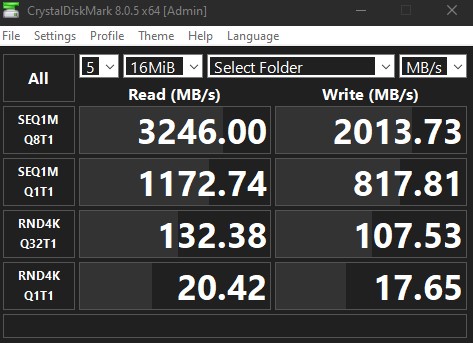
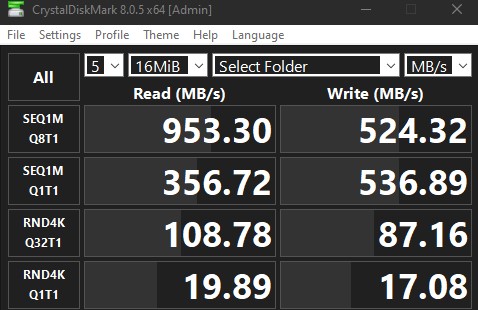
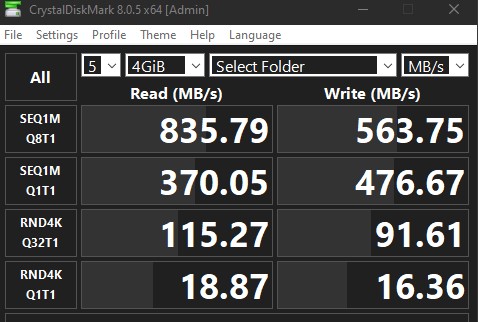
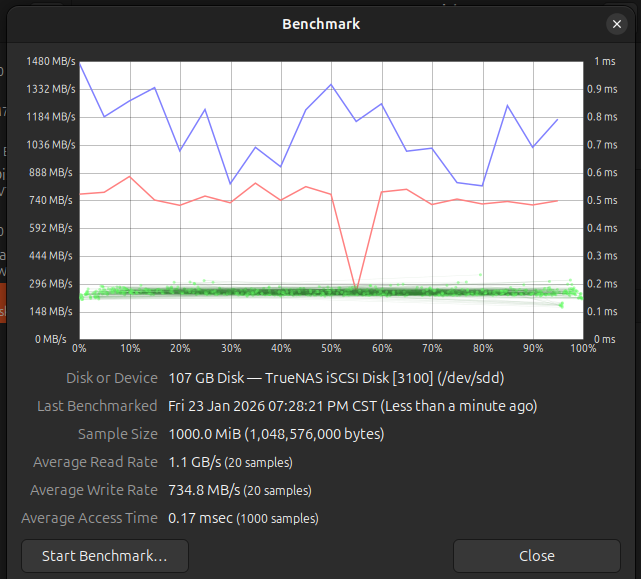
The benchmarks I’m sharing were on my 40 Gbe DAC to the NAS. I could not achieve full 40 Gbe on TrueNAS Scale since I believe RoCE is disabled in TrueNAS Scale. iSCSI and NVMe-oF were very close in benchmarks for Linux, but I went with NVMe-oF/TCP. I successfully ran Steam games on 10 Gbe to System 2 over CAT6a 100+ ft away without any issues. Side note, some of the benchmarks are probably cached in ARC as I ran multiple samples, but this should hold true for gaming files. Speeds are measured in MBytes per second.
CrytalDiskMark 8.0.5 x64 on Windows SMB 16MB
CrytalDiskMark 8.0.5 x64 on Windows SMB 4GB

CrytalDiskMark 8.0.5 x64 on Windows iSCSI 16MB
CrytalDiskMark 8.0.5 x64 on Windows iSCSI 4GB
Native benchmark Linux iSCSI 16MB

Native benchmark Linux iSCSI 1GB
Installing Steam
I recommend installing Steam on a local SSD drive with reasonable storage should the title require local installation; it also improves startup times for the Steam client. You can install it using SMB shares (symlink or mounted) or iSCSI/NVMe-oF, but the load times could be noticeably slower from your NAS. For Linux, you will need to install the i386 component for Steam.
After installing Steam:
Windows Storage Options:
- Mount a network drive as a letter drive and direct Steam to install games to the mapped drive in settings (recommended). Configured for my System 2 Windows 11 setup. Steam will create all the folders and file dependencies.
- Use symlink on a 2nd drive to redirect SteamLibrary/steamapps to your SMB share. Configured for System 1 Windows 10 on a 5400 rpm 500 GB 2.5" with limited storage. The drive speed does not matter as the reads/writes are directed to your NAS.

- Use symlink to redirect /Steam/steamapps to your SMB share

Symlink from Windows command prompt
	mklink /D "C:\Steam\steamapps" "\\ip address\SMB share"
Linux Storage Options:
Linux requires you to mount the storage and make it persistent after reboots. This is true for SMB shares and zvols. I won’t cover it in detail, but the terminal command to accomplish it is listed below. You’ll need to modify the /etc/fstab to make it persistent. Attached zvols are raw storage that will require you to format the drive as though you are attaching an actual disk drive.
Terminal for symlink
	ln -s /path/to/mount /path/to/symlink

Using iSCSI or NVMe-oF in Linux
	Discover and Log In to the iSCSI Target
	sudo iscsiadm -m discovery -t sendtargets -p (NAS_IP)
	sudo iscsiadm -m node -T (TARGET_IQN) -p (NAS_IP) --login

	Discover and Log In to the NVMe-oF Linux (used for Ubuntu 25.10 System 1 setup)
	sudo nvme discover --transport=tcp --traddr=10.0.0.5 --trsvcid=4420
	sudo nvme connect --transport=tcp --traddr=10.0.0.5 --trsvcid=4420 --nqn=nqn.2024-08.com.example:my-disk
		*replace the ip with that of your NAS
If you opted to map a letter drive or use zvols, go into Steam Settings/Storage, Add the drive and set it as default for game installation. If you see the storage space reflecting what you have on the NAS, it is configured properly. Windows and Linux will install some files natively to the installation drive for Proton and others necessities. Install your games and test.
Conclusions
The load times on both 10/40 Gbe were great & games ran smoothly in both Windows 10/11 and Linux. I highly recommend setting up a special vdev for small file/folder and to handle a lot of the high I/O operations. I used a stripe vdev configured and consider everything on the pool as expendable with each drive being a vdev in stripe configuration to better handle I/O operations. You can go without a special vdev and it will work as I’ve tested. You can backup the installation folders to another pool, but I noticed each system will have some minor unique configurations for each system in the installation folder.
Games were tested in 4k with a lot of settings enabled. Third-party Ubisoft games didn’t seem to have issues either.
Other titles:
Battle.net will refuse to run from symlink or iSCSI in Windows. It will identify symlinks to the NAS ip shares, and it will refuse to run from Windows iSCSI. You can use Steam Proton Experimental to install Battle.net in Linux. The installation will default to the main installation drive in Linux. Update the file path to the Battlenet.exe when installation has been completed. After the Battlenet is installed and started, you can install Battle.net games. StarCraft and StarCraft 2 ran at 4k Ultra Settings. I did not test any additional titels on this platform.
EA Cleint ran on SMB, but Dragon Age Origins Ultimate Edition itelf would not start. Installation in Windows iSCSI worked for both. Dragon Age Origins is one of those games that needed modding and patching to working in Windows. Linux will load the client but have issues validating the registration key due to some missing files related to legacy Nvidia physics. Using Steam Proton, you can install Nvidia Physx and switch back to the game launcher to run the game.
Guild Wars 1/2 ran without issues over SMB. I’ve not tested in Linux.
GOG installed locally on an SSD using symlink GOG Galaxy\Games to the NAS. Games installed and ran after applying compatibility fixes work around in Windows for the ones I owned. Use Lutris in Linux to install GOG games. All the ones I own ran in Linux using Lutris without any issues.
Neverwinter Nights Diamond
Neverwinter Nights 2
The Witcher: Enhanced Edition
The Witcher 2
The Witcher 3
List of Steam Games Tested
20XX
Assault Android Cactus
Assetto Corsa*
Awesomenauts
Baldur’s Gate: Enhanced Edition
Baldur’s Gate II: Enhanced Edition
Bastion
Batman: Arkham City GOTY
Battle Chasers: Nightwar
Borderlands 2
Brawlhalla
Castle Crashers
CastleStorm
Cat Quest II
Catan Universe
Child of Light* Ubisoft title
Clue/Cluedo: Classic Edition
Darkest Dungeon®
Devil May Cry 5
DiRT Rally*
Disturbed
Divinity: Original Sin (Classic)
Divinity: Original Sin Enhanced Edition
Divinity: Original Sin 2
Dungeon Defenders
The Elder Scrolls V: Skyrim
The Elder Scrolls V: Skyrim Special Edition
Fallout
FEZ
THE GAME OF LIFE
THE GAME OF LIFE 2
Garfield Kart
Garfield Kart - Furious Racing
Gauntlet
GRIP: Combat Racing
Hasbro’s BATTLESHIP
HELLDIVERS
Hob
HOT WHEELS UNLEASHED
The Jackbox Party Pack
The Jackbox Party Pack 2
The Jackbox Party Pack 3
The Jackbox Party Pack 4
The Jackbox Party Pack 5
Kingdom: Classic
Kult: Heretic Kingdoms
LEGO MARVEL Super Heroes
Magicka 2
Mark of the Ninja: Remastered
NARUTO SHIPPUDEN: Ultimate Ninja STORM 4
Ni no Kuni II: Revenant Kingdom
Overcooked
Overcooked! 2
Overload
Portal 2
Rayman Legends
Resident Evil 2
RISK: Global Domination
Rocket League
Shadows: Awakening
Shadows: Heretic Kingdoms
Sid Meier’s Civilization V
Sid Meier’s Civilization VI
Sonic & All-Stars Racing Transformed Collection
Sonic CD
Strike Vector
Sublevel Zero Redux
Teenage Mutant Ninja Turtles: Splintered Fate
Tomb Raider
Torchlight II
Trine 2
Wizard of Legend
