Good ol - Disks have duplicate serial numbers: None - But they don't?

So I have done a fair amount with TrueNAS and ZFS (we are a partner).

This however not an enterprise system, it’s a c240 M5 Cisco server, SAS Backplane, with of course direct HBA internal and external. The drives are NetAPP 7.68TB SSD’s that have been reformatted to 512b etc etc, the external shelfs worked great, after the reformat was able to make an 8x 3.84tb raidz2 with 6x drives each.
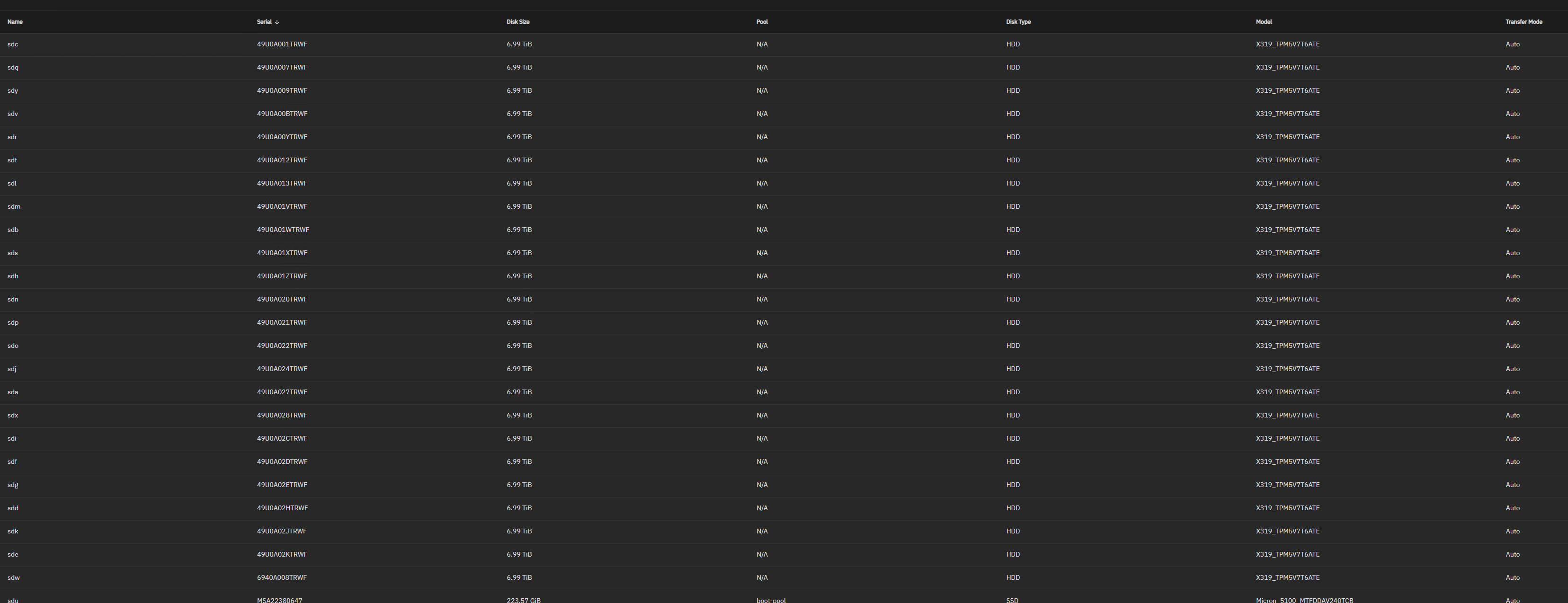
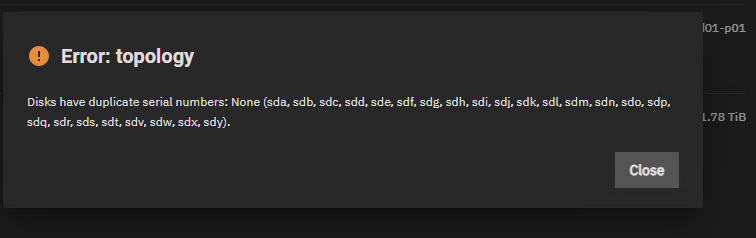
These 7.68 are being slightly more difficult. The GUI is telling me these drives are different, but the pool creation is telling me they are the same. Is there a log I can check to get a little more details?

put they show that they don’t in the gui and in the cli?

root@tn01-ssd01[/home/truenas_admin]# midclt call disk.query | jq ‘. | {name: .name, serial: .serial, lunid: .lunid}’
{“name”: “sdu”,“serial”: “MSA22380647”,“lunid”: “500a07511eaaf785”}{“name”: “sdk”,“serial”: “49U0A02JTRWF”,“lunid”: “58ce38ee20917878”}{“name”: “sdd”,“serial”: “49U0A02HTRWF”,“lunid”: “58ce38ee20917874”}{“name”: “sde”,“serial”: “49U0A02KTRWF”,“lunid”: “58ce38ee2091787c”}{“name”: “sdh”,“serial”: “49U0A01ZTRWF”,“lunid”: “58ce38ee2091782c”}{“name”: “sdp”,“serial”: “49U0A021TRWF”,“lunid”: “58ce38ee20917834”}{“name”: “sdi”,“serial”: “49U0A02CTRWF”,“lunid”: “58ce38ee20917860”}{“name”: “sdm”,“serial”: “49U0A01VTRWF”,“lunid”: “58ce38ee2091781c”}{“name”: “sdt”,“serial”: “49U0A012TRWF”,“lunid”: “58ce38ee209177b0”}{“name”: “sdo”,“serial”: “49U0A022TRWF”,“lunid”: “58ce38ee20917838”}{“name”: “sdq”,“serial”: “49U0A007TRWF”,“lunid”: “58ce38ee209172ec”}{“name”: “sds”,“serial”: “49U0A01XTRWF”,“lunid”: “58ce38ee20917824”}{“name”: “sdn”,“serial”: “49U0A020TRWF”,“lunid”: “58ce38ee20917830”}{“name”: “sda”,“serial”: “49U0A027TRWF”,“lunid”: “58ce38ee2091784c”}{“name”: “sdy”,“serial”: “49U0A009TRWF”,“lunid”: “58ce38ee209172f4”}{“name”: “sdw”,“serial”: “6940A008TRWF”,“lunid”: “58ce38ee20986824”}{“name”: “sdv”,“serial”: “49U0A00BTRWF”,“lunid”: “58ce38ee209172fc”}{“name”: “sdx”,“serial”: “49U0A028TRWF”,“lunid”: “58ce38ee20917850”}{“name”: “sdl”,“serial”: “49U0A013TRWF”,“lunid”: “58ce38ee209177b4”}{“name”: “sdb”,“serial”: “49U0A01WTRWF”,“lunid”: “58ce38ee20917820”}{“name”: “sdc”,“serial”: “49U0A001TRWF”,“lunid”: “58ce38ee209172d4”}{“name”: “sdf”,“serial”: “49U0A02DTRWF”,“lunid”: “58ce38ee20917864”}{“name”: “sdg”,“serial”: “49U0A02ETRWF”,“lunid”: “58ce38ee20917868”}{“name”: “sdr”,“serial”: “49U0A00YTRWF”,“lunid”: “58ce38ee209177a0”}{“name”: “sdj”,“serial”: “49U0A024TRWF”,“lunid”: “58ce38ee20917840”}{“name”: “sdax”,“serial”: “S3SGNX0M413850”,“lunid”: “5002538b4944fb00”}{“name”: “sday”,“serial”: “S3SGNX0M413849”,“lunid”: “5002538b4944faf0”}{“name”: “sdbh”,“serial”: “S3SGNX0M413972”,“lunid”: “5002538b494502a0”}{“name”: “sdbi”,“serial”: “S3SGNX0M413969”,“lunid”: “5002538b49450270”}{“name”: “sdbj”,“serial”: “S3SGNX0M414293”,“lunid”: “5002538b494516b0”}{“name”: “sdbk”,“serial”: “S3SGNX0M414993”,“lunid”: “5002538b49454270”}{“name”: “sdbl”,“serial”: “S3SGNX0M413847”,“lunid”: “5002538b4944fad0”}{“name”: “sdbm”,“serial”: “S3SGNX0M413911”,“lunid”: “5002538b4944fed0”}{“name”: “sdbn”,“serial”: “S3SGNX0M414257”,“lunid”: “5002538b49451470”}{“name”: “sdbo”,“serial”: “S3SGNX0M414258”,“lunid”: “5002538b49451480”}{“name”: “sdbp”,“serial”: “S3SGNX0M413917”,“lunid”: “5002538b4944ff30”}{“name”: “sdbq”,“serial”: “S3SGNX0M411809”,“lunid”: “5002538b49444ec0”}{“name”: “sdaz”,“serial”: “S3SGNX0M413856”,“lunid”: “5002538b4944fb60”}{“name”: “sdbr”,“serial”: “S3SGNX0M413858”,“lunid”: “5002538b4944fb80”}{“name”: “sdbs”,“serial”: “S3SGNX0M411765”,“lunid”: “5002538b49444c00”}{“name”: “sdbt”,“serial”: “S3SGNX0M411758”,“lunid”: “5002538b49444b90”}{“name”: “sdbu”,“serial”: “S3SGNX0M414280”,“lunid”: “5002538b494515e0”}{“name”: “sdba”,“serial”: “S3SGNX0M411699”,“lunid”: “5002538b494447e0”}{“name”: “sdbb”,“serial”: “S3SGNX0M413901”,“lunid”: “5002538b4944fe30”}{“name”: “sdbc”,“serial”: “S3SGNX0M411701”,“lunid”: “5002538b49444800”}{“name”: “sdbd”,“serial”: “S3SGNX0M411810”,“lunid”: “5002538b49444ed0”}{“name”: “sdbe”,“serial”: “S3SGNX0M413981”,“lunid”: “5002538b49450330”}{“name”: “sdbf”,“serial”: “S3SGNX0M414991”,“lunid”: “5002538b49454250”}{“name”: “sdbg”,“serial”: “S3SGNX0M414192”,“lunid”: “5002538b49451060”}{“name”: “sdz”,“serial”: “S3SGNX0M411763”,“lunid”: “5002538b49444be0”}{“name”: “sdaa”,“serial”: “S3SGNX0M411812”,“lunid”: “5002538b49444ef0”}{“name”: “sdaj”,“serial”: “S3SGNX0M414291”,“lunid”: “5002538b49451690”}{“name”: “sdak”,“serial”: “S3SGNX0M411760”,“lunid”: “5002538b49444bb0”}{“name”: “sdal”,“serial”: “S3SGNX0M411754”,“lunid”: “5002538b49444b50”}{“name”: “sdam”,“serial”: “S3SGNX0M414071”,“lunid”: “5002538b494508d0”}{“name”: “sdan”,“serial”: “S3SGNX0M411757”,“lunid”: “5002538b49444b80”}{“name”: “sdao”,“serial”: “S3SGNX0M414284”,“lunid”: “5002538b49451620”}{“name”: “sdap”,“serial”: “S3SGNX0M414290”,“lunid”: “5002538b49451680”}{“name”: “sdaq”,“serial”: “S3SGNX0M411775”,“lunid”: “5002538b49444ca0”}{“name”: “sdar”,“serial”: “S3SGNX0M411772”,“lunid”: “5002538b49444c70”}{“name”: “sdas”,“serial”: “S3SGNX0M414285”,“lunid”: “5002538b49451630”}{“name”: “sdab”,“serial”: “S3SGNX0M413914”,“lunid”: “5002538b4944ff00”}{“name”: “sdat”,“serial”: “S3SGNX0M411755”,“lunid”: “5002538b49444b60”}{“name”: “sdau”,“serial”: “S3SGNX0M414061”,“lunid”: “5002538b49450830”}{“name”: “sdav”,“serial”: “S3SGNX0M414074”,“lunid”: “5002538b49450900”}{“name”: “sdaw”,“serial”: “S3SGNX0M414278”,“lunid”: “5002538b494515c0”}{“name”: “sdac”,“serial”: “S3SGNX0M413859”,“lunid”: “5002538b4944fb90”}{“name”: “sdad”,“serial”: “S3SGNX0M411756”,“lunid”: “5002538b49444b70”}{“name”: “sdae”,“serial”: “S3SGNX0M411731”,“lunid”: “5002538b494449e0”}{“name”: “sdag”,“serial”: “S3SGNX0M411764”,“lunid”: “5002538b49444bf0”}{“name”: “sdaf”,“serial”: “S3SGNX0M413908”,“lunid”: “5002538b4944fea0”}{“name”: “sdah”,“serial”: “S3SGNX0M411771”,“lunid”: “5002538b49444c60”}{“name”: “sdai”,“serial”: “S3SGNX0M414287”,“lunid”: “5002538b49451650”}
Are the HBAs flashed to IT Mode and not in IR? There are a few recent threads on this. You may want to use the Report a Bug in the TrueNAS GUI. Upper right, looks like a smile for Feedback / Report a Bug and make sure to attached a debug dump.

This is another thread.

1 Like

yes, it’s full IT mode. They are not connected via USB or anything crazy like that.

Edit: I’m thinking might be a bug because cli making a zpool by devid works great, but might not have all the checks.

These disks are connected with only one SAS cable and not two? Multipath connections are not supported under Community. That could be one item. The linked thread had a possible bug but the user has not submitted a report, the last time I checked. You would be a good Report a Bug considering ‘properly’ connected drives, not a usb enclosure.

Done - Jira

that is correct, no multipathing.

1 Like

for a quick test, I can make a quick pool via the cli, then export it, then import it in the gui, and the correct mapping to /dev/sd* show up. I’ll await for a bit. we have some time for this one so happy to work through it.

@mealan is there a debug attached to that Jira? I can’t see one.

If you’re getting a 403 or other “Access Denied” trying to use the link from the bug-clerk let me know as well.

I apologize, I though it attached. One is attached now right after I redid the error. I should also say these drives aren’t on a shelf but they are attached directly to the back plane.

edit: it also appears that I did a dd into the wrong dir and ran out of space on the boot pool. If the logs are too chatty for that I can reboot and wait till tomorrow and redo it.

Could you post the results (in codeblocks ideally) of:

python3 -c "from middlewared.utils.disks_.disk_class import iterate_disks;print(list(x.serial for x in iterate_disks()))"

I want to see if our middleware is having a moment somewhere. I know you made the disk.query call above, but this is closer to what it’s going to see when building a pool.

I’m not the original poster but I’m having the same issue.
I ran your command and got this output:

[None, None, None, None, None, None, None, None, ‘HBSA19124100390’]

I think you’re on to something, there are 24 “nones” in that output.

root@tn01-ssd01[/home/truenas_admin]# python3 -c “from middlewared.utils.disks_.disk_class import iterate_disks;print(list(x.serial for x in iterate_disks()))”
[‘S3SGNX0M414280’, ‘S3SGNX0M411758’, ‘S3SGNX0M411765’, ‘S3SGNX0M413858’, ‘S3SGNX0M413917’, ‘S3SGNX0M414258’, ‘S3SGNX0M411809’, ‘S3SGNX0M413911’, ‘S3SGNX0M414257’, ‘S3SGNX0M413969’, ‘S3SGNX0M414993’, ‘S3SGNX0M413847’, ‘S3SGNX0M414293’, ‘S3SGNX0M413972’, ‘S3SGNX0M413981’, ‘S3SGNX0M414192’, ‘S3SGNX0M414991’, ‘S3SGNX0M411810’, ‘S3SGNX0M411701’, ‘S3SGNX0M413901’, ‘S3SGNX0M411699’, ‘S3SGNX0M413856’, ‘S3SGNX0M413849’, ‘S3SGNX0M413850’, ‘S3SGNX0M411755’, ‘S3SGNX0M414074’, ‘S3SGNX0M414278’, ‘S3SGNX0M414061’, ‘S3SGNX0M414284’, ‘S3SGNX0M411775’, ‘S3SGNX0M411812’, ‘S3SGNX0M414285’, ‘S3SGNX0M411763’, ‘S3SGNX0M411772’, ‘S3SGNX0M414290’, ‘S3SGNX0M411771’, ‘S3SGNX0M414071’, ‘S3SGNX0M411757’, ‘S3SGNX0M411754’, ‘S3SGNX0M411760’, ‘S3SGNX0M414291’, ‘S3SGNX0M414287’, ‘S3SGNX0M411764’, ‘S3SGNX0M413908’, ‘S3SGNX0M411731’, ‘S3SGNX0M411756’, ‘S3SGNX0M413859’, ‘S3SGNX0M413914’, None, None, None, None, None, None, None, None, None, None, None, None, None, None, None, None, None, None, None, None, None, None, None, None, ‘MSA22380647’]
root@tn01-ssd01[/home/truenas_admin]#

I am struggling on getting that code block.

Try editing and hit Ctrl+e or (</>) on the tool bar and then paste in the info

1 Like

@HKfan a detailed list of your hardware, OS version, your pool info and how they are attached. The other thread you mentioned a LSI 9300-8i and a bug report NAS-139550.
Could you run sudo sas3flash -list and post the results back using Preformatted Text? Ctrl+e or (</>) on the toolbar for replies.

25.10.1 - Goldeye
Intel(R) Core™ i7-6700K
Gigabyte Z170X - Gaming 5 Mobo
LSI 9300-8i
8x Toshiba KPM5WRUG3T84
Attached to the LSI card with 4:1 SFF-8643 to SFF-8482 cables

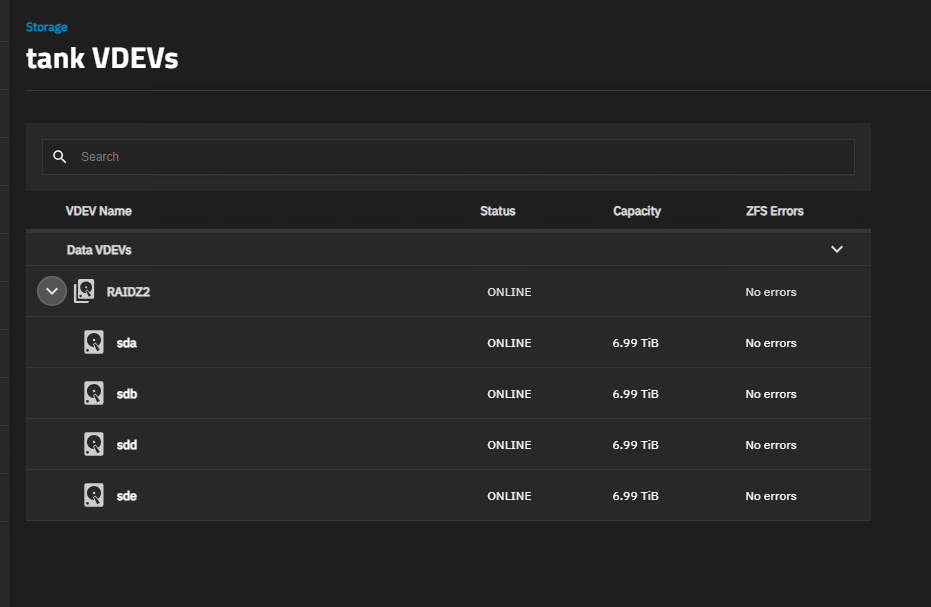
A single pool with a 7 disk data VDEV and now a single disk spare vdev, added via CLI, as the GUI produces this bug. So my pool now contains the disk I was attempting to add.
But I still get the error if I try to add another disk via GUI.

Avago Technologies SAS3 Flash Utility
Version 16.00.00.00 (2017.05.02)
Copyright 2008-2017 Avago Technologies. All rights reserved.

    Adapter Selected is a Avago SAS: SAS3008(C0)

    Controller Number              : 0
    Controller                     : SAS3008(C0)
    PCI Address                    : 00:02:00:00
    SAS Address                    : 56c92bf-0-0033-1316
    NVDATA Version (Default)       : 0e.01.30.28
    NVDATA Version (Persistent)    : 0e.01.30.28
    Firmware Product ID            : 0x2221 (IT)
    Firmware Version               : 16.00.14.00
    NVDATA Vendor                  : LSI
    NVDATA Product ID              : LSI3008-IT
    BIOS Version                   : 08.37.00.00
    UEFI BSD Version               : 18.00.00.00
    FCODE Version                  : N/A
    Board Name                     : INSPUR 3008IT
    Board Assembly                 : INSPUR
    Board Tracer Number            : CAK615EB0276A70

    Finished Processing Commands Successfully.
    Exiting SAS3Flash.

To clarify, the drives are from a NetApp, similar to @mealan , I don’t know the NetApp part numbers.
I wonder if NetApp sometimes deletes the serial numbers, from whatever field the middleware pulls from, when NetApp flashes them or formats them.

What size and Model drives are you using?
these are X319_TPM5V7T6ATE NetApp 7.68TB

My Jira bug was closed I think unfairly.

Fibre Channel is not being used, but there is a mlom so the fnic driver is being loaded. it also says
”Check NETAPP storage array health - controller/firmware issues”

Which leads me to believe this is AI review and not human reviewed, as there are no netapp storage arrays, just disks. In full transparency there are netapp shelfs as well. My next thing to try is these drives in a netapp shelf.

Thanks,
Alan

edit: and also to clarify, the drives that are failing are NOT connected via a shelf, but rather the server direct backplane.

This did get human reviewed. (I don’t think it was even AI-summarized either, it wouldn’t have listed every numbered bullet as #1.)

This isn’t the first time I’ve seen NetApp disks or shelves act oddly. Can both of you ( @mealan and @HKfan ) show or describe the full topology of the shelves and the IO modules? I’m wondering if somehow it’s still creating a multipath layout inadvertently based on an expander being somewhere in the chain, or an accidental loop.

I have an LSI9300-8i SAS controller in a PCIe slot on the motherboard.
I attach the drives to the controller using SAS SFF-8643 to 4X SFF-8482 cables
So there a 4 drives connected to each of the SFF-8643 ports on the controller.
SMART shows all the details about the drives including their serial numbers. So I don’t know why the example script that SmallBarky gave shows “none” for the serials.