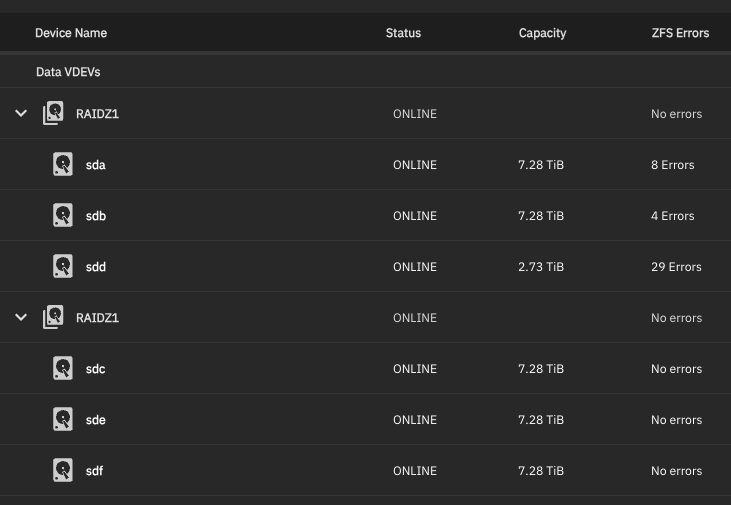
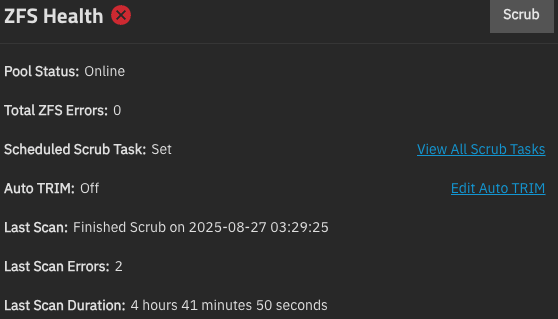
Thanks in advance, any advice is appreciated. I started with two 3 disk arrays (Z1). I originally used 3TB drives. Some months ago I was able to purchase 4 8TB drives and swapped 3 of them into one of the arrays without problems. Well, it did show a warning of “2 x RAIDZ1 | 3 wide | Mixed Capacity”, but I didn’t think it was anything serious.
Later on, one of the 3TB drives showed errors, so I swapped in the remaining 8TB drive, again without problems. When another of the 3TB drives showed errors (• Device: /dev/sdb [SAT], 2 Currently unreadable (pending) sectors.) I decided to swap out the remaining 3TB drives with 8TB ones.
Now I get an alert: “Pool ZPOOL state is ONLINE: One or more devices has experienced an error resulting in data corruption. Applications may be affected.”
Is there anything positive I can do at this point other than replacing this whole pool? I have a partial backup, but NOT looking forward to rebuilding everything.
Your plight is likely not that bad. You seemingly have two different types of errors. A physical drive error and several ZFS error.
In my signature is a link to Drive Troubleshooting Flowcharts, or use the strickly word version in the TrueNAS Resources. Start at the beginning, follow the flow chart and issue the commands as written.
If something does not make sense, let me us know and someone will clarify for you.
If you are questioning if a drive must be replaced and are on the edge, post the smartmctl -a /dev/sd? for the suspect drive and we can examine it and let you know what is going on.
I had something similar once, it turned out to be that the SAS card chipset was improperly cooled. I added some 40 mm fans to the chipset heatsinks and the errors went away.
It was very similar to what you describe, random errors across multiple drives, not always the same.
This started happening after years of excellent service from my HBA card.
Maybe I am barking up the wrong tree, but it’s worth a check.
Yes, this is a concern of mine. The NAS I am using is known for running hot, and a lot of 3rd party solutions have cropped up. As it is, the disks are running around 50-55º C, which seems sub-optimal. Anyway, all the errors have been squashed for now.
My advice for others who find this thread: go here
To document what I did: sudo zpool status -v
I found the files that were corrupted and replaced them from a backup. sudo zpool clear (to clear the errors)
Then scrubbed the zpool.