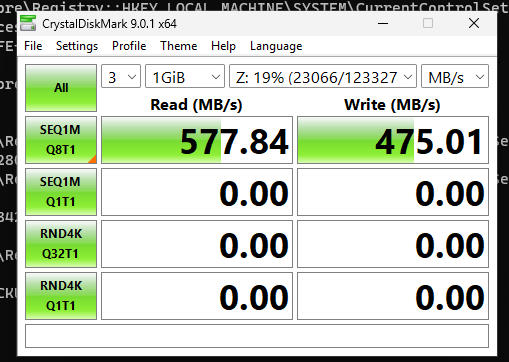
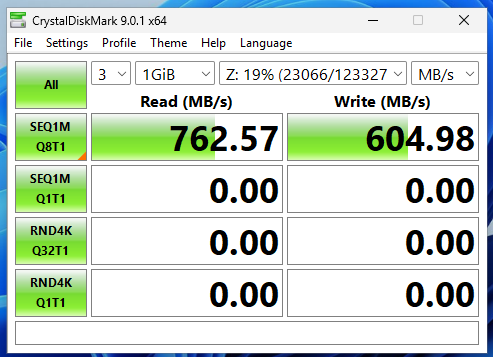
I am at best getting 260MB/s Download and 193MB/s upload. Is there anyway I can configure TrueNAS to perform faster as I am on a 10Gb network everything connected via a switch?
I have tried MTU 9000 but that did not make much of a difference except make my WIFi laggy.
TrueNAS - 25.04.2.4
CPU - AMD Ryzen 3 3200G
RAM – 32GB 2400MHz (2*16GB)
MB - Gigabyte A520I AC
GFX - Vaga
5xSeagate IronWolf 10 TB NAS Internal Hard Drive HDD in RAIDZ2
i would try to find out where your bottleneck is: maybe going to ssd/nvme drives, maybe it is the wiring, …
it is unlikely it is your software. but if you really care, maybe go native and run nothing but just the freebad distro + samba: cannot be much faster than that.
How are you testing (sharing protocol / local, type/size/quantity of files)?
Depending on your testing methodology your results can vary pretty wildly, though what you have currently is certainly nothing to scoff at.
Is the client you’re testing from on wifi? (Your comment re. wifi being laggy with jumbos enabled would suggest so).
If so, those figures are very good. I’d be happy with that.
Just to be clear: 10Gb/s throughput is pretty hard to achieve with consumer equipment. The bottlenecks are all inside your server hardware: the disks, RAM, PCIe bus and network card.
Testing machine is connected via Ethernet and I am getting the throughput from HWiNFO64 after a Macrum Reflect complete backup ~120GB. The WiFi issue was to do with another machine on the network buffering frequently when TrueNAS MTU was changed from the default.
Consensus seems to be my figures are Okay, so I guess I will accept that.
My knowledge on Macrum Reflect is zero but assuming it uploads images via SMB from their website.
If you’re on Windows you may be interested in this:
I found myself reading his entire writeup a couple years ago. It was very informative as I’m not super familiar with Windows internals myself.
Was hoping I could find an old comment of mine, no luck but I’m pretty sure there’s a before/after floating around here somewhere where I applied these changes and my SMB performance improved significantly.
(Note: Unsure if this is still relevant as I have been off of windows for a year or so now, but worth having a look seeing as Microsoft does seem to break something with every update..)
That was interesting, shame the script no longer works on Windows 11 24h2 and on wards. I checked my device config in Windows and EEE was already disabled, and apparently TrueNAS does not enable it by default.
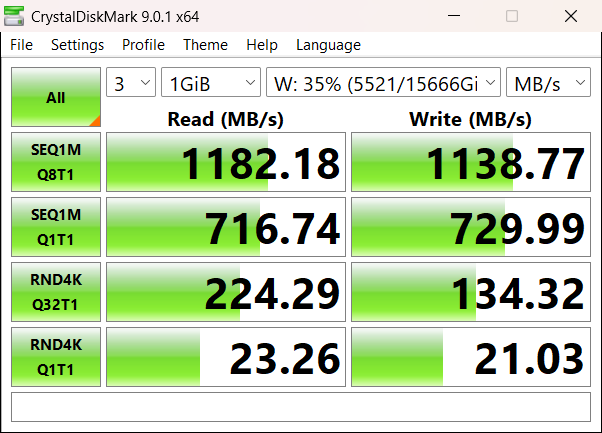
This is from a completely fresh Windows 11 25H2 VM. Looks like there is still a pretty significant uplift in sequential performance from the base configuration.
I had a similar problem. Did you try to run iperf3 across the devices to see if you get 9.6GB or so first? You also have to have your X240 cards plugged into PCIEx8 or x16 slots to get max bandwidth. Hope it helps some!
I should still be getting more than 280MB’s even with tailscale. I don’t know why tailscale is half the available bandwidth. TrueNAS is the exit node for my phones internet connection. Is this causing TrueNAS to send data to itself?
If your network is connected locally via a switch, why are you using tailscale? A VPN will certainly slow it down. FWIW, I rarely get full 10GB speeds reading and writing from my truenas box due to the slower hard drives and overhead.
I just use Tailscale for everything which I now realise I shouldn’t. I have disconnected the old share and mapped the drive directly to TrueNAS and the difference is considerable.
I would be interested to know why Tailscale performs so badly on a local network. I thought the software would have been better as my network is nowhere near CPU bound. In fact I never see CPU (server) usage go above 50% under load.