Hello all,
I am new to TrueNas. I have experience with Unraid for a do-it-all machine but I wanted a reliable and longstanding NAS to replace an aging Synology device.
Fast forward to today, I can’t get write to the NAS at speeds any faster than about 120mb/s. NAS to PC gives me around ~190mb/s.
Specs on machine are:
Ryzen 3600, 3200mhz 64gb ECC
Ironwolf Pro 6tb x 5 on RaidZ2
PCI-E Cards, LSI Card & 10Gbe Nic
Network is primarily 10Gbe; only the link on my PC is 2.5gbe, but I have a bunch of things coming in to make it all 10G.
Jumbo frames (9000) are fully functioning PC->UDM-SE->TrueNAS
I was using ChatGPT to try and figure out the slow speeds and here is how we ended up for testing:
recordsize=1M
sync=disabled (for test; setting to Standard makes no difference)
logbias=throughput (for test; default of “latency” seemed to be just a HAIR slower)
compression=lz4
…and writes are still stuck at ~120 MB/s, while reads are ~200 MB/s, then we’ve effectively ruled out:
Pool speed (fast at ~650 MB/s local) (testing using fio)
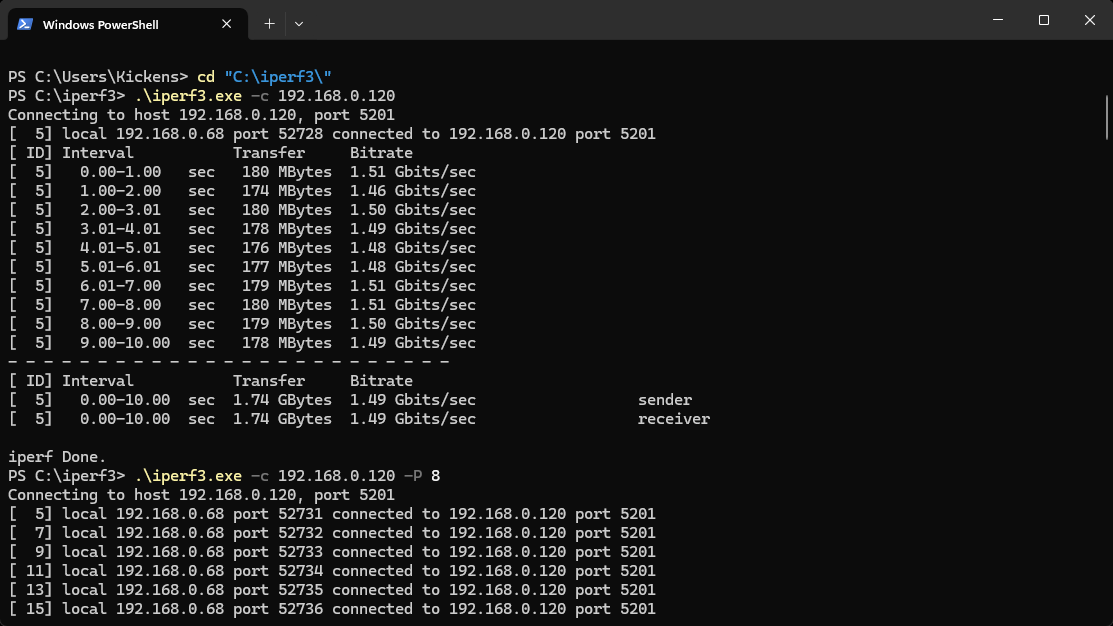
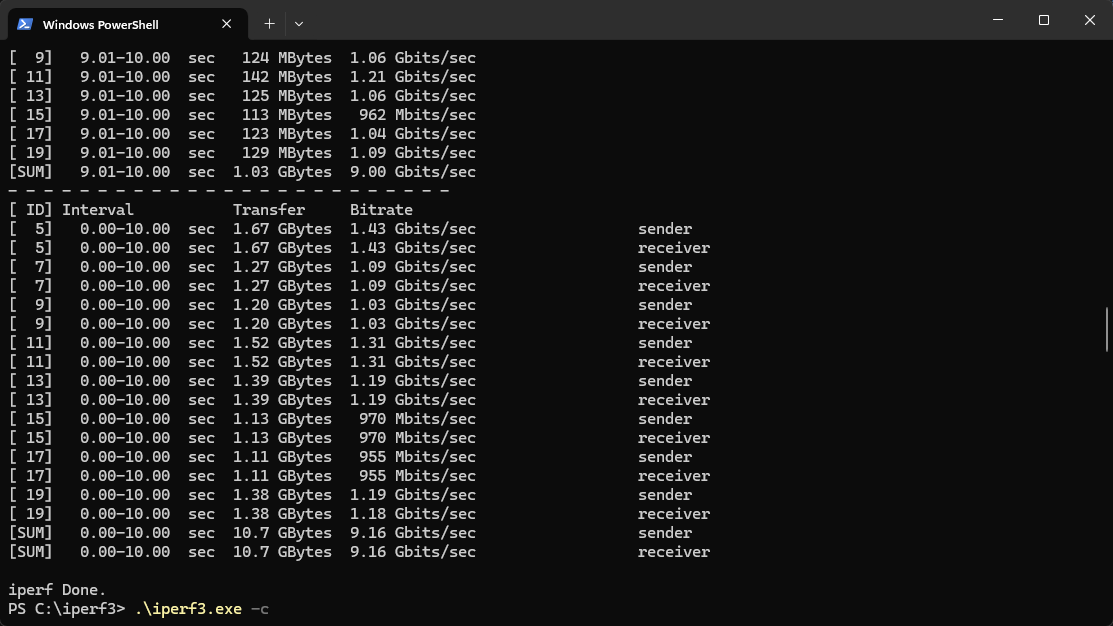
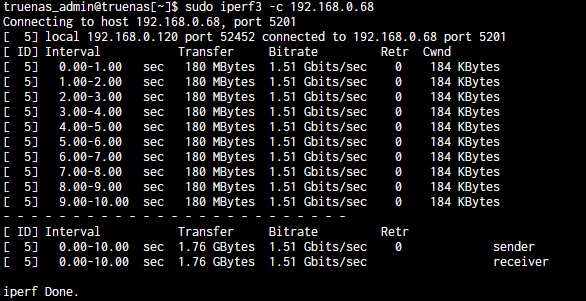
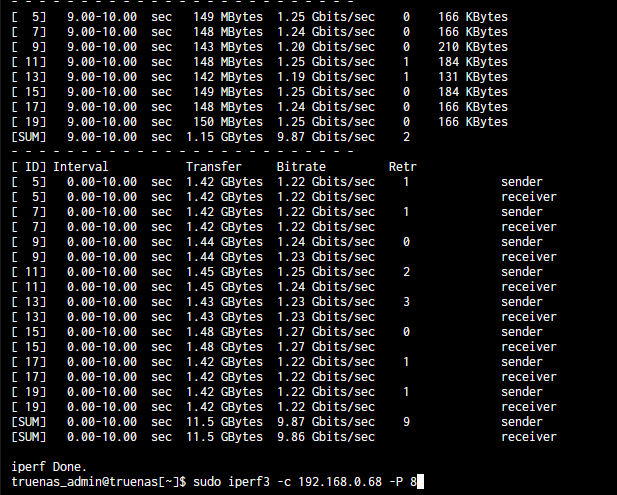
Network (fast at ~2.4 Gbps iperf3)
Dataset config (correct)
Client antivirus/Defender (disabled, no effect)
CPU bottleneck (smbd only 8% load)
There is no data on the NAS yet as I am waiting for two cache SSDs to come in. Not sure if they’ll be used better in a different way.
I’m truly at a loss because SMB via one of my Unraid Shares (granted, its a 980 PRO) fully saturates my bandwidth. Maybe I am just misunderstanding max speeds but this is now slower than my Synology machine.
Can’t help with the speeds - but just as a thought. Those cache SSD’s, how exactly do you intend to use them? I doubt they will have the effect that you think / hope they will do. They do not work the same way as in Unraid or Synology
Yes I am aware that they do not function the same way. I settled on doing on doing a special vdev for metadata as I think it would be most beneficial down the road when taking into account quality of life when indexing and other things of the sort. I am, of course, open to suggestions on how to use them. Thank you.
What 10Gbe NIC are you using for the TrueNAS setup? IIRC it can be important as only some cards (eg Mellanox) play nicely to give you full speed.
Otherwise, the issue is that you’re only getting 1Gbe speed (~120Mb/s) when copying from PC to NAS, when you would expect 2.5 Gbe? This would be for large single files only, of course…
@Kickens OK - I just wanted to check that you have done your research. If you don’t plan on using the small blocks on the sVDEV then you might get away with an L2ARC (metadata only) as its not pool critical.
Also, if you are planning on using containers, vm’s or apps then you might consider instead a mirrored paid of SSD’s as it makes them more responsive
I’m using an 10gtek x520 card across all machines. My remaining 10Gbe stuff came in yesterday and after a setting the MTU on the Truenas to 9014(UDM-SE and PC are now on 9014) instead of 9000, I was able to make the speed an extremely consistent 180 megabytes per second.
Weirdly enough, I expected my Unraid share to skyrocket to about 1gb/s since now my PC was properly linked but it did not. Instead, it stayed right at around 250-260 megabytes per second.
I figured it could be IDS/IPS on the Unifi Dream Machine scanning the traffic so I switched vlans and that did not help either… so I’m a bit loss. My nzb client downloads at around 370 megabytes per second on WAN through IDS/IPS so I’m truthfully a bit loss at this point. Everything shows full 10GbE link on the UDM.
Obviously I know this is breaking away from Truenas on its own, but I know everyone here contains a lot more knowledge about this stuff than I do.
Thank you for that. I don’t plan on using any containers or anything; it will be just a pure NAS/Backup box. I ended up doing mirrored SSDs for the meta data as apparently those files are imperative to the pool’s function.
Just to verify, your 10gtek x520 NICs, are they the ONLY NICs in the machines involved or are they merely one of several installed?
Sometimes we see users install a 10GbE NIC while leaving the built-in 1GbE connected and configured. Even if the plan is to not use the 1GbE. This can cause issues, depending on how it’s set up.
How are you testing the file write speed? Are you copying or moving a lot of small files for these tests?
I just used 7 zip to compress four Ubuntu ISO files to a 17.3 GB file. Copying from a NVMe on a Win 11 PC to my single drive TrueNAS gets a sustained 190-215 MB/s per the Windows File Manager. My TrueNAS is off an Intel i7-920 and it very old
Same way… 15gb zip. I turned off all security provisions on the UDM and I added about 50 megabytes per second to my Unraid NVMe share and about 20 megabytes per second to my Truenas dataset. Getting close, but I thought that would fix it.
My WAN speed increased from 2000 gigabits to my full 5000 gigabits that I pay for even though IDS/IPS is rated at 3500 gigabits.
Please pay attention to capitalisation, which is all over the place. Check and correct. Typing “bit” and “Byte” in full may help ascertain what you really mean.
The title litterally says “120 mb/s” which is 120 millibits, 0.12 bits/s. Not much I agree.
There’s an issue here. You’d want to see around 9 Gbits/s from a 10G link on iperf3 before considering any optimisation on the storage part.
Well, 1.2Gbps is very close to 120MB/s. Mb there is some switch misconfiguration involved. Can you directly connect your PC to the NAS and run iperf tests again?
IMO there is still some information about the network missing. What are the connectors between machines (SFP+ and/or RJ45), are you usinga mixture, and are you using decent fibre and/or at least Cat6 cabling for short runs?
Have you tried swapping cables in and out to see of there’s any difference?