For some reason I can’t understand, I have more than 60 ZFS LIST processes running on my mechanical HDDs and I can’t do nothing else than listening to the heads running frantically.
How can I terminate all those processes? Tried KILL, PKILL, nothing.
Even reboot doesn’t help, Truenas restart them again when rebooted.
In the mean time the big list of ZFS LIST has finished and the system has became somewhat responsive again. I can read SMB share but the interface isn’t loading properly, i.e. I have many widgets with the refresh arrow.
Before having this hiccup, I deliberately copied many thousands of files, for a total of around 60 TB, to test system and hdds. I think that somehow that overwhelmed the system.
I am now trying to delete some folders to free space with Midnight Commander but the deletion process hung in the middle, something like 535/1134 files and seems unresponsive.
Any hint to recover a usable situation?
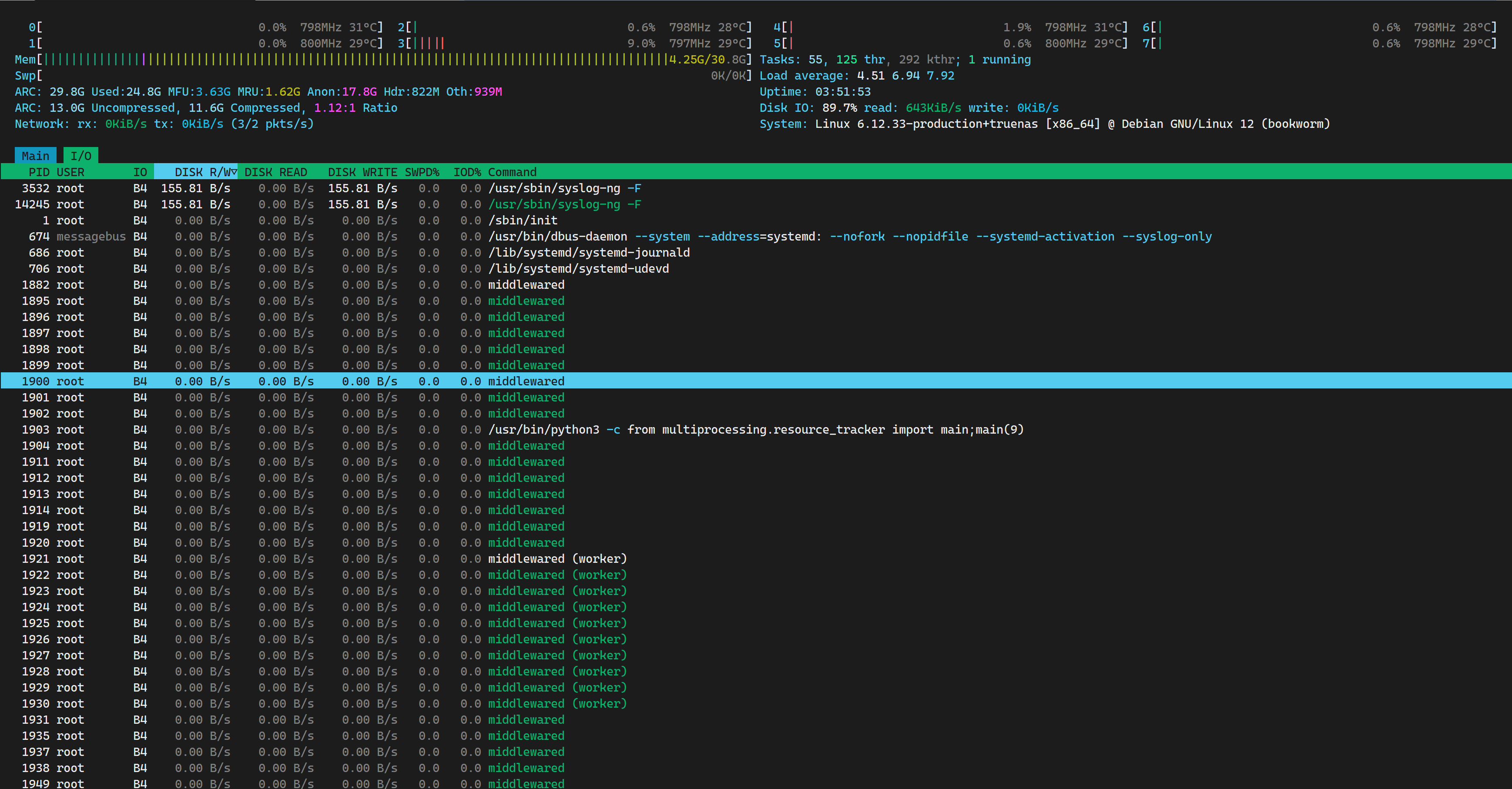
This is a screenshot of htop, while the deletion process is still hung.
Ha! So you actually had an idea of the reason…
Would you care to describe your system and setup? (“16 GB RAM, dedup enabled” would go a long way to solve the mystery.)
Tried to reboot from GUI to fix the hung Midnight Commander. Truenas closed services, i.e. SSH and WEB so I can’t notice what’s happening, the hdd aren’t almost moving but the machine isn’t rebooting yet. Hope it will fix without having to reset.
Can’t understand why a “simple” deletion makes the system so unresponsive.
Is there a way to check the “file system” for errors, something more thoroughly than a scrub?
Before copying so many files, the pool and the system seemed to run really well.
If it at least gave some life sign… now that it finally rebooted it’s 20 minutes I am waiting to have SSH or WEB access without knowing why.
Picture that this server is up from one week or two and I did nothing but copying files, without messing around with any strange configuration.
Why it takes so much to delete (even freezing while doing it) / shutdown / reboot?
EDIT: I was finally able to enter gui and it shows refresh icon on all widgets and showing
service.control 0.00%
Started: 24/01/2026 23:37:55
smb.configure 0.00%
Setting up SMB directories.
pool.dataset.sync_db_keys 0.00%
Started: 24/01/2026 23:37:54
directoryservices.setup 0.00%
Started: 24/01/2026 23:37:54
pool.import_on_boot 0.00%
Started: 24/01/2026 23:21:24
but never really finishing. Is there anything I can do? Perhaps fresh reinstall of Truenas could help even if nothing has really changed but pool content?
P.S: atop gives me 200%+ DISK IO but I can’t see any process r/w so much in the I/O atop tab. How can I find what’s causing so much effort?
You have a 13 year old processor with DDR3 memory and you are moving 60TB around in a 64TB system. You are not going to have good results. If you dont kill it, you are going to have to be VERY patient for all tasks to complete. If your use case it to do things like that, you need a bigger/faster/stronger/newer system.
That’s not “testing the system” but “stuffing it up to the gills”.
Do you have enabled dedup? If so, the frantic IO is for handling the DDT which does not fit in RAM and you have two solutions:
Wait for the task to complete, and pray hard.
Nuke the system, wipe everything and redo it on saner baser.
I left it running all night long, this morning everything seemed ok but every time I try to delete something, it stops around 58%, SMB service becomes unresponsive and HDDs start to act like crazy,
That’s not quite how you presented it earlier, you said you were testing the system.
But now you say you can’t nuke the system because you don’t have a backup.
So this isn’t really a test, this is essentially a production setup with live data that doesn’t exist elsewhere. Hopefully this can be a learning experience for you and anyone who reads this.
I would suggest looking at the Klara Systems article on zpool iostat and trying to see if your drives and pool have a problem or are evenly working. You would have to post updates on your system so we can even guess as what to look at.
Is it still completely unresponsive? Getting better but super busy? I think you need to post data from commands here, like you did with the zpool iostat earlier. We would be trying to figure out if your system is making progress that we can see.
You have IMO a very marginal system for what was attempted which is to move 60 TB on a 64 TB system with a COW filesystem (ZFS). You don’t say how you are doing the copy or with what method. A Send/Receive would be the best way. Other methods are going to at best be at the speed of disk i/o and at worst take up to 2 weeks to finish if left alone to do the copy.
So how were you trying to copy the data? This may help fix the system.
MC is a command line file manager. It is baked into Truenas and would be (at least I do) used to do some things in an ssh session or the shell available from Truenas GUI. Handy since it is split screen and you don’t need to remember all the command line commands and their syntax. For a Truenas system using mc you just need to go to /mnt and the data pools and .ix-apps pool are right there. There would be some minimal system overhead in using mc over a plain command line command, but it reduces the need to remember certain syntax. I think you can on a different computer open mc there and link from it to the server but why would you when it is baked into Truenas?
This is the way I see it.
On system a mv (move) is at the file level and would be slow even on the same system. because a move has to go back and delete the old file.
an on system copy is faster but still works at the file level.
an on system rsync could be an option, but is is rather slow
Any commands that are likely to take a long time (longer then a few minutes) I would run in a tmux session on the server so they will keep working if something happens to the terminal the command was started in.
A on system block (send/receive) could be an option as it is fast but only works on the block level not file level and so may not be applicable. It’s newish in Truenas so I don’t really know.
Any operation involving an off system process is going to be very very slow and probably will eventually fail as the data will leave the server to the device performing the operation then be sent back.
There are other ways that Truenas can handle what needs to be done that depending on parameters, may be a much better option and not lock up the file system for days or weeks which 60Tb of data can do. I don’t have a lot of experience in all of these different options as my production systems are storage systems for mostly static data.
One thing that is limiting the system is it is nearly completely full, and that can severely degrade operations. ZFS has to have room to work.
There really is not enough info on the what and how, other than many files being copied.


 If so, the frantic IO is for handling the DDT which does not fit in RAM and you have two solutions: