
TL;DR: HPE ProLiant MicroServer Gen8 crashes with Unrecoverable System Error (NMI) errors on TrueNAS SCALE v25.04 but does not on v24.10 nor Debian 12. Different kernel = cause?
Hello,
For some time now I’m trying to get TrueNAS SCALE working on a HPE ProLiant MicroServer Gen8 (CPU: E3-1220L V2, RAM: 16GB PC3L 12800E Memtest86+ OK) with extra PCI Express 9211-8i SAS card (to extend the existing storage provided by the integrated HPE Dynamic Smart Array B120i controller)
I get “Unrecoverable System Error (NMI)” and it reboots, the symptoms are:
The server reboots, the hardware “Health LED” blinks red and the iLO’s “Integrated Management Log” (BMC tool) page says:
Class: System Error Description: Unrecoverable System Error (NMI) has occurred. System Firmware will log additional details in a separate IML entry if possible
Class: OS Description: User Initiated NMI Switch
I’ll detail all my incremental attempts below but I am at point where it looks like it works with v24.10 “Electric Eel” but fails with v25.04 “Fangtooth”.
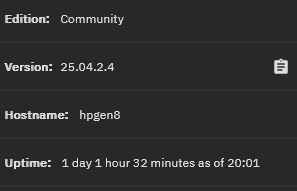
On my last attempt, I’ve managed to have it running a full week (without any crash/reboot in the end) on TrueNAS-SCALE v24.10.2.4 (Linux truenas 6.6.44-production+truenas #1 SMP PREEMPT_DYNAMIC Wed Aug 6 20:07:31 UTC 2025 x86_64 GNU/Linux) (thanks to CertainBumblebee769 on Reddit)
where the previous attempt on TrueNAS-SCALE v25.04.2.3 (Linux truenas 6.12.15-production+truenas #1 SMP PREEMPT_DYNAMIC Wed Aug 20 13:31:09 UTC 2025 x86_64 GNU/Linux) failed in 4 days resulting in a crash/reboot.
It took me a while because I suspected my PCI Express 9211-8i SAS card to be faulty (I also had to downgrade it’s firmware), or the support of SSDs, so I’ve tested without/without the card, with/without SSDs, vanilla Debian (v6.1.140-1) and TrueNAS v24/v25.
Those 2 tests are without my SAS card, I’m currently testing with the SAS card, then I’ll add storage HDDs.
If it works fine, I’d have built a working v24.10 setup, but I’d like to have a v25.04  .
.
Let’s say it works, the issue would most likely be related to the kernel? Is it possible to run TrueNAS SCALE v25.04 on v6.6 kernel? On a version comprised between 6.6 and 6.12 (to find the latest working one)?
Thanks
Recap:
- TrueNAS SCALE v25.04.2.3 runs v6.12.15 (not working)
- TrueNAS SCALE v24.10.2.4 runs v6.6.44 (working)
- Debian v12.11 runs v6.1.140-1 (working)
Server firmware/BIOS are up-to-date:
- System ROM: J06 04/04/2019
- System ROM Date: 04/04/2019
- Backup System ROM: J06 11/02/2015
- iLO Firmware Version: 2.82 Feb 06 2023
- Server Platform Services (SPS) Firmware: 2.2.0.31.2
- System Programmable Logic Device: Version 0x06
- System ROM Bootblock: 02/04/2012
- Embedded Flash/SD-CARD: Controller firmware revision 2.10.00
Here are all my incremental attempts (🔧 highlights the change)
- Test #1
- Setup:
- One 3.5" HDD on B120i
- No 9211-8i PCIe SAS card
- Debian 12.11 (kernel v6.1.140-1) installed on B120i’s HDD
- Duration: 3 days
- Verdict:
 No crash, no reboot, no NMI error
- Setup:
- Test #2
- Setup:
- One 2.5" (
 ) HDD on B120i
 - No 9211-8i PCIe SAS card
- Debian 12.11 (kernel v6.1.140-1) installed on B120i’s HDD
- One 2.5" (
- Duration: 3 days
- Verdict: No crash, no reboot, no NMI error
- Setup:
- Test #3
- Setup:
- One 2.5" HDD on B120i
- 9211-8i PCIe SAS card inserted ()
- Debian 12.11 (kernel v6.1.140-1) installed on B120i’s HDD
- Duration: 3 days
- Verdict: No crash, no reboot, no NMI error
- Setup:
- Test #4
- Setup:
- One 2.5" HDD on B120i
- 9211-8i PCIe SAS card inserted
- One 3.5" HDD powered and SATA-connected to the PCIe SAS card ()
- Debian 12.11 (kernel v6.1.140-1) installed on B120i’s HDD
- Duration: 3 days
- Verdict: No crash, no reboot, no NMI error
- Setup:
- Test #5
- Setup:
- One 2.5" SSD () on B120i
- 9211-8i PCIe SAS card inserted
- One 3.5" HDD powered and SATA-connected to the PCIe SAS card
- Debian 12.11 (kernel v6.1.140-1) installed on B120i’s SDD
- One 2.5" SSD (
- Duration: 3 days
- Verdict: No crash, no reboot, no NMI error
- Setup:
- Test #6
- Setup:
- One 2.5" SSD on B120i
- 9211-8i PCIe SAS card inserted
- Four () 3.5" HDDs powered and SATA-connected to the PCIe SAS card
- Debian 12.11 (kernel v6.1.140-1) installed on B120i’s SDD
- Duration: Was OK idle, but failed when started to process data on thoses HDDs (disk I/O)
- Verdict:
 kernel errors (“kernel: DMAR: ERROR: DMA PTE for vPFN 0xf1f80 already set (to f1f80003 not 120d5c001)”), No reboot
- Setup:
- Test #6a
- Setup:
- One 2.5" SSD on B120i
- 9211-8i PCIe SAS card inserted
- Four 3.5" HDDs powered and SATA-connected to the PCIe SAS card
- Debian 12.11 (kernel v6.1.140-1) installed on B120i’s SDD
- Added
intel_iommu=offto GRUB’sGRUB_CMDLINE_LINUX_DEFAULT(source) ()
- Duration: (Sadly, I didn’t write it down)
- Verdict: No crash, no reboot, no NMI error
- Setup:
- Test #7
- Setup:
- Two 2.5" SSD on B120i
- 9211-8i PCIe SAS card inserted
- Four 3.5" HDDs powered and SATA-connected to the PCIe SAS card
- TrueNAS SCALE v25.04.2.3 () (Linux truenas 6.12.15-production+truenas #1 SMP PREEMPT_DYNAMIC Wed Aug 20 13:31:09 UTC 2025 x86_64 GNU/Linux) installed on SSDs
- ZFS Data-pool on the 9211-8i HDDs ()
- Duration: 42 hours
- Verdict: NMI errors, Server reboot
- Setup:
- Test #8
- Setup:
- One () SSD on B120i
- 9211-8i PCIe SAS card inserted
- Four 3.5" HDDs powered and SATA-connected to the PCIe SAS card
- TrueNAS-SCALE v25.04.2.3 (Linux truenas 6.12.15-production+truenas #1 SMP PREEMPT_DYNAMIC Wed Aug 20 13:31:09 UTC 2025 x86_64 GNU/Linux) installed on SSD
- ZFS Data-pool on 4 9211-8i HDDs
- Fix
midclt call system.advanced.update '{"kernel_extra_options": "intel_iommu=off"}'applied ()
- One (
- Duration: 19 hours
- Verdict: NMI errors, Server reboot
- Setup:
- Test #9
- Setup:
- One SSD on B120i
- No 9211-8i PCIe SAS card ()
- Four 3.5" HDDs powered but not SATA-connected ()
- TrueNAS-SCALE v25.04.2.3 (Linux truenas 6.12.15-production+truenas #1 SMP PREEMPT_DYNAMIC Wed Aug 20 13:31:09 UTC 2025 x86_64 GNU/Linux) installed on SSD
- ZFS Data-pool on 4 HDDs, but offline
- Fix
midclt call system.advanced.update '{"kernel_extra_options": "intel_iommu=off"}'applied
- Duration: 4 days and 5 hours
- Verdict: NMI errors, Server reboot
- Setup:
- Test #10
- Setup:
- Two SSDs on B120i
- No 9211-8i PCIe SAS card
- No HDD
- TrueNAS-SCALE v24.10.2.4 (Linux truenas 6.6.44-production+truenas #1 SMP PREEMPT_DYNAMIC Wed Aug 6 20:07:31 UTC 2025 x86_64 GNU/Linux) installed on SSDs
- Duration: 7 days
- Verdict: No crash, no reboot, no NMI error
- Setup:
- Test #11
- Setup:
- Two SSDs on B120i
- 9211-8i PCIe SAS card inserted ()
- No HDD
- TrueNAS-SCALE v24.10.2.4 (Linux truenas 6.6.44-production+truenas #1 SMP PREEMPT_DYNAMIC Wed Aug 6 20:07:31 UTC 2025 x86_64 GNU/Linux) installed on SSDs
- Fix
midclt call system.advanced.update '{"kernel_extra_options": "intel_iommu=off"}'applied ()
- Duration: ? (pending)
- Verdict: ? (pending)
- Setup:
- Test #12
- Setup:
- Two SSDs on B120i
- 9211-8i PCIe SAS card inserted
- Four 3.5" HDDs powered and SATA-connected to the PCIe SAS card ()
- TrueNAS-SCALE v24.10.2.4 (Linux truenas 6.6.44-production+truenas #1 SMP PREEMPT_DYNAMIC Wed Aug 6 20:07:31 UTC 2025 x86_64 GNU/Linux) installed on SSDs
- Fix
midclt call system.advanced.update '{"kernel_extra_options": "intel_iommu=off"}'applied
- Duration: ? (no started)
- Verdict: ? (no started)
- Setup:

 )
) .
. NMI errors, Server reboot