
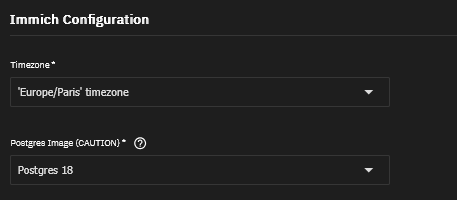
It looks like you didn’t do step 6, switch to Postgres 18. Guessing from your last few lines of posted messages. I would have expected target version 18
I think you meant Step 5 which I did in the Edit button in Apps. I even did Step 6 but the error come fast
[ix-postgres-main]      - [2026-03-21 10:58:58] - Starting entrypoint with migration and upgrade handling
[ix-postgres-main]      - [2026-03-21 10:58:58] - No migration needed from old data location.
[ix-postgres-main]      - [2026-03-21 10:58:58] - Checking directory [/var/lib/postgresql/15_backup/docker]
[ix-postgres-main]      - [2026-03-21 10:58:58] -   - Found database: PostgreSQL [15]
[ix-postgres-main]      - [2026-03-21 10:58:58] - Using highest version found: PostgreSQL [15] at [/var/lib/postgresql/15_backup/docker]
[ix-postgres-main]      - [2026-03-21 10:58:58] - Starting timezone migration for /var/lib/postgresql/15_backup/docker
[ix-postgres-main]      - [2026-03-21 10:58:58] - Parameter [timezone] is already canonical - [Europe/Paris]
[ix-postgres-main]      - [2026-03-21 10:58:58] - Parameter [log_timezone] is already canonical - [Europe/Paris]
[ix-postgres-main]      - [2026-03-21 10:58:58] - Timezone migration complete
[ix-postgres-main]      - [2026-03-21 10:58:58] - Current version: 15
[ix-postgres-main]      - [2026-03-21 10:58:58] - Target version: 18
[ix-postgres-upgrade]   - [2026-03-21 10:58:58] - Starting upgrade from PostgreSQL [15] to [18]
[ix-postgres-upgrade]   - [2026-03-21 10:58:58] - ERROR: Old PostgreSQL [15] binaries not found at [/usr/lib/postgresql/15/bin]
[ix-postgres-main]      - [2026-03-21 10:58:58] - ERROR: Upgrade failed
[ix-postgres-main]      - [2026-03-21 10:58:59] - Starting entrypoint with migration and upgrade handling
[ix-postgres-main]      - [2026-03-21 10:58:59] - No migration needed from old data location.
[ix-postgres-main]      - [2026-03-21 10:58:59] - Checking directory [/var/lib/postgresql/15_backup/docker]
[ix-postgres-main]      - [2026-03-21 10:58:59] -   - Found database: PostgreSQL [15]
[ix-postgres-main]      - [2026-03-21 10:58:59] - Using highest version found: PostgreSQL [15] at [/var/lib/postgresql/15_backup/docker]
[ix-postgres-main]      - [2026-03-21 10:58:59] - Starting timezone migration for /var/lib/postgresql/15_backup/docker
[ix-postgres-main]      - [2026-03-21 10:58:59] - Parameter [timezone] is already canonical - [Europe/Paris]
[ix-postgres-main]      - [2026-03-21 10:58:59] - Parameter [log_timezone] is already canonical - [Europe/Paris]
[ix-postgres-main]      - [2026-03-21 10:58:59] - Timezone migration complete
[ix-postgres-main]      - [2026-03-21 10:58:59] - Current version: 15
[ix-postgres-main]      - [2026-03-21 10:58:59] - Target version: 18
[ix-postgres-upgrade]   - [2026-03-21 10:58:59] - Starting upgrade from PostgreSQL [15] to [18]
[ix-postgres-upgrade]   - [2026-03-21 10:58:59] - ERROR: Old PostgreSQL [15] binaries not found at [/usr/lib/postgresql/15/bin]
[ix-postgres-main]      - [2026-03-21 10:58:59] - ERROR: Upgrade failed
I still got the same issue.
I think you need to post all your details on where you are at, what versions of software, etc. That may offer a clue to other posters.
This worked for me, thanks
It could upgrade successfully using UI and just one shell command:
• immich running with pg15: go to admin section, create backup job, save ..sql.gz to your computer
• stop immich with pg15
• in truenas, edit immich app: 1) select pg18 2) chose a different host directory for pg (other configuration for data and additional storage locations can remain unchanged)
• launch immich, wait until web interface shows up at http://IP:PORT
• in Truenas Shell create postgres user in database
sudo docker exec ix-immichpg18-pgvecto-1
psql -U immich -c "CREATE ROLE postgres SUPERUSER CREATEDB
CREATEROLE LOGIN PASSWORD "postgres';"
• go to http://IP:PORT, upload backup and restore
maybe helpful for others.
This also worked for me, thanks for the hint! After roll back and upgrade to the postgress 18, last upgrade made the app restart couple of times on its own, but things sorted themselves up and is working fine now.
I was able to work around this with the following approach.
- Took a Snapshot of the current immich app data location (Recursive)
- Rolled Immich back to version 1.13.1 (did not rollback snapshots)
- Once it was back-up, edited the app, changed to Postgres 18, saved
- Once it was back-up from the postgres upgrade, verified it was up, accessible, etc
- Then upgraded using the normal App GUI prompt
Everything is up, changes I made this morning prior to starting are present, all looks well. I do run an instance called immich-t for testing, and I did it on that first.
NOTE that I did it this way because the 15 to 18 upgrade would fail on the current (previous) version.
Just seeing that others posted the same process via GUI & SSH. I didn’t catch those in my initial skim 
Did you also roll back the volumes or just the container images? (There is a checkbox labeled “Roll back snapshots of ix_volumes”)
Just the image container - I did not check the box “Roll back snapshots from ix_volumes”
I tried your version.
- I rolled back to immich 1.13.2 (had no 1.13.1 as a rollbck option)
- verified proper rollback by using WebGUI (everything worked, photos were visible)
- edited app - changed to Postgres 18, saved
- waited for completion of postgres update and verified everthing worked by checking in WebGUI again (photos were visible)
- used upgrade in the TrueNAS Gui
- It is stuck in deploying mode.
- according to log it is stuck in a loop “Hint: Rebuild all objects in this database that use the default collation and run ALTER DATABASE immich REFRESH COLLATION VERSION, or build PostgreSQL with”
Edit: nevermind. I manually stopped Immich, waited for full stop and restarted the docker via GUI and now everything looks fine. Immich-Gui can be reached via web:port, all photos look good as far as I checked.
This soloution worked for me with no issues. (1.13.6 to 1.14.2)
- Stop Immich app
- Edit ix_values file in shell or SSH: (your version might be different)
sudo nano /mnt/.ix-apps/app_configs/immich/versions/1.13.6/ix_values.yaml
Find the following line:
postgres_upgrade_image:
repository: ixsystems/postgres-upgrade
tag: 1.2.1
Change value to:
postgres_upgrade_image:
repository: ixsystems/postgres-upgrade
tag: 1.1.11
Save the changes.
- Start the Immich app.
- Edit the app to Postgres 18. Wait for app to come back online and check it is working.
- Stop the Immich app.
- Revert the changes in section 2 back to 1.2.1 and save.
- Start the Immich app and update.
I am also seeing this error. I notice a lot of the suggested fixes here talk about editing the App and selecting the Postgres Image. I am not seeing this selection at all.
Under a heading of Immich Configuration there is a field for the database password and database storage type selection. Then I see User and Group Configuration, Network, Storage, Labels and Resources.
Maybe I am looking in the wrong place? Or I have another problem to solve before solving this problem?
TIA
Worked perfectly. Thank you very much for a clean and easy solution! 

I’m feeling like I’m on a different planet here. The tags on the images in my yaml file look nothing like any of the posts here.
images:
  image:
    repository: ghcr.io/immich-app/immich-server
    tag: v1.135.3
  ml_image:
    repository: ghcr.io/immich-app/immich-machine-learning
    tag: v1.135.3
  ml_cuda_image:
    repository: ghcr.io/immich-app/immich-machine-learning
    tag: v1.135.3-cuda
  ml_rocm_image:
    repository: ghcr.io/immich-app/immich-machine-learning
    tag: v1.135.3-rocm
  ml_openvino_image:
    repository: ghcr.io/immich-app/immich-machine-learning
    tag: v1.135.3-openvino
  pgvecto_image:
    repository: ghcr.io/immich-app/postgres
    tag: 15-vectorchord0.4.3-pgvectors0.2.0
  redis_image:
    repository: bitnami/redis
    tag: 8.0.3
At this point do I just delete the app and start again? I’m guessing the database will not be readable by the current version or upgradable. Bugger.
Hello everyone, thanks for the clarification of the issue so far. I’m new to the forum because I really need your help with this one.
I too was using pg 15 but I wasn’t aware of the migration process. I noticed that the Application failed to upgrade and did the first thing that came up to me: I made screenshots of my configuration, deleted Immich and all previous images and tried to install a fresh new copy with the exact same settings. After that didn’t work, I started looking at the forum and found this thread.
Immich isn’t running anymore, I can’t roll back to a previous immich and my data is in a pg 15 database. Now there are ideas running in my head to spin up a custom app from a previous immich version for example but the data in Immich is just too dear to me and my family, I really don’t want to skrew up any more.
Can you please help me find a safe way to migrate to the latest version?
Thanks if you’ve been giving this your attention.
- Martijn
It looks like you are using a much older version of Immich.
You should be able to update to version 1.13.x and it will have the postgres update in it.
Unfortunately, I don’t have that option. The only option in the drop down is the current version
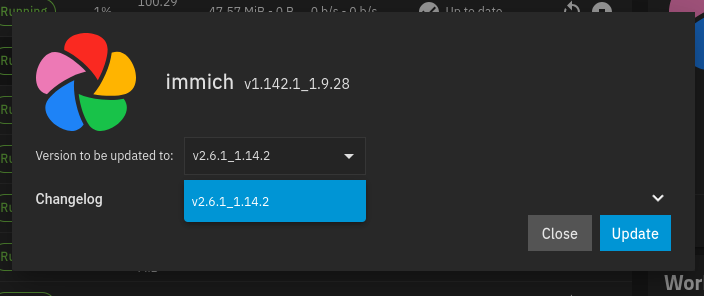
Looking at my version list it’s longer than I remember since I last did an upgrade. The breakage in the volume mappings was a blocker for me. I was really worried about having to move the data sets around for some reason. So I couldn’t do an upgrade until I did that. It looks like last time I upgraded was July last year.