
See ##UPDATE## below for the final step to take in doing this that worked for me. Your mileage may vary.
I went into Apps page and unset the app pool. I don’t know if this is necessary, but I assumed it would make it easier in case files were in use when I tried to copy them over.
I created two datasets per the documentation from TrueNAS and named them according to my setup. Make sure that if you copy the way that I did this, that you adjust the file path according to how you setup your system originally.
/mnt/Main_Tank/Immich/data and /mnt/Main_Tank/Immich/postgres-data
Since I nested these two new datasets under the original /mnt/Main_Tank/Immich dataset, it inherited the permissions (as I had done that before so that nested datasets would have the same permissions). You may need to adjust your datasets because I believe Immich needs root permissions according to their documentation.
I tried running the command per the described PR listed in this thread (edited for my setup):
cp -a /mnt/Main_Tank/Immich/pgdata/. /mnt/Main_Tank/Immich/postgres-data/
However, it returned this error:
cp: preserving times for '/mnt/Main_Tank/Immich/postgres-data/.': Operation not permitted
So, I used rsync to do this and it worked fine. Rsync will preserve file attributes and also copy over any hidden files. I do not know if this is necessary, but it worked for me.
Note that in my setup below that the naming convention has changed from “video” to “encoded-video”. The rest remains the same (per the documentation on Immich’s website.
rsync -avh --progress /mnt/Main_Tank/Immich/pgdata/ /mnt/Main_Tank/Immich/postgres-data/
rsync -avh --progress /mnt/Main_Tank/Immich/backups/ /mnt/Main_Tank/Immich/data/backups
rsync -avh --progress /mnt/Main_Tank/Immich/video/ /mnt/Main_Tank/Immich/data/encoded-video
rsync -avh --progress /mnt/Main_Tank/Immich/library/ /mnt/Main_Tank/Immich/data/library
rsync -avh --progress /mnt/Main_Tank/Immich/profile/ /mnt/Main_Tank/Immich/data/profile
rsync -avh --progress /mnt/Main_Tank/Immich/thumbs/ /mnt/Main_Tank/Immich/data/thumbs
rsync -avh --progress /mnt/Main_Tank/Immich/upload/ /mnt/Main_Tank/Immich/data/upload
Finally, I went in unchecked the ‘Use old storage config’ option and pointed the data to the new data sets/directory. However, note that this likely needs to be updated:
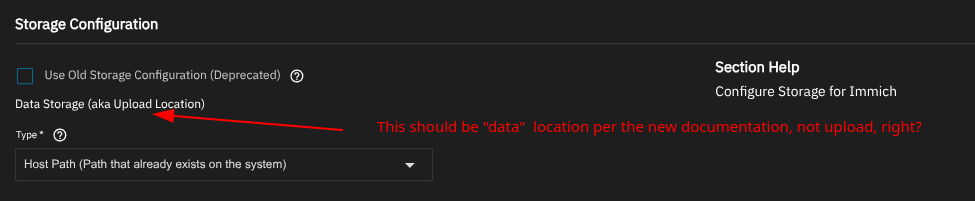
Now, when I went to launch the container, I got this error message:
Traceback (most recent call last):
  File "/usr/lib/python3/dist-packages/middlewared/job.py", line 515, in run
    await self.future
  File "/usr/lib/python3/dist-packages/middlewared/job.py", line 562, in __run_body
    rv = await self.middleware.run_in_thread(self.method, *args)
         ^^^^^^^^^^^^^^^^^^^^^^^^^^^^^^^^^^^^^^^^^^^^^^^^^^^^^^^
  File "/usr/lib/python3/dist-packages/middlewared/main.py", line 622, in run_in_thread
    return await self.run_in_executor(io_thread_pool_executor, method, *args, **kwargs)
           ^^^^^^^^^^^^^^^^^^^^^^^^^^^^^^^^^^^^^^^^^^^^^^^^^^^^^^^^^^^^^^^^^^^^^^^^^^^^
  File "/usr/lib/python3/dist-packages/middlewared/main.py", line 619, in run_in_executor
    return await loop.run_in_executor(pool, functools.partial(method, *args, **kwargs))
           ^^^^^^^^^^^^^^^^^^^^^^^^^^^^^^^^^^^^^^^^^^^^^^^^^^^^^^^^^^^^^^^^^^^^^^^^^^^^
  File "/usr/lib/python3.11/concurrent/futures/thread.py", line 58, in run
    result = self.fn(*self.args, **self.kwargs)
             ^^^^^^^^^^^^^^^^^^^^^^^^^^^^^^^^^^
  File "/usr/lib/python3/dist-packages/middlewared/api/base/decorator.py", line 101, in wrapped
    result = func(*args)
             ^^^^^^^^^^^
  File "/usr/lib/python3/dist-packages/middlewared/plugins/apps/app_scale.py", line 62, in start
    compose_action(app_name, app_config['version'], 'up', force_recreate=True, remove_orphans=True)
  File "/usr/lib/python3/dist-packages/middlewared/plugins/apps/compose_utils.py", line 61, in compose_action
    raise CallError(err_msg)
middlewared.service_exception.CallError: [EFAULT] Failed 'up' action for 'immich' app. Please check /var/log/app_lifecycle.log for more details
Here are the logs:
admin@truenas[/var/log]$ sudo cat app_lifecycle.log
[2025/06/03 10:18:56] (ERROR) app_lifecycle.compose_action():56 - Failed 'up' action for 'nginx-proxy-manager' app:  Network ix-nginx-proxy-manager_default  Creating\n Network ix-nginx-proxy-manager_default  Created\n Container ix-nginx-proxy-manager-npm-1  Creating\nError response from daemon: invalid mount config for type "bind": bind source path does not exist: /mnt/Main_Tank/Nginx/data\n

[2025/06/17 11:40:22] (ERROR) app_lifecycle.compose_action():56 - Failed 'up' action for 'immich' app:  Network ix-immich_default  Creating\n Network ix-immich_default  Created\n Container ix-immich-permissions-1  Creating\n Container ix-immich-permissions-1  Created\n Container ix-immich-redis-1  Creating\n Container ix-immich-machine-learning-1  Creating\n Container ix-immich-pgvecto-1  Creating\n Container ix-immich-redis-1  Created\n Container ix-immich-machine-learning-1  Created\n Container ix-immich-pgvecto-1  Created\n Container ix-immich-server-1  Creating\n Container ix-immich-server-1  Created\n Container ix-immich-permissions-1  Starting\n Container ix-immich-permissions-1  Started\n Container ix-immich-permissions-1  Waiting\n Container ix-immich-permissions-1  Waiting\n Container ix-immich-permissions-1  Waiting\n Container ix-immich-permissions-1  Exited\n Container ix-immich-pgvecto-1  Starting\n Container ix-immich-permissions-1  Exited\n Container ix-immich-redis-1  Starting\n Container ix-immich-permissions-1  Exited\n Container ix-immich-machine-learning-1  Starting\n Container ix-immich-redis-1  Started\n Container ix-immich-pgvecto-1  Started\n Container ix-immich-machine-learning-1  Started\n Container ix-immich-machine-learning-1  Waiting\n Container ix-immich-permissions-1  Waiting\n Container ix-immich-pgvecto-1  Waiting\n Container ix-immich-redis-1  Waiting\n Container ix-immich-permissions-1  Exited\n Container ix-immich-pgvecto-1  Error\n Container ix-immich-redis-1  Healthy\n Container ix-immich-machine-learning-1  Healthy\ndependency failed to start: container ix-immich-pgvecto-1 is unhealthy\n
##UPDATE##
Running this to chown the new postres database fixed the issue:
chown -R 999:999 /mnt/Main_Tank/Immich/postgres-data/
Matt