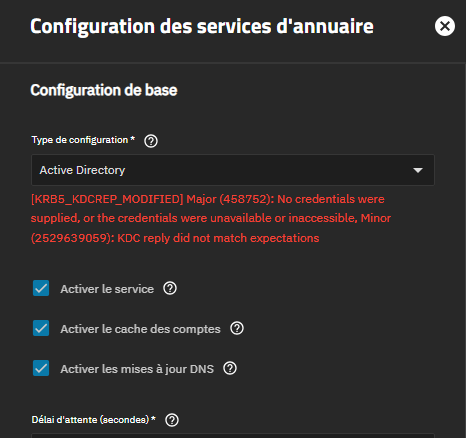
Yes already set AD as DNS (192.168.1.47) on TNS with no success, also already deleted all the previous registred machine in AD and cleared DNS entries too without luck.
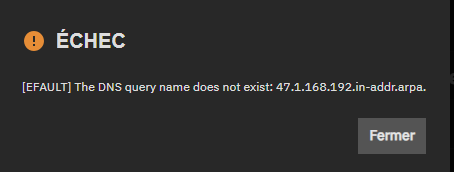
Just tried a new time an this time i got a weird thing, like DNS IP should be 192.168.1.47 but here it displays written in reverse order, why this mess can happen if this is really the DNS IP from Windows server which is displayed?
I have the same issue with 25.10.2.1. I’m trying to join it to a Samba 4 Active directory and I get errors that it can’t find my PDC. My DNS is setup correctly, I have all the required SRV records. I’m able to join a Windows 11 computer to this active directory without any issue and I can login to the Windows 11 computer with credentials from the AD but TrueNAS scale refuses to join.
```
Just tried a new time an this time i got a weird thing, like DNS IP should be 192.168.1.47 but here it displays written in reverse order, why this mess can happen if this is really the DNS IP from Windows server which is displayed?
```
That’s the reverse lookup for your DC. Minimally, DCs should have PTR entries in the AD DNS. It not being present indicates probably a manual change to your AD DNS that’s rather significantly broken.
I suggest doing internet search on the terms. Microsoft may have French documentation that assists on Domain Controlers, Active Directory and DNS Pointer Records.
Thanks for cloudflare explainations, reading this for PTR use , in my case I don’t understand what it could help for.
On my LAN i have WSE2016 (acting as DNS) on static IP 192.168.1.47 and TNS server 25.10.2.1 having static IP 192.168.1.37 and set to use 192.168.1.47 as DNS resolver .
Name resolution is working fine in both ways, ping FQDN or Nslookup with IP or FQDN are resolving fine.
May be i’m wrong, but i’m not sure my problem is DNS related
I got another location with exactly same hardware install and there’s no Reverse Zone set on the WSE2016 DNS service and that location is working like a charm AD SYNC is OK.
For test and also to retablish external Bkuups for WSE16 server, tonight I added a Synology NAS to the WSE16 AD (it went like a breeze compare to Scale) worked at the first try.
Once jointure was done I created a new bkup task from software running on WSE16 side and started to bkup without any problem on synology NAS.
So almost that test proof AD is working fine and probably this is bugs on Scale side.