Is X10SRH-CF (with hot LSI 3008) a good choice for home NAS in terms of noise?

Finally got around to starting the server build.

I have an X10SRH-CF with an E5-2620v3 CPU, a cooler, and 8 GB of RAM (the whole kit was 200 EUR).

At the moment I’m testing everything on a table (no case yet):

• Keyboard and display work
• IPMI works
• The LSI 3008 controller gets very hot — hot enough that I can only keep my fingers on the heatsink for a couple of seconds. Once I noticed it, I placed a 140 mm fan next to it, and that seems to help.
• I’m not sure which temp sensor corresponds to it; maybe “PCH”, since that one climbs the fastest and reached 44 °C within a few minutes even with the fan running.

I had to power everything down because I ran out of time.

The question:

Current planned setup is ATX tower case, 4x8TB drives in RAIDZ2, not sure about anything else. Thought that more “modular” (flexible) motherboard would help if any experiments or upgrades happen. And this one was 200 euro with cpu, so seemed as a good option for a newbie. The Xeon D based X10SDV usually costs more, cheaper offers (200-250 euro) on AliExpress with 3-4 week shipping waiting spooked me away.

If it really runs this hot (and will be too power hungry), then I’ll need strong airflow, which means louder fans that consume more power and wear out faster. If it is impossible to run it reasonably quietly in a regular ATX tower case at home, then I’d rather go for something without the onboard HBA, like the X10SRL-F.

What complicates the decision is that locally I have much better offers (and many more options) for SAS drives than for SATA. The NAS will be placed in the corridor of my apartment — not a bedroom or a living room, but also not a dedicated equipment room.

So a lot of this comes down to my personal tolerance and expectations, and probably can’t be fully answered by others. Getting first-hand experience is the only way.

To the moderators: if you think this thread is unnecessary, feel free to delete it.
Yes its “normal”. Server boards are meant to be run inside a server chassis with screaming fans. When transplanted into a consumer case, you have to actively cool the components that have a heatsink on them.

1 Like

The LSI card expects significant airflow. If it doesn’t get it it will corrupt your pool and then expire. You need to put a fan on that heatsink in some manner

1 Like

Back to your question: It is a good board for a powerful server with big storage, and you can add more RAM for cheap. It is overkill for simple “home” use, and not the best choice if “home” implies “low power” and “quiet”.
Is it a complete rackmount server, or the board+CPU+RAM transplanted into an ATX tower case?

What use case exactly, and how many drives?

1 Like

Buy a more recent HBA. The 9400 and beyond series consumes a lot less power and hence produces a lot less heat. The payback depends on where you live. See the art of the server YouTube videos comparing drawn power from various HBA generations.

Current planned setup is ATX tower case (or maybe something smaller and simpler if I switch the motherboard), 4x8TB drives in RAIDZ2, not sure about anything else. Maybe one more pool of about the same size in the future. Thought that more “modular” (flexible) motherboard would help if any experiments or upgrades happen. And this one was 200 euro with cpu, so seemed as a good option for a newbie. The Xeon D based X10SDV usually costs more, cheaper offers (200-250 euro) on AliExpress with 3-4 week shipping waiting spooked me away.

(Also added this to the main post.)

The main concern is noise, the power draw is not so important. Unless it is unacceptable, but I don’t know what it’ll be unless I try. So decided to try something instead of endlessly guessing what I might need. Only after getting some experience and statistics, I can swap this server to something optimized for my usage. Not sure even about the transcoding and other use cases yet.

@etorix
You may remember my uncertainty in a post couple months ago (https://forums.truenas.com/t/help-deciding-on-a-custom-build-vs-used-server/48063?u=walker_sector_7). Finally got to move on.

As already mentioned here, most (all?) HBAs need extra attention or cooling when they’re not installed in a server chassis. Quite a few HBAs have died because this wasn’t done…

Many here probably know this YouTuber (I think all his videos are great!)
“Art of Server” (YouTube channel: https://www.youtube.com/@ArtofServer/videos

He also made a series of videos where he tests the performance of different HBAs, using a setup that allows him to measure power consumption as well. Super interesting!

You have to keep in mind that if an HBA consumes 10 watts, all of that turns into heat that has to be dissipated somehow.
Anyone who has ever soldered knows how hot even a 10-watt soldering iron gets…

I believe in his introduction video for this test series, he explicitly mentions that he points a fan at the HBA cards during testing to keep them reasonably cool.

1 Like

I didn’t connect any drives to it, so it never “worked” in a normal sense. Also, the periods when it was powered on didn’t last long (though I can’t tell exactly how long, probably like 3 launches of the system 10 minutes each), so I’m hoping it didn’t overheat.
I ran some checks with lspci and dmesg; there were no errors or anything that looked suspicious — just version info, memory allocations, and messages like port enable: SUCCESS (at least as far as someone using these tools for the first time can tell).

Does this indicate anything good or bad?
Is there a way to verify that the HBA is okay without connecting any drives?

I don’t really know enough about this myself…
I guess the only way to be sure is to hook up some drives and test it.

I mixed up three different topics in a single thread (probably because I’m in a slight panic mode):

  1. Checking the HBA

  2. Comparing the X10SRH-CF to other boards for home use

  3. (Possibly) figuring out adequate cooling for the X10SRH-CF

(Also edited the original post to better reflect the idea below and minimize offtopic.)

The idea is: if this motherboard turns out to be too power-hungry and too hot to run reasonably quietly in a regular ATX tower case at home, then I’d rather go for something without the onboard HBA, like the X10SRL-F.

What complicates the decision is that locally I have much better offers (and many more options) for SAS drives than for SATA. The NAS will be placed in the corridor of my apartment — not a bedroom or a living room, but also not a dedicated equipment room.

So a lot of this comes down to my personal tolerance and expectations, and probably can’t be fully answered by others. Getting first-hand experience is the only way.

To the moderators: if you think this thread is unnecessary, feel free to delete it.
Plug a drive. SATA will do.

(Re)Define “home”… It means very different things to different people—and do not expect that any one will remember an old thread.
An ATX board and a SAS HBA, on their own, both look overkill for my definition of “home use”.

Depends on your case, and on the ability to point a fan in the general direction of the HBA. A slow and quiet big fan should do.

Indeed. Noise tolerance in particular is very personal. My threshold is at SIX drives in a Node 304—and then the ideal board is a X10SDV-xx-TLNnF; if 1 GbE is enough, a MJ11-EC1 would come at 60 €.

In your case, size does not matter, but noise still does. This requires a decision as to the number of drives
And then whether you really want to run SAS drives rather than SATA.

From the outside, going into “slight panic mode” over cooling a HBA to accomodate a mere four drives of relatively small capacity (8 TB in the age of 28 TB HDDs) appears as a great success… at looking for trouble and finding it. My crystall ball suggests that the SAS drives you’re eyeing are refurbished with many, many flight years in a data centre, and you might be coming back here in a few months in “active panic mode” due to a degraded array.

1 Like

Yep, will do that with the old SATA drive.

For me it’s mostly storing personal graphic design projects, personal photos and videos, also some garbage like movie rips for convenience (over the DVDs and Blu-rays). Most probably a Jellyfin server and maybe a couple of auxiliary services/apps (if needed). But not sure about anything right now. Ideally, it should not exceed noise level of a usual pc (working in idle, but again this is very different for different pc-s), but slightly (again, personal) louder is acceptable too. Since I don’t know what I’ll do with it, ideally it has to have more ports and slots than X10SDV.

But I read that many use refurbished server drives a lot.
Does it mean they risk the same way I do?
Or I shouldn’t buy cheaper refurbished drives?
Price itself probably doesn’t mean much, as one could just stick any tag on a drive close to its finale.
Or you mean that refurbished SATA drives are statistically in a better shape?

That’s my case, I only have about ~5GB of data now. And how it grows depends on some decisions which are not made yet. Good if a motherboard has enough ports to add more drives. If no need for more drives, then fine… not a big deal.

I got a new Supermicro A2SDI-8C-HLN4F this summer. It’s perfectly adequate for a TN system with a maximum of 12 SATA disks without video transcoding and only 1-2 clients.
I run the board in Node 804 with currently 4 HDDs and a total of 4 regulated fans (all around 700-800 rpm). The system runs 2 VMs and additionally JellyFin and Scrutiny – all without performance limitations.

It runs at around 40 dB when idle and around 43 dB when in operation. However, it should be noted that the disks in Node 304 and also in Node 804 are suspended in rubber buffers. This dampens the noise of the HDD, especially when in operation. With my previous Proliant Microserver Gen8, the disks were more audible due to the backplane and fixed slots.

Translated with DeepL.com (free version)

1 Like

That depends first on the number of drives, and then on the case (e.g. Node 304 is quite good at muffling drives, being mostly closed, while Node 804 leaves the noise out through the top mesh).
With low capacity to start with you should aim for few drives and stay at that. Future extension to 8 drives looks overkill.

I recently bough some used SATA drives myself, out of a data centre at the ned of warranty. But these were 20 TB.
The 8 TB drives you’re eyeing could be ten years out and quite worn out. If not, and they were put in service at a time when 8 TB HDDs were already small by the standard of the day… the seller works on a business model I do not understand.
Get thorough information on the drives, and understand the risk model. Get more drives than you need to have pre-burnt cold spares. It’s more work than buying new and under warranty.

Not at all.
But for a small array and small capacity, going SAS is adding a (hot running) HBA and complexity for no apparent benefit.

1 Like

As for the noises coming from the mesh above node 804, I’m afraid I have to agree with you.
I placed thin cardboard directly on the frame above and secured it as tightly and comprehensively as possible with tape. This dampens the noises somewhat.

1 Like

…but then hinders cooling.
This was just an example to illustrate that different cases behave differently, and that there is a tension between cooling (airflow) and suppressing noise (closed case).

1 Like

Noted, thanks!

So when I need more capacity, I better swap them for larger drives first instead of adding a pool?

And more risk. This is the route I don’t really like, was considering it just for sake of a lower price. But it’s 170 eur for “refurbished” SAS with 2 year “warranty” vs. 270 eur for new SATA WD Red Pro with 3 year warranty. For my case of RAIDZ2 I need 4 drives plus 1 in a cold spare. With those refurbished ones I probably need like 2 as a spare. So the difference is still notable, but considering the stress (for me, I’m not that tough to sleep without having a bad dream about my NAS going into “surprise” mode), it looks like buying some “peace” for myself. Of course, the plan includes backups and all the necessary recurring procedures regardless of the age and condition of the drives.

I… understand. Since I already have a motherboard, I’m planning to go this route:

  1. Switch the LSI off (it will still consume power and produce heat, but less, right?)
  2. Buy SATA drives (probably new)
  3. Setup a noise/temp balanced cooling.
  4. Collect usage statistics for some period (a year, for example).
  5. If I absolutely need or want to, switch to a different motherboard/cpu/whatever later. SATA drives are compatible with anything, which helps.

This “fixes” (ok, compensates) my bad decision as much as possible.

Yes. Whenever noise and/or power are of concern, fewer drives is better.
If supply is reliable and backups are in place, the purchase of cold spares may well be deferred.

For EIGHT terabytes ??? I don’t think I would even consider refurbished EIGHTEEN terabyte drives at this price, especially SAS. SATA drives allow for more flexibility (no need for a SAS HBA), and generally have more comprehensive SMART reports than their SAS equivalents, so for me SAS comes second choice.

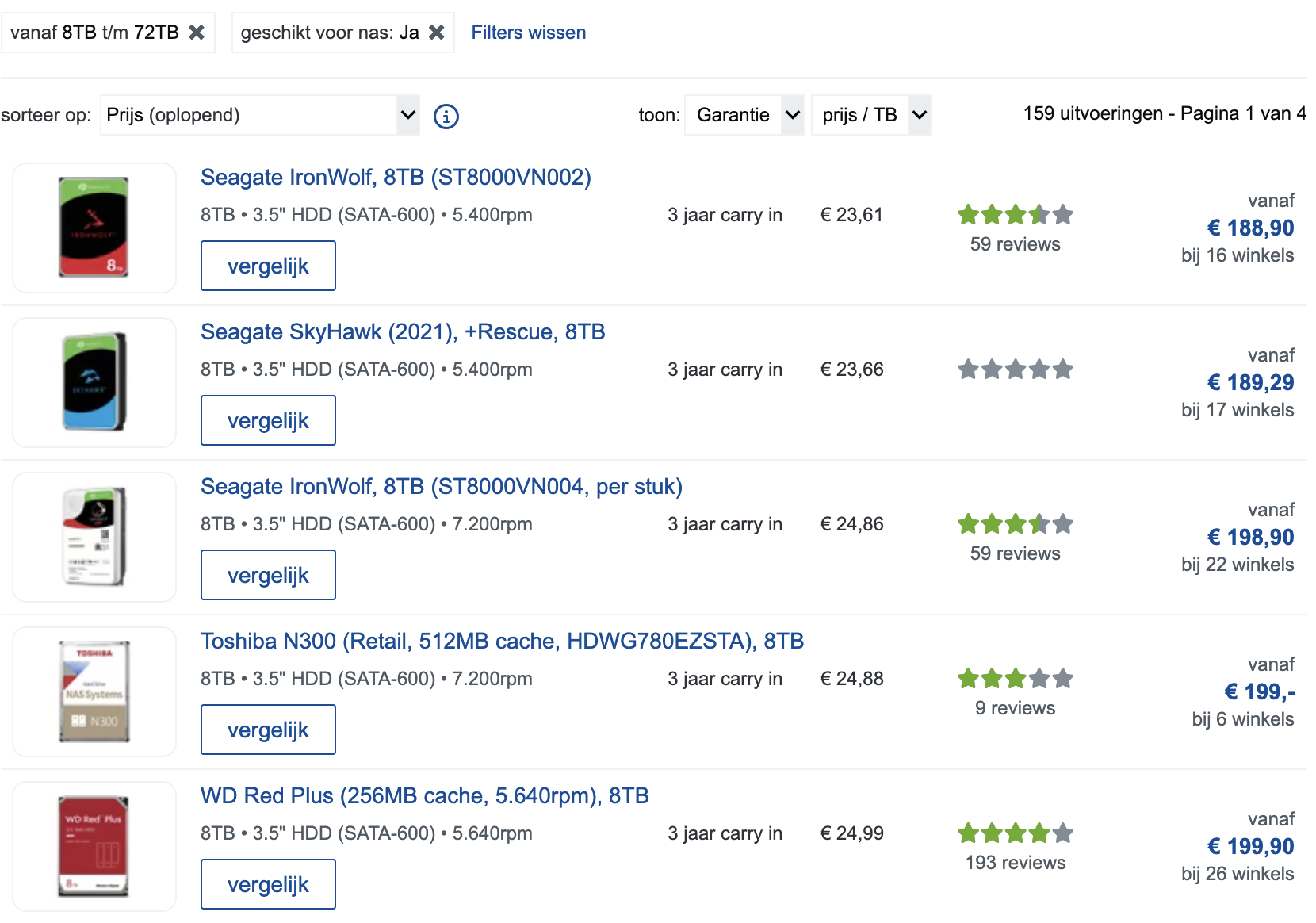
Locally, I can find new 8 TB NAS HDDs for 190-200 €:

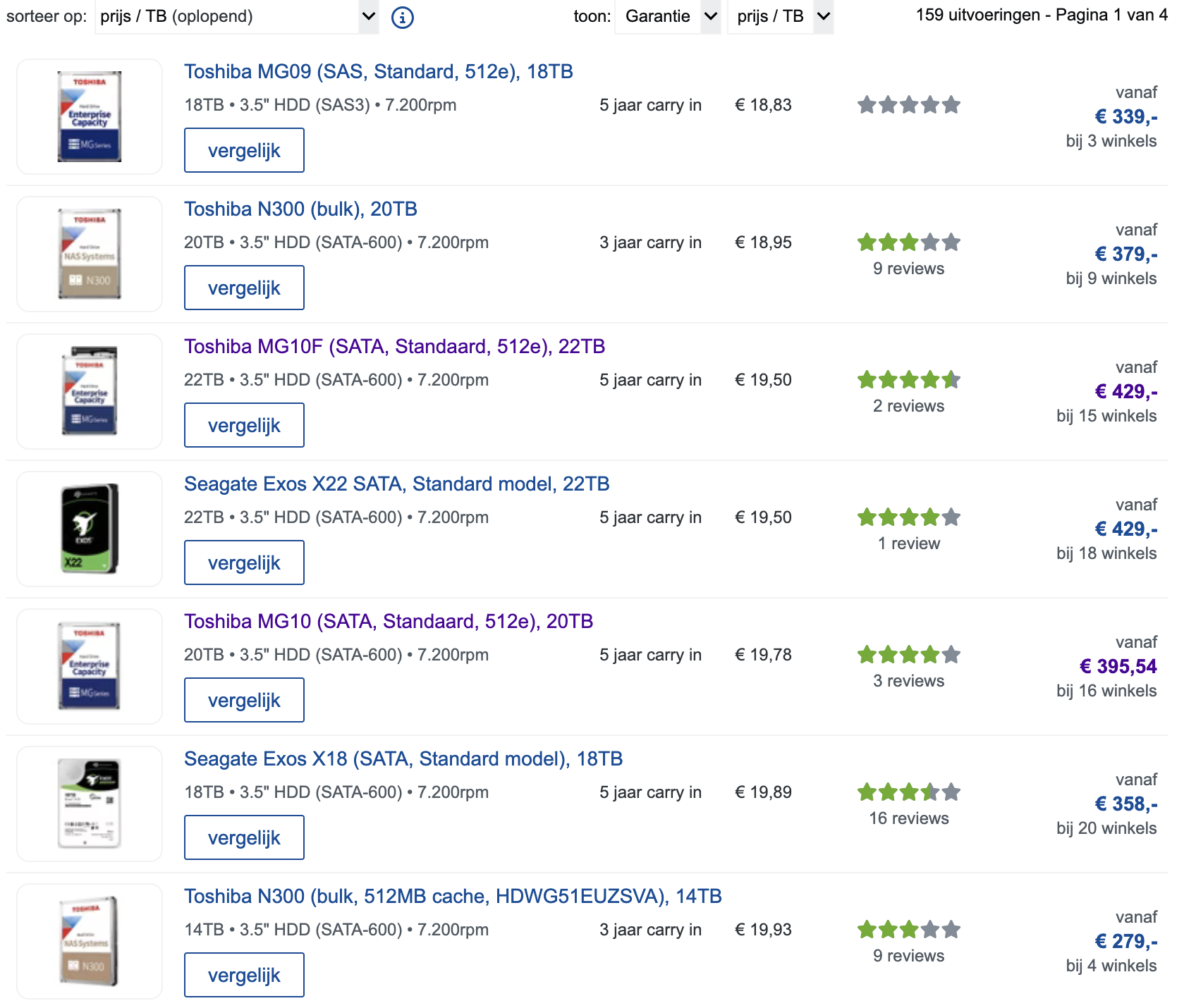
But the best price per TB is for around 18-20 TB, with the odd 22 TB or 14 TB drive sneaking in the sorted list.

I can only suggest you shop around (any “Black Friday” running around?), or shop from further afar, and see what you could fit within your budget.

1 Like