To start out I am still quite new to using Truenas or even Linux so feel free to assume I am missing something obvious.
I have been trying for weeks now to update from 22.12.4.2 (I know I am way behind) to a newer version 25.04.2.6 and am having no luck. I am aware of the update path chart. I have been trying to upgrade to 23.10.2 first with no success. When I try to do so I end up stuck in a loop when trying to boot to 23.10.2.
After trying that for a while I decided to try a fresh install of 25.04.2.6 on a separate drive. I disconnected all but that drive to make sure I don’t overwrite any of my other data, and tried the install. I can get to the GNU GRUB page which gives the options of “Start TrueNAS Scale Installation” and “Start TrueNAS Scale Installation (115200 baud)”. I tried each option multiple times, sometimes removing RAM or changing BIOS settings. Then I tried different USBs, using rufus instead of Balena etcher, then I tried ventoy (great tool btw). Next I decided to try a fresh Install of 23.10.2. I went through all of the same trials as with 25.04.2.6 trying to get a fresh install, no difference.
All of my attempts at a fresh install end the same way. I make it to the GNU GRUB page which gives the options of “Start TrueNAS Scale Installation” and “Start TrueNAS Scale Installation (115200 baud)”, after selecting either the screen goes black and either stays that way or reboots to the BIOS.
Throughout all of my attempts, booting back into my 22.12.4.2 install everything works fine.
At this point I have no idea where to go. I would like to get to the latest version whichever way works. Any ideas?
AMD Ryzen 5 5600X3D
ASUS TUF Gaming B550-Plus Wifi II
32GB RAM
AMD RX550 (only for display output)
Samsung 256GB Boot
2x Seagate ironwolf pro 16TB in RAID 1
Do you have Apps, etc or is this just data?
Guessing going into BIOS / UEFI and disabling anything you aren’t using like wifi. Is it up to date on firmware and have you used anything other than defaults like power saving, etc?
I do have apps (Plex, Jellyfin, MakeMKV) as well as data.
I guess I really don’t understand why the current version would run with zero issue, but any attempt to run a newer version has no success.
I tried to update through the GUI to see if there was any change, the image is where it gets hung up
Apps will be a problem for upgrading. WARNING: June 1st is the Apps Migration Deadline for TrueNAS 24.04 and 23.10 - #56 by Roadrunr
I would work on making sure you have excellent backups of your data and document your system as detailed as possible. Apps will have to be recreated after working through why the most current versions of TrueNAS aren’t booting. You can try boot a Live Linux version to see if that works, at least. Browse the forum posts where people have boot and install problems as that may give you a few hints.
Thanks for that info, I had no idea about the apps issue.
I installed Ubuntu to make sure the system was still working, no problems there.
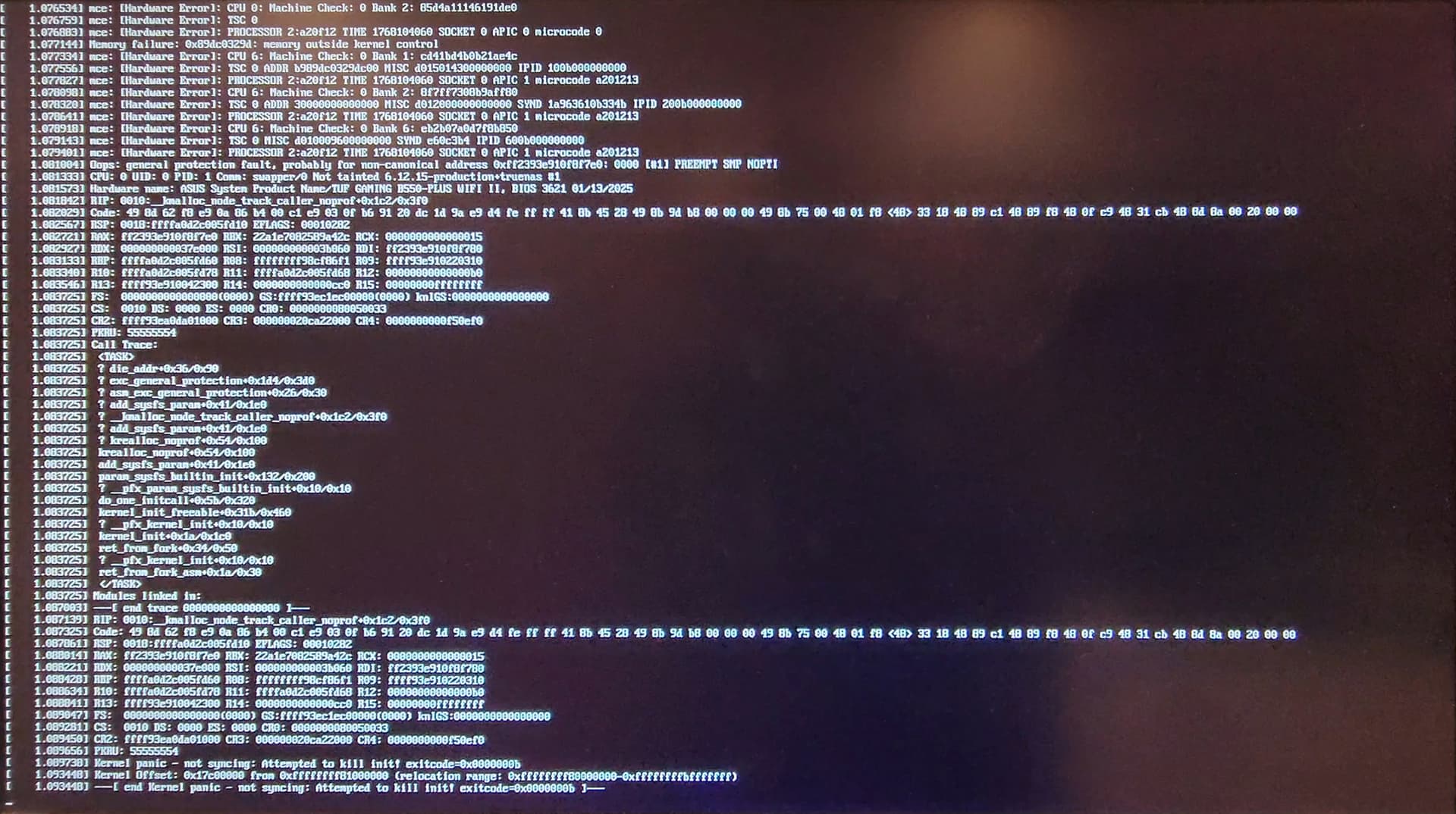
After a ton of other attempts at updating, I noticed that sometimes letting the installer timeout the selection instead of hitting enter myself would yield slightly different results. Eventually, I got this screen.
I noticed the line “1.077144] Memory failure: 0x89dc0329d: memory outside kernel control”. I only was able to get this screen once, but it made me refocus on hardware.
At this point I used another system so that I could eliminate the remaining hardware factors. I first ran the installer on the system to make sure that it ran at all. After succeeding with the second system I swapped the CPU and RAM between the systems since I really didn’t want the motherboard to be the issue, successful installs on both systems. I swapped the RAM back to the original systems since that was easiest. This gave weird results initially, so I decided to swap the CPUs back to their original systems and the RAM to the opposite systems. This gave me my answer.
The whole time it was the RAM. It still is really weird to me since the system had no issues at any point with 22.12.4.2 but any newer versions would not run. I’ve been attempting to use those RAM sticks in other windows systems, but they are having a ton of weird issues so far. I guess they are busted? Maybe the uptime of the server scrambled them idk.