I’ve recently built two identical NAS, one is the backup of the other.
I’ve selected some used datacentre drives and everything works well. My only concern is that at least the primary NAS seems to be more or less constantly making some seeking noise. Now, its datasets are mapped on a computer so I’d imagine some requests might be periodically coming from the OS. However, it’s like a constant, rhythmic noise.
It happens more or less every 5 seconds and I read online that zfs commits every 5 seconds - it feels like a lot of activity though.
I appreciate TrueNAS is a server-grade tool, my NAS is a server grade machine (HP Microserver G8) and the drives are also datacentre-grade. Just wondering if there is anything I can do to tell the NAS to relax a bit?
I can hear some 5s periodic activity from the backup server too but it’s only a few clicks.
It’s an HP MIcroserver G8 with 4x WD WUH721414AL5204 Ultrastar DC HC530 LFF 14TB drives.
The NAS is used for basic storage, I have one raidz1 pool, 4 datasets, no VMs, no apps. Some datasets are encrypted, no deduplication, basic datasets with default parameters. There is a duplication task set for the other NAS which runs at midnight or so. I will check if the noise matches read/write on the reports.
Maybe next time I hear that noise I can unplug the network and see if it stops.
Yes, they are noisier than my old WD Red but not a lot and that’s not my point. I’m not questioning the noise they make but why they seem to be active every 5 seconds.
ZFS by default will “close off” its transaction groups - that is to say, pending writes that you’ve sent to the system - after 5 seconds, unless something makes them close earlier. So that’s most likely what you’re hearing is the regular activity of ZFS committing any changes you or apps/services might be making.
Then my next question is: what is constantly writing to my NAS that requires ZFS to commit changes every 5 seconds??
The NAS is mapped on my macOS, plus there is Time Machine active - is that enough to constantly write something on the NAS even when my computer is not being used? Is there a way to find out what is happening, what is writing that data to the NAS constantly?
Thanks!
Edit: the NAS was making the usual 5-seconds seeking noise - though I think it was less loud than usual - so I unplugged the ethernet cable and nothing changed. So it doesn’t seem to be activity caused by the network.
I believe I might have read somewhere that datacentre drives can do that? How can I find out where the activity is coming from?
Nothing externally is writing - it’s ZFS writing the timestamp, closing the group, and basically saying “this five seconds has elapsed” in case there’s a power outage and it has to know what a stable state on disk is in order to import the pool at that point.
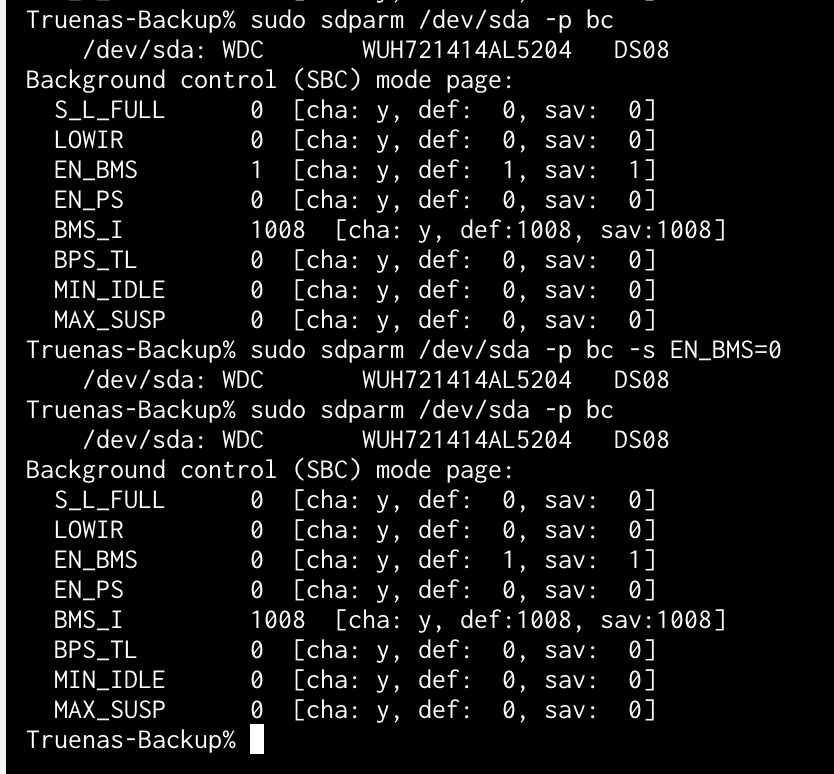
But the seek noises in the OneDrive sample seemed a bit more frequent that 5s. Has the noise level dropped since disabling BMS?
No unfortunately. Thought at least tonight it was a very minor rhythmic sound. Same timing but very little activity.
The main NAS has the app service started (but no apps), the backup doesn’t. Both make that noise. One thread I found online was blaming the app service.