Good afternoon,
I’m having trouble logging into Nextcloud. I think I understand why, but I can’t seem to fix it.
Setup:
Dataset: 2x SSD for applications (mirror)
Dataset: 3x HDD for data/files, etc. (RAIDZ1)
TrueNAS SCALE version: 25.04.2.6
I installed Nextcloud via the TrueNAS App Store following this guide: https://www.youtube.com/watch?v=l12ODVA_ZnA
According to the guide, Nextcloud is installed on the SSD in the applications folder.
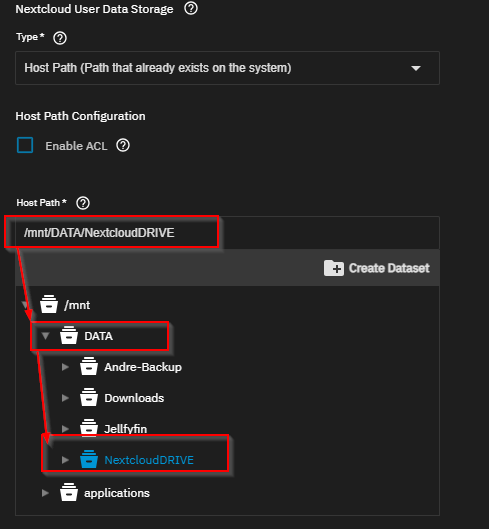
However, I deviated by placing the user data—the folders where files are stored—on the HDDs in the DATA → NextcloudDRIVE folder (see screenshot).
After installation:
Nextcloud appears as active. When I click on the UI, I reach the login screen, but the password I set during installation doesn’t seem to work. I keep getting stuck at the login screen.
I believe this is because Nextcloud cannot access the NextcloudDRIVE folder. I suspect it’s a permissions issue, but I haven’t been able to resolve it.
I’ve been struggling with this for two days. Does anyone have any ideas on what I can do? Or should I just do a fresh installation using the two datasets as recommended?
I don’t want the user files on the SSD since I have 8TB available on the HDDs.
Thanks in advance!
Nextcloud user Data Storage
Have you found a solution to this? I have TrueNAS 25.10.1 (Goldeye with updates) FWIW.
I have a similar setup to you:
–SSD pool for applications/things that need to be extra fast.
–HDD pool (2x 20 TB in mirror config) where I’d like to store the large things (user data etc.)
So for example, when I install Nextcloud through the TrueNAS “store,” I choose to put its AppData and Postgres on the SSD. Then I want the user data on the HDD pool.
I get the same problem: Nextcloud web GUI will come up, but I can’t log in. It doesn’t matter what values I set for the admin user or password, it simply doesn’t let me log in. It claims “Wrong login or password” when this is not the case.
WTF?
I too tried to follow the walkthrough you linked, but I get stuck because my login doesn’t work, so I can never get into Nextcloud. I am not mistyping the admin username or password or anything like that.
Hey @Andre-nas and @NAStyAMDuser, I’m on TrueNAS Scale 25.10.2.1 and I’m using the same Nextcloud data structure as both of you (AppData and Postgres on a small SSD pool, UserData on a large HDD mirror pool). All of the directories were manually created and my Nextcloud is installed through the TrueNAS App Store. I was also unable to log in at first, but got it to work after a few hours of trial and error. Having the datasets on separate pools does not cause any problems. The problem is with permissions and/or networking. But I’m not sure exactly what was the cause of the problem, so I’ll list all of the changes I tried.
It’s important to know how you connect to Nextcloud, because the default configuration assumes you’re connecting through a TLS domain and authentication will fail otherwise. I started off trying to connect to Nextcloud using the NAS LAN IP and port for local testing before exposing it to the internet. I could reach the login screen, but clicking the login button would just refresh the page, no “wrong password” alert or anything else.
If you’re connecting on the LAN, do these:
- Select the Nextcloud stack in the Apps menu. Go into the shell of the container named “Nextcloud” and run
cat /var/www/html/config/config.php. This will show you the networking configuration for Nextcloud.
- Look for the section named
trusted_domains. If you entered your LAN IP as the Host when deploying Nextcloud on TrueNAS, the port number will be stripped. You need the IP with and without the port. Add a new entry into trusted_domains by running php occ config:system:set trusted_domains n --value="192.168.YOUR.IP:PORT", where n is 1 more than the highest index in the trusted_domains array.
- Change the HTTPS
overwriteprotocol in the config to HTTP with php occ config:system:set overwriteprotocol --value="http".
- Disable
forcessl with php occ config:system:set forcessl --value="false" --type=boolean.
- Set same site cookies to lax with
php occ config:system:set cookie_samesite --value="Lax".
Then go to the TrueNAS shell and check the permissions of each of the Nextcloud data volumes with ls -lan /mnt/<pool_name>/<directory_name>. The owner of all folders in AppData and UserData should be UID 33 while Postgres should be 99. In my case, the data folder and nextcloud-init-sync.lock in AppData were owned by root, so I changed the owner to UID 33.
The very important part is that you have to clear your browser cookies and flush the Redis database every time you re-attempt to log in to Nextcloud after changing something. If you tried to log in but failed because of a permission or networking error, your previous failed logins can create Redis session locks and block you from logging in with a new session.
Check if you got session locked by opening the Network tab inside Inspect Element. Try to log in with the tab open, and if you see a POST request with Set-Cookie: nc_username/token/session=deleted, you got session locked. You can also check this by going into the Redis container’s shell and running redis-cli -a <your_redis_password> MONITOR. You will see PHPREDIS_SESSION:<numbers>_LOCK in the logs. Run redis-cli -a <your_redis_password> FLUSHDB to clear the session locks.
After this, I was able to log in to Nextcloud using my NAS LAN IP. I switched to a TLS domain later, so I reversed all the HTTPS->HTTP config changes and changed the Nextcloud hostname in the TrueNAS App settings to my TLS domain. You can also change it with php occ config:system:set overwritehost --value="<cloud.yourdomain.com>".
Wow, nice detective work @jamtland . I’ve been using Opencloud these several months, as I found it much easier to configure. Good to know it’s at least possible to us Nextcloud without having a domain, which I don’t.