Nextcloud > Nginx > Letsencrypt > Ovh redirect from my-domain

Hi all !

I’m really struggling to get my install working and can’t find the answer in the forum despite looking,…

I had it all running with Truenas Core then migrated, so here’s the config:

  • Truenas Scale latest update
  • Installed NPMplus for the reverse proxy with ports 80 and 443 redirected in my router to My_TrueNAS_IP:NPM_port_#
  • Installed Nextcloud (all seems fine from the logs, though I have not yet been able to reach the home screen due to the issue below)
  • my.domain.ovh is registered at OVH and dynamically redirecting to my public IP.
  • I have a wildcard certif. generated by letsencrypt with the OVH plugin, all done via NPMPlus interface
  • Created a proxy host in NPMPlus with cloud.my-domain.ovh redirecting to My_TrueNAS_IP:nextcloud_port_# and using the certificate generated
  • I have installed Pi-hole to setup local DNS records npm.my-domain.ovh pointing to My_TrueNAS_IP and CNAME records with cloud.my-domain.ovh pointing to npm-mydomain.ovh (though I must admit I don’t fully understand what that’s used for).

But when I try to access cloud.my-domain.ovh, I get:

cloud.my-domain.ovh has a security policy called HTTP Strict Transport Security (HSTS), which means that Firefox can only connect to it securely. You can’t add an exception to visit this site.

[…]

Because there’s an issue with the site’s certificate. Sites use certificates issued by a certificate authority to prove they’re really who they say they are. This site’s certificate is self-signed. It wasn’t issued by a recognised certificate authority – so we don’t trust it by default.

Error Code: MOZILLA_PKIX_ERROR_SELF_SIGNED_CERT

And when I try to get direct access using My_TrueNAS_IP:nextcloud_port_#, I get:

An error occurred during a connection to 192.168.50.246:30027. SSL received a record that exceeded the maximum permissible length.

[…]

Error Code: SSL_ERROR_RX_RECORD_TOO_LONG

I’ve logged into the NPMPlus console, and manually generated a certificate using:

certbot certonly --preferred-challenges dns-01 -d my-domain.com -d *.my-domain.com --server https://acme-v02.api.letsencrypt.org/directory --rsa-key-size 4096 --staple-ocsp

I got a certificate, copied it where NPMPlus saved the other but it has had no-impact whatsoever.

When I look at the certificate, when Firefox gives me the error, a line under validity says:

Not Before Sat, 12 Sep 2026 21:39:29 GMT

Not After Fri, 13 Jan 3026 21:39:29 GMT

I guess year 3026 is the translation of the ‘permanent’ validity I had selected on OVH API, but just wondered if that was part of the cause ?

Otherwise, I don’t know how to proceed further. Any help welcomed !!

Dumb question here - but have you moved TrueNAS away from 80 and 443?

Or used an alias address?

No dumb questions here !

Yes, I had. Port 80 => 81, and 443 to 444.

Tanguy

In NPM > Hosts > Proxy Hosts, I select my proxy host “cloud.my-domain.ovh”, then Edit > change the certificate to another (old) certificate and Save.

=> I get the SAME error message from Firefox. I go to “View the Certificate” and it’s still the same (same date, time, etc…).

I deduct that NPM is not configured properly and the certificate in use,… I don’t know where it comes from !

Any idea ?

I think I’ve got a lead…

Nginx runs within Nextcloud container, NOT within NPM which I thought was the case.

I’ve configured and installed the certificate in NPM.

But in the installation process of Nextcloud there is this section:

So it may as well be that Nextcloud is having it’s certificate (self-signed) not trusted by Firefox, whilst I was thinking the problem was with NPM or the certificate I created there.

I understand I need to re-install Nextcloud to prove this lead. Which I’ll have to do a bit later (too late now).

I don’t know about NPM, but maybe I can help you in general.

HSTS means that your domain: my-domain.ovh and all it’s subdomains, don’t allow for http. Everything has to be encrypted.

But for NPM acting as a reverse proxy, you can still direct it to 192.168.1.10:80 where your Nextcloud is installed. You can’t however make a proxy redirect to cloud.my-domain.ovh:81

And of course you have to correctly configure your proxy to send headers and real IPs and so on and Nextcloud should also know that your NPM Proxy on 192.168.1.20 is a proxy.

Hope that helps.

Or maybe this helps. It is for Nextcloud AIO and NGINX, but the principles are the same.

I don’t have much background in IT, so it’sall semf learning with lots of forum reading, so yes, It does help, many thanks !

Unfortunately, I still have not progressed much. I re-installed both NPM and nextcloud, following some tutos (NPM tuto, nextcloud tuto)…

But now, when I try to access nextcloud, firefow gives me a SSL_ERROR_RX_RECORD_TOO_LONG which is likely due to the server not serving SSL.

So my issue must be with NPM, though I have successfully created a Proxy host names cloud.my-domain.com redirecting to my-NAS_IP:Nextcloud port # with an SSL certificate and ‘Force SSL’ option on.

… don’t get what’s happening, really !

Any suggestion?

Tanguy

How and from where are you trying to access nextcloud and thus getting this error?

Exactly what URL are you trying to reach?

Do you have local DNS and have you pointed your nextcloud dns name at NPM? [Thats the step I keep forgetting]

So am trying to access via cloud.cartan.ovh. (what I called in the earlier messages my-domain.com).

I own cartan.ovh @OVHCloud and this sub-domain is dynamically redirected to mi IP. That step works fine.

On my router, I have ports 80 and 443 redirecting to ‘my.Truenas.local.ip’:‘NPM-port#’. I’ve controlled and that step works too.

On NPM, I have created a certificate, using OVH API. I’ve checked in the logs and letsencrypt confirms certificate generation ok - no errors.

Still on NPM, I created a virtual host, named cloud.cartan.ovh that redirects to ‘my.Truenas.local.ip’:‘Nextcloud-port#’ and uses the certificate I created.

Yet still, since I re-installed all: when I try to access cloud.cartan.ovh, I get this error code that shows the site is not protected. I also used https://www.ssl.org/ to check my SSL and it confirms my site is not using SSL.

So I think the problem comes from the NPM config, but don’t understand what it is…

I don’t think it does. If I browse to that FQDN, I get the NPM+ admin login page (I hope you have a very secure password, because that’s exposed to the Internet). Meaning:

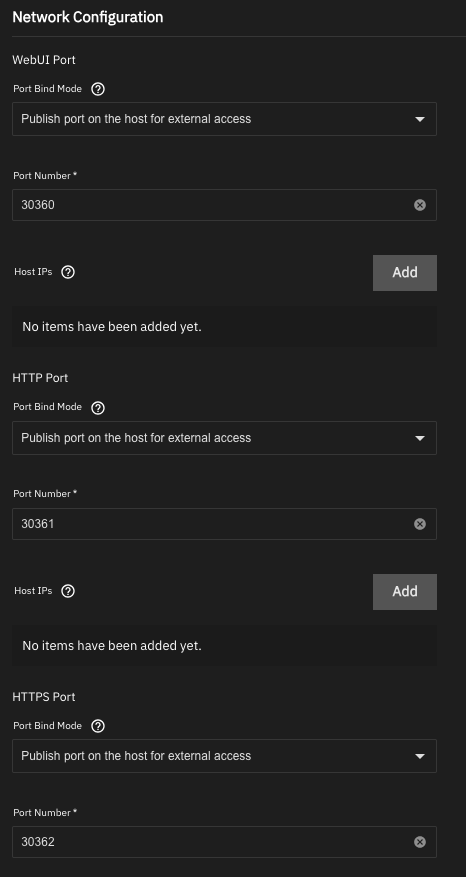
Are you sure you’re forwarding to the right ports? NPM+ needs you to specify three ports in its configuration:

You should be forwarding 80 to the HTTP port (30361 in my screen shot) and 443 to the HTTPS port (30362), with nothing forwarded to the WebUI port (30360). If you’ve used something else for the HTTP and HTTPS ports (e.g., 80 and 443 as I recommend in my NPM guide), forward 80 and 443 from the router there, but the point is to forward 80 to the HTTP port and 443 to the HTTPS port–and forward nothing to the WebUI port.

OmG !! Yes, that works !!

I had indeed various error (not sure which came first, but that many tries & attempts lead to a big mess!!) So I was asking NPM to listen to 80 and 443 AND asking the router to send 80 and 443 to NPM web UI !..

Add to that an error in NPM virtual host config redirecting to a wrong nextcloud port…

And add to that various mixed calls between http and https…

So could now access nextcloud, with certificate ! I’ll now go ahead and clean up the whole things to close what is not necessary.

Many thanks !!

Tanguy

@dan : one more detail if I may, please.

This is with regards to having nextcloud - or any other app that I may later want accessible from the outside - “hidden” behind the reverse proxy.

I had followed your guide (+/- the errors I made…) and created a docker network called ‘proxy’.

NPM and nextcloud joined ‘proxy’ with container name ‘npm’ and ‘nextcloud’ respectively.

I installed Pi-Hole to be able to create local DNS records.

I created npm.cartan.ovh to point to ‘my.TrueNAS.IP’ and then CNAMEs for cloud.cartan.ovh to point to npm.cartan.ovh (such that any substantial apps in that network would be another CNAME for the same target.)

But I’m missing something: in the virtual host edit of nextcloud in NPM, if I try to replace the ‘my.TrueNAS.IP’ by ‘nextcloud’, it cannot find it (Bad Gateway)… Isn’t there something else to do in Pi-Hole to associate ‘proxy’ to something ? I fail to understand from your guide how that part would work.

Thanks,

Tanguy

Did you also join pihole to the proxy network? If not that may be your issue. Since pihole wont be able to resolve if it’s not joined to the proxy network…

Thanks, @LarsR.

Yes, checked and PiHole is in the same (and only) ‘proxy’ container network.

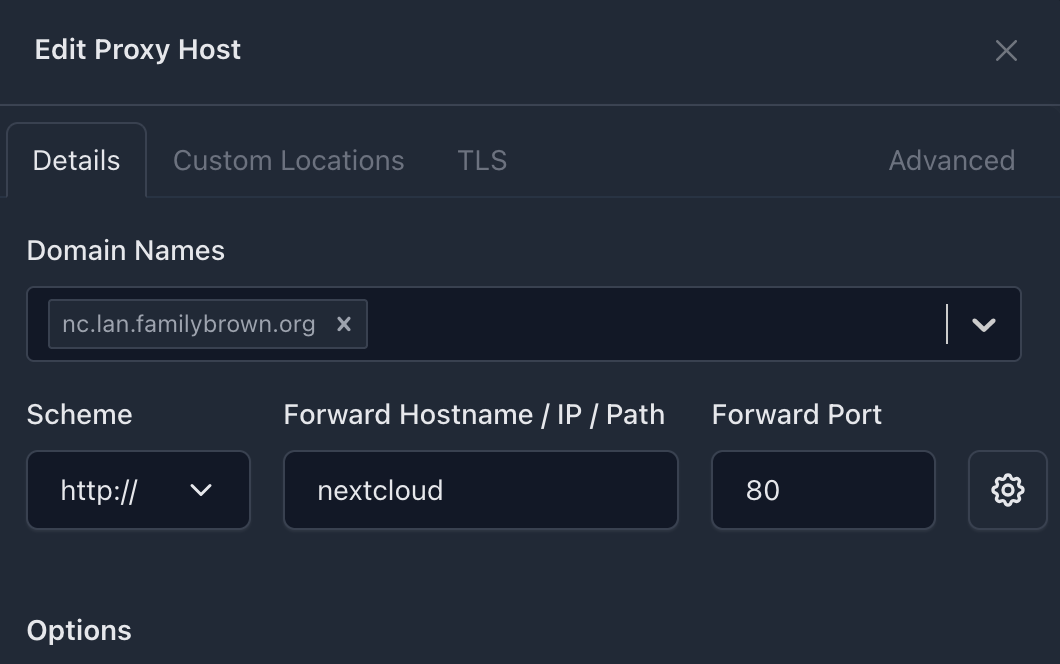
Not in Pi-Hole; if the containers are on the same internal network (proxy), Docker’s built-in DNS should handle the name resolution. What’s happening is that the iX apps use weird port numbers, which aren’t the port numbers the apps actually use internally. For this to work properly, you need to use the port the application is actually listening on, which for Nextcloud is port 80.[1] This setup in NPM+ works for me:


  1. How could you determine this? A few options. One is to just know the port for the app in question; another is to Google it. A third is to convert the app–or maybe a second installation of the app–to a custom app and look at its YAML. The latter is what I did to determine that the nextcloud container internally listens on port 80. ↩︎

You are an excellent problem solver !

Many, many thanks, nextcloud:80 also worked for me!

‘Over & out’ for this thread, now, I think. I hope this discussion could also be beneficial to others !

Thanks all !

Tanguy