
It fixed the issue for me, thanks for the tip.
Have you tried testing SMB read/write speeds after this fix ?
I can fully saturate my 2.5GbE lan connection both ways.
It fixed the issue for me, thanks for the tip.
What fix are we talking about here?
1 Like
This one
I’m more confused now.
This is a new feature introduced with Samba 4.22, which is enabled by default. If it’s really enabled by default, then how come the above midclt command solves the issue? This means that TrueNAS CE 25.10 intentionally disables SMB3 client directory leasing?
Ignoring the above, it’s still unclear why this started happening with CE 25.10. There was no SMB3 client directory leasing in previous version of Samba, and yet clients on older TrueNAS releases were able to browse and view folders without issues. Now this option is “required” for normal behavior, even though it never existed before?
How does enabling what is essentially a client-side cache change the behavior of file visibility based on ACL type? What relation does a client-side cache have with the ACL type, ownership, and permissions of files on the server?
I feel like I’m missing something obvious and might be misunderstanding what’s going on.
EDIT: There seems to be two problems intersecting in this thread that may or may not be related. One is about the “delay” and decreased performance. The other is about empty directory listings.
4 Likes
I totally agree. The “fix” seems to be a SMB optimization available since the latest versions of samba. activating it does what it is supposed to do, ie better performance and doing so, hide the real undercover performance problem. IMHO the real source of the problem is still there
Here is my current /etc/smb4.conf file (ie after migration to 25.10)
  more /etc/smb4.conf
  [global]
      disable spoolss = True
      dns proxy = False
      {...}
      smb3 directory leases = no
      zfs_core:zfs_integrity_streams = False
      zfs_core:zfs_block_cloning = False
      registry shares = True
      include = registry
1 Like
this from the Jira Ticket is what I also think is happening.
As my original issue was closed due to be duplicte I just wanted to add that
midclt call smb.update '{"smb_options": "smb3 directory leases = Yes"}'
does help but does not resolve issue, direct access to files like from media player does still yell 404 issue, the workaround does help with browsing share as it does not vanish but it does not resolve the issue, it just mask it.
Enabling directory leasing (new default) has practical impact that it behind the scenes enables “strict rename”.
We disabled the new parameter during the RC cycle due to significant performance impact for certain workloads discovered by our performance team (idea being that disabling the new feature would be less impactful for existing userbase). Explanation of performance impact is contained in the linked manpage. Unfortunately, it appears that there may be some upstream bug when the new feature is disabled. I haven’t had time to investigate yet.
3 Likes
I’m sorry, but is this a case of the right hand and left hand working on the same project? 
Upstream Samba: “strict rename” bad. Leave disabled! 
Also Upstream Samba: “smb3 directory leases” good. We enable by default! 
Also Also Upstream Samba: Enabling “smb3 directory leases” (which we enable by default) forces “strict rename” to be enabled, which is… bad? 
Come on, what is this…
2 Likes
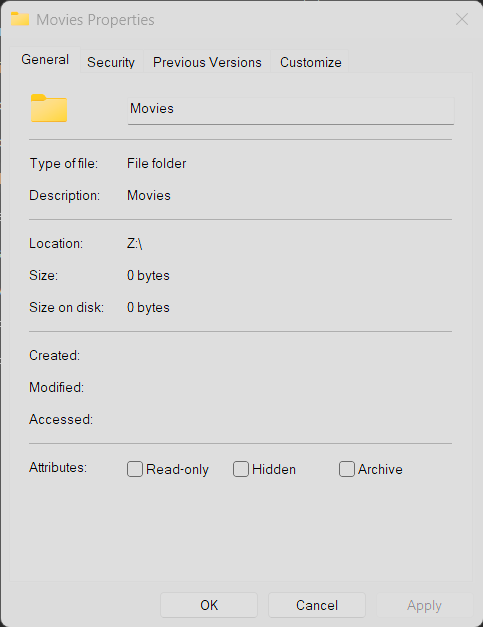
Not sure if this is related, but on 25.10 i cant get the properties of any of the root folders in my shares, however, any sub-directory works fine
5 Likes
nice find!
same here, once right click any one of the root folders, the list is gone.
It’s a repeatable issue.
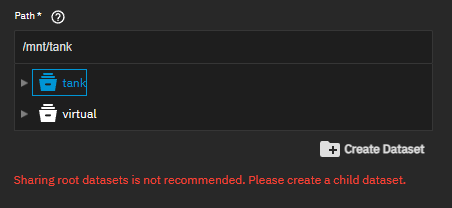
Soooooooo, quick question, how many people here having SMB issues have shared the root of their pool? I setup my shares when I started using Bluefin, and am ashamed to say have only just now noticed the box on the doco page saying to NOT share the root of your pool.
In my defense it has never caused an issue before 25.10
Also if it is really that bad, then why does the GUI allow it?
I have one system that has been running since Dragonfish, which I upgraded to 25.10 from 24.10 this week, as well as a new system installed with 25.10. Both systems are experiencing the issues described in this thread. I have never shared the root of my pool.
I switched to 25.10 a couple of days ago and all my smb shares became practically unusable. For example, I had issues opening pdf files. The 1st try would error out on sumatra and only on the 2nd try would the file launch. If I try to open a few other pdf files immediately after, they would open, but waiting a bit would trigger the same issue.
All my excel files would error out, especially those who pull info from other files. I think some of my excel files’ visual basic code even broke because of that.
When looking through TNS audit, I was able to find unsuccessful SMB events which had the “NT_STATUS_OBJECT_NAME_NOT_FOUND” error. That rabbit hole brought me to a few old samba threads which talked about issues with caching and/or leasing, but I did not want to mess around with any samba configs, so I reverted back to 25.04.2.6.
So far, after going back to 25.04.2.6, I have not had any issues with my smb shares.
1 Like
For me, the only system completely unaffected is the one reverted to 25.04.2.5.
Even with the smb3 directory leases = Yes mitigation suggested above, the ones on 25.10 are a bit flaky.
Hope this gets prioritized for 25.10.1
2 Likes
That’s why .0 is a beta, .1 is an RC, and .2 is a stable release?
1 Like
This is a good question and I’d be interested in seeing more answers.
It hasn’t for the past 2 or 3 versions:
TrueNAS 25.10 now ships with access-based-enumeration by default, which is a feature which hides files in a directory. Given that people have issues with files not showing up, I am surprised people are not investigating that new feature for a possible cause.
I haven’t upgraded to 25.10, but reading the patch it would seem that the feature is enabled by default. But there is a new setting called ixnas:truenas_abe which doesn’t appear to be available in the Web-UI. If you want to investigate, I’d say setting ixnas:truenas_abe = No might yield some results.
Edit: I did confuse access based share enumeration with hide unreadable, corrected the text
Reference: NAS-136499 / Enable access-based-enumeration by default for ixnas shares by anodos325 · Pull Request #462 · truenas/samba · GitHub
1 Like
You may think differently, but the bug seems to affect enough people that it should have been caught during beta and RC testing. This is not a cosmetic or fringe issue.
4 Likes