No Username/Password fields for AD join

On one of our NASes when I try to enable Active Directory I can’t get input fields for username and password. I think there was a previous AD configuration on this system before ´but there’s no information left (at least visible in the interface).

buggy

correct (different system)
Any idea how to get this working?

See the UI Guide (this is the link for 25.10)

I do know that Docs page. Both systems are actually 25.04 (the buggy one runs 25.04.2.6).

Did I overlook something? Are those inputs supposed to vanish at some point?

Do you have a kerberos set for authentication to AD in the form? Generally, you’ll use either a username + password combination for AD communication or a kerberos keytab. The former is only used when initially joining the domain. Once the latter is configured then the username + password combination is removed from the form (25.04). This is simplified in 25.10.

There are no records in the kerberos keytab section. Can I check if something was muddled with via CLI? I am not the only one using this system.

whole page to be sure

Hmm… what is output of midclt call activedirectory.config | jq?

# midclt call activedirectory.config | jq
{
  "id": 1,
  "domainname": "TEST",
  "bindname": "<redacted>",
  "verbose_logging": false,
  "allow_trusted_doms": false,
  "use_default_domain": false,
  "allow_dns_updates": false,
  "disable_freenas_cache": false,
  "restrict_pam": false,
  "site": "",
  "timeout": 20,
  "dns_timeout": 20,
  "nss_info": "TEMPLATE",
  "enable": false,
  "kerberos_principal": "<redacted>",
  "createcomputer": "",
  "kerberos_realm": null,
  "netbiosname": "<redacted>",
  "netbiosalias": []
}

So remove the kerberos principal from the UI config as discussed above.

Sorry but… how? The only field that’s filled out in the ui normally is the domain name (with a test value).
Kerberos realm and principal (in the advanced “configure active directory” options) as well as kerberos keytab, kerberos realms are all empty.

Did you click on the “advanced options”?

yes, as stated above:

Kerberos realm and principal (in the advanced “configure active directory” options) as well as kerberos keytab, kerberos realms are all empty.
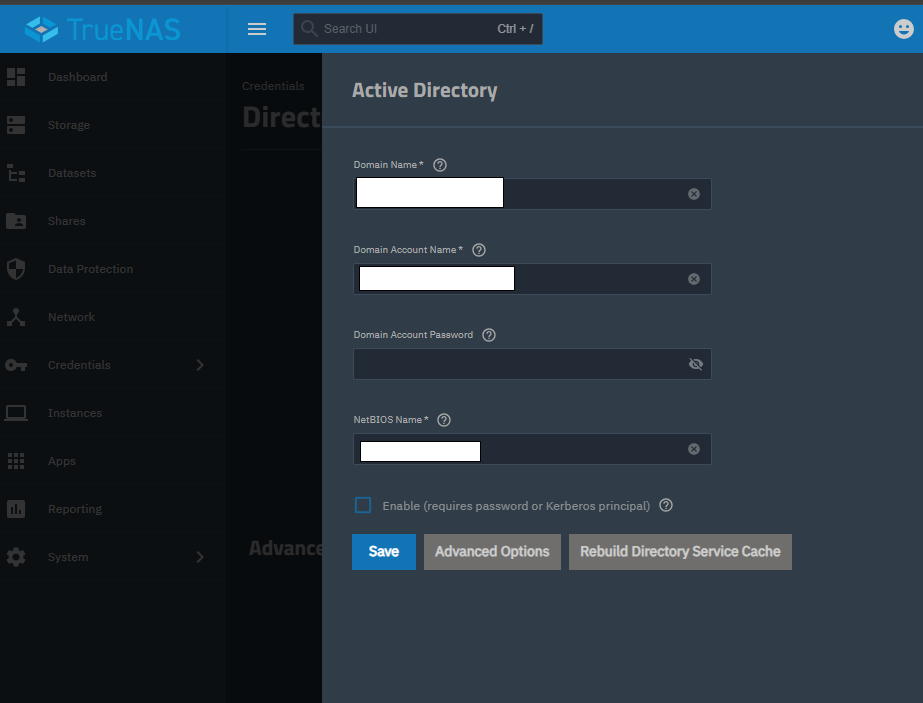
"TEST"

This is an invalid / unexpected domain name.

Anyway. Does midclt call activedirectory.update ‘{“domainname”: <your domain>, “kerberos_principal”: ““}’ -j clear it?

Thanks, that did clear it. I set an actual domain name in the process.

Now the input fields show up again :+1: no idea why the principal didn’t show up in the UI though.

Sounds like a UI bug, but also one that won’t happen in 25.10 because backend / UI was redesigned here.

1 Like