NVMe over TCP Device Slower Than Expected

Issue: ~1.8GB/s throughput from NVMe over TCP device on linux client
Here is the setup and my testing so far:

NVMe device is a 4-wide stripe of gen3 NVMe drives. It was tested locally on an ubuntu testbench (xfs) to do around 8GB/s seq. read, 5GB/s seq. write.
Then testing locally as a ZFS stripe in my truenas system, i saw similar numbers.

When testing with fio and kdiskmark on the linux client, I seem to be limited to around 1.8GB/s. volblocksize 128k , recordsize 128k . zvol was set to inherit these values. the barryallen nvme device is using XFS on the client, and blocksize seems to have been set at 16k as I couldnt set it any higher with the mkfs.xfs tool. Though i assumed that wouldnt be the cause of such extreme performance issues?

All networking points of contact are set to 9000 MTU, and are 40Gbe links.
CPU thread usage does not seem to be the bottleneck on server or client either.

iperf3 test shows ~28Gb/s bandwidth, perhaps indicating that transferring over TCP itself is not the issue, but my implementation of NVMe over TCP?
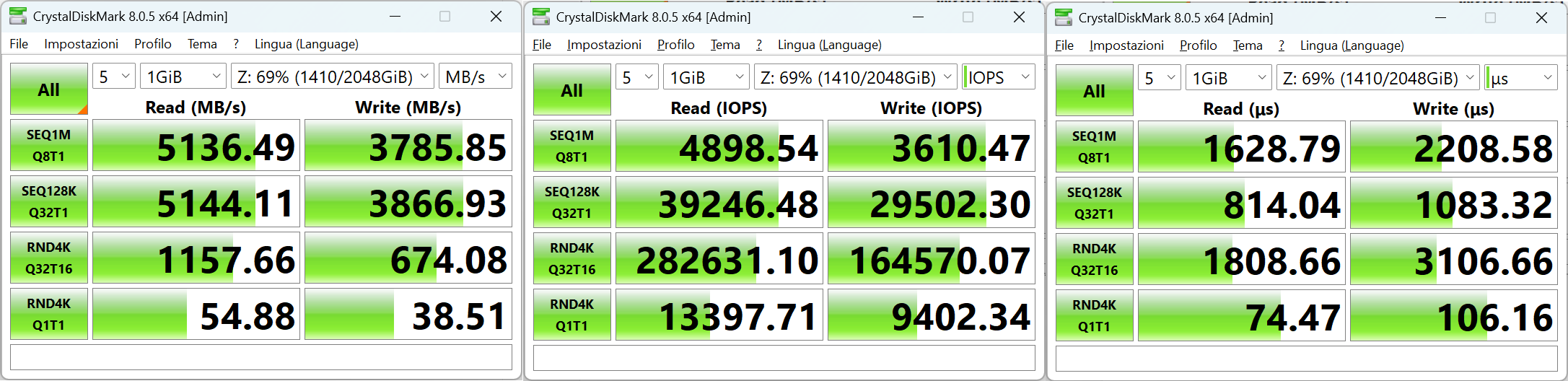
How fast is a copy to /dev/null ? And is it different if you run it again?

Hello,

If yours network cards support RDMA, then you can try to enable it to see the difference in performance. In my case I must enable RDMA because otherwise I can’t connect to target in Win11.

My performance:

NIC are both Chelsio 100Gbps, MTU 9000, Pool Raidz1 with 4 NVME PCIe 4.0 disks (formatted with 4k blocks).

Best Regards,

Antonio

What is your CPU/RAM/motherboard configuration?

Can you share your test results more specifically, like the actual output of the actual commands you used to test locally and via the Linux box ?

Server:
Epyc 7713 , 8x64GB 3200 , ROMED8-2T
The pool configuration has changed to a striped mirror, where the SSDs in question are x1 1TB Kingston SKC2500 and x3 1TB Silicon Power A60
Client:
Ryzen 7700X , 2x16GB 6000C32, X670E-E Strix

Both devices are using Mellanox CX314a’s. Arista 7050SX in between. 9000MTU as previouly stated.

I have also increases my TCP send/receive buffer sizes to 64MB as a longshot for performance tuning, but that had not done anything. TCP window scaling is also enabled.

I will update the main post with this information, but it seems read speeds increased after I added the --nr-io-queues flag to the nvme connect command with a value of 4 or 8. When I reconnect excluding the flag, or manually set it to 1, I see the ~1.8GB/s throughput I was seeing before. However, write speeds are still slow.
The following are the results on the client running fio after connecting to my NVMe subsystem with --nr-io-queues 4 added

fio --name=read_test --ioengine=libaio --rw=read --bs=1M --numjobs=4 --size=10G --iodepth=32 --runtime=60 --direct=1 --time_based --filename=/dev/nvme1n1
Output:
Run status group 0 (all jobs):
READ: bw=3070MiB/s (3219MB/s), 691MiB/s-846MiB/s (724MB/s-887MB/s), io=180GiB (193GB), run=60019-60040msec

Disk stats (read/write):
nvme1n1: ios=183839/0, sectors=376502272/0, merge=0/0, ticks=7660499/0, in_queue=7660499, util=99.86%

fio --name=write_test --ioengine=libaio --rw=write --bs=1M --numjobs=4 --size=10G --iodepth=32 --runtime=60 --direct=1 --time_based --filename=/dev/nvme1n1
Output:
Run status group 0 (all jobs):
WRITE: bw=1908MiB/s (2001MB/s), 465MiB/s-494MiB/s (488MB/s-518MB/s), io=112GiB (120GB), run=60053-60070msec

Disk stats (read/write):
nvme1n1: ios=40/114323, sectors=5376/234133504, merge=0/0, ticks=10/7631165, in_queue=7631175, util=100.00%

When I tested the stripe locally, I had formated it with sudo mkfs.xfs -d su=512k,sw=4 with mdadm, raid 0.
And simply ran kdiskmark on the default nvme profile.

Actually, I just realized, judging by the ~100% util I see when running the write test and monitoring the truenas system with htop, I am seeing a single thread get maxxed out @ 100%.
Though in this case, how can I distribute this load across multiple cores? I figured it would do that by default. Should I just disable write compression on this zfs pool too? Or is that unecessary.

zfs is pretty well multithreaded until you really increase the recordsize/blocksize too far;
and even then htop hides kernel threads by default so you won’t see them until you enable it in htop’s settings.

you should really post what process you are seeing that you suspect is being single-core bound.

I seem to have solved my own issue when specifying the --nr-io-queues flag, as I’m now bottlenecked by the performance of my SSDs rather than my networking or client/server’s CPU performance. I’ll mark this thread as resolved for now. Thank you all for helping me brainstorm!