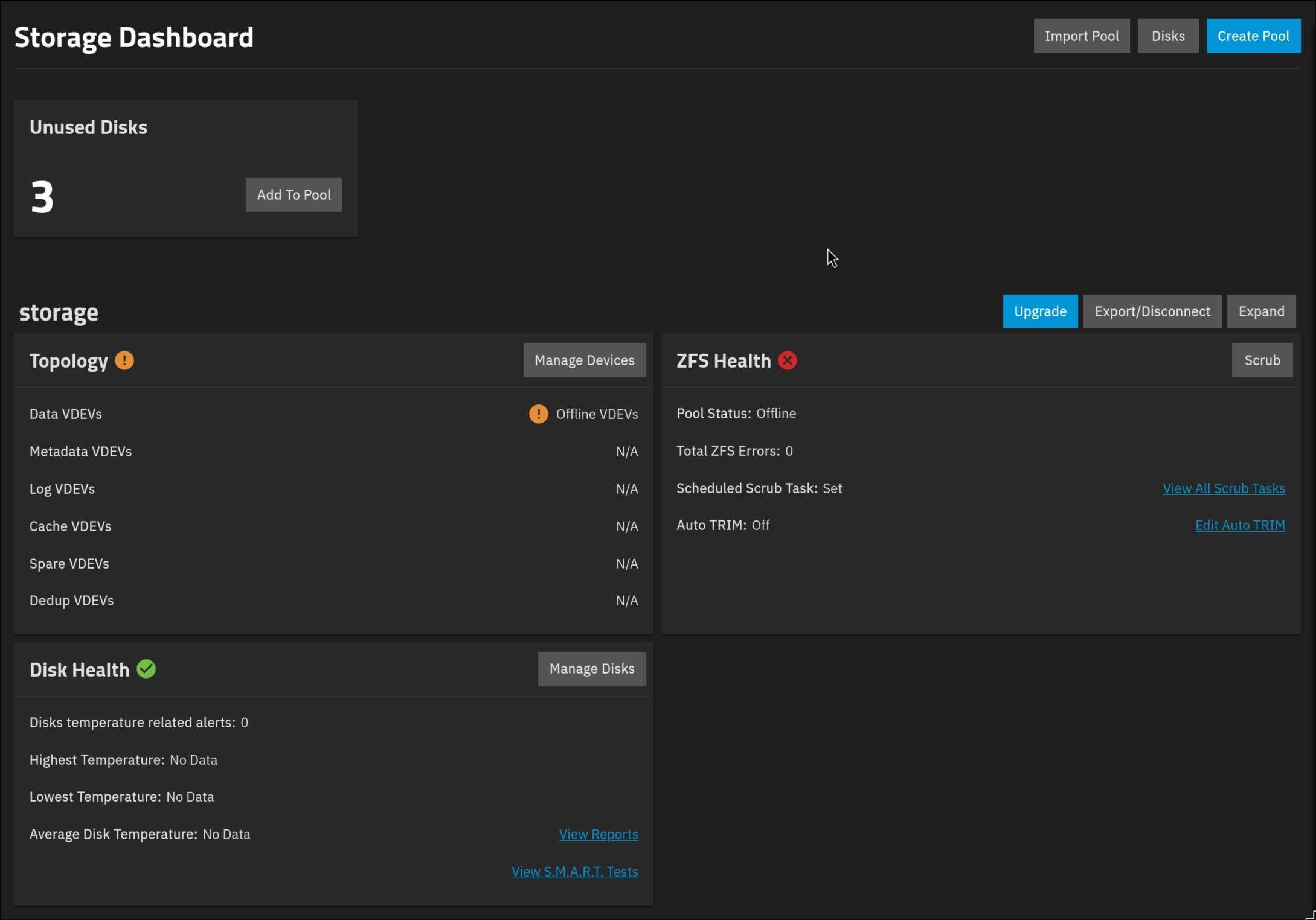
I wanted to upgrade an old PC that had truenas (freenas before) with new RAM and Disks.
But during manipulations my main pool disapear. I try zpool status / list to get something but no.
Is it anyway to get the pool back or to retrieve data from the disk ?
my config is an old dell XPS 8300:
Intel(R) Core™ i5-2310 CPU @ 2.90GHz
2TB HDD as main pool
500GB SSD with OS
6GB of RAM before update 16GB now
OS Version:25.04.2.6
Look for your introductory email from the forum when you signed up. You may need to do the TrueNAS Bot tutorial to get more forum rights and post images of your system.
I would power down and check all your disk and power connections. We would need more info on what is happening to your system or if there are any error messages. If your single disk pool dies, you lose all the data in that pool as there isn’t any redundancy.
You can try going to the Shell in the GUI and running the following. Please post the results back using Preformatted Text (</>) on toolbar or Ctrl+e. Each command result in it’s own Preformatted Text box.
Thanks for answering ! I will take a look to emails later thanks. By this: “If your single disk pool dies, you lose all the data in that pool as there isn’t any redundancy.” you mean if the disk dies or the pool dies ? To me disk isn’t dead no issue about that.
zpool import no pools available to import
zpool status -v
pool: boot-pool
state: ONLINE
status: One or more features are enabled on the pool despite not being
requested by the ‘compatibility’ property.
action: Consider setting ‘compatibility’ to an appropriate value, or
adding needed features to the relevant file in
/etc/zfs/compatibility.d or /usr/share/zfs/compatibility.d.
scan: scrub repaired 0B in 00:00:29 with 0 errors on Sun Feb 22 03:45:31 2026
config:

    NAME                                             STATE     READ WRITE CKSUM
    boot-pool                                        ONLINE       0     0     0
      ata-WDC_WDS500G2B0A-00SM50_175204422004-part2  ONLINE       0     0     0

errors: No known data errors
All your system is seeing is the boot-pool and the HD associated with it. It isn’t seeing an exported pool and the data HD. Do you see any unattached disks listed in the GUI?
Yes I have one disk recognize (I unplugged all others) but no pool (and it was a pool before)… lsblk -bo NAME,MODEL,ROTA,PTTYPE,TYPE,START,SIZE,PARTTYPENAME,PARTUUID NAME MODEL ROTA PTTYPE TYPE START SIZE PARTTYPENAME PARTUUID sda WDC WDS500G2B0A-00SM50 0 gpt disk 500107862016 ├─sda1 0 gpt part 40 524288 BIOS boot 94515636-0efe-11eb-8074-180373b059ce ├─sda2 0 gpt part 33555496 482915385344 FreeBSD ZFS 9458772f-0efe-11eb-8074-180373b059ce └─sda3 0 gpt part 1064 17179869184 FreeBSD swap 945528dd-0efe-11eb-8074-180373b059ce sdb ST2000DL003-9VT166 1 gpt disk 2000398934016 └─sdb1 1 gpt part 40 209715200 EFI System ace70443-734f-47a4-8e7c-6c2b247f13db
The old pc had FreeNAS (FreeBSD) before. That is a normal look for any systems that came from that or TrueNAS Core. SDB is the odd one as it looks to be erased or isn’t related to the data disk from before
The other clue on the disk is the model names that give hints on the size.
That would explain why your pool and the data disk are missing. You can have more than one 2TB drive in the system, if you have available slots and power. TrueNAS will only report them as extra drives. If you did have the wrong drive in the system, TrueNAS should recognize the data disk. Try to track them by the serial numbers if you have multiple drives. That’s a unique identifier.
The device names can change at every boot so SDB might be SDA the next time.
The PARTUUID is unique but isn’t much help when you are looking at the physical HDs. The serial number will be on the outside of the drive somewhere. Some users add stickers with the serial numbers so they can identify the drive without having to remove them or power off. It helps with replacing the correct drives when you have more than one.
I reconnect all 2TB drives I have and this is the output: lsblk -bo NAME,MODEL,ROTA,PTTYPE,TYPE,START,SIZE,PARTTYPENAME,PARTUUID,SERIAL NAME MODEL ROTA PTTYPE TYPE START SIZE PARTTYPENAME PARTUUID SERIAL sda WDC WDS500G2B0A-00SM50 0 gpt disk 500107862016 175204422004 ├─sda1 0 gpt part 40 524288 BIOS boot 94515636-0efe-11eb-8074-180373b059ce ├─sda2 0 gpt part 33555496 482915385344 FreeBSD ZFS 9458772f-0efe-11eb-8074-180373b059ce └─sda3 0 gpt part 1064 17179869184 FreeBSD swap 945528dd-0efe-11eb-8074-180373b059ce sdb ST2000DL003-9VT166 1 gpt disk 2000398934016 6YD0H0J4 └─sdb1 1 gpt part 40 209715200 EFI System ace70443-734f-47a4-8e7c-6c2b247f13db sdc ST2000DM006-2DM164 1 gpt disk 2000398934016 Z4Z8WGBQ sdd ST2000DM001-9YN164 1 gpt disk 2000398934016 S1E08NW5 └─sdd1 1 gpt part 40 209715200 EFI System e51b837d-594d-4a02-8f49-3f496e0ec832
What info shows for STORAGE pool when you check the Manage Devices button for the Offline VDEV? I don’t know if it will show anything useful if the disk was erased. What was your entire process from the old machine and os version to where you are currently?
it shows absolutely nothing. The machine stay what she was, I only upgrade RAM and add disks.
I removed all disk from the NAS to check the disk sanity with CrystalDiskInfo software on a Windows and put them back on the NAS. That’s the only manipulation I did.
Maybe windows did not recognise the disks and asked to initialise them, thereby creating a new gpt table and efi partion, overwriting the existing partition table. Not sure it fhat would be recoverable.
Edit: not sure initialising already creates a efi partion…
Is there a “safe way” to take a look / get back data from this HDD ?
I saw multiple software but I don’t know the efficiency and if it’s worth to try ?
I don’t think there is a way. You can try running Klennet Recovery on Windows with the disks attached but you need to decide if it is worth the $$$ for actually recovery. You should be able to get an idea of how it works and runs from their website.
Hey ! Using the free option of the software, it finds the zfs partition and pool name.
For you is that a “good” thing ? and can I recover my pool on truenas ?