TrueNAS SCALE Disk Pool not showing

Good afternoon. I have a TrueNAS SCALE server that I built and has been running fine (no issues at all) since March 2025. I use it to run a Jellyfin server and for some general file sharing across my home network. The other day I was moving some files to a shared folder and I got some error. I don’t remember exactly what it said and I did not copy it down. I know it mention I/O in the error message.

Next I hopped on the browser and logged into the TrueNAS dashboard. It was a bit strange as the dashboard appeared different than what I was used to. It also appeared as if the storage tile was not loading. I saw some alerts on the “bell” they appeared to refer to the dataset and pool (I’ll paste the alerts at the end).

From here I just figured I would reboot the server go from there. After selecting restart from the dashboard, the server would not boot. Next I removed all of my HDDs and plugged it back in. The server booted up and I was able to get back into the dashboard. No the dashboard looked normal from what I was used to except (obviously) the storage tile was blank. I shut the server down with plans to work on it later.

Today I got around to trying to troubleshoot. I turned on the server so I could research the alerts that were still in the notification bell. Now it wouldn’t connect via the browser. I connected a keyboard and monitor to it and and attempted to boot it when I noticed that the case fan would start to spin then stop. Also there was a LED on the MB I/O panel that would light when the fan tried to spin then go out when the fan stopped. It’s as if it was being toggled on and off. I hooked up a new power supply and now I am able to boot the server and access it via the browser dashboard.

I reinstalled all of my HDDs. It booted up and I am still able to access it via the browser dashboard. The problem is that the storage tile is still blank. The storage dashboard shows there are “Disks with exported pools 4” Before I do anything else I thought I would get on the forums and seek some advice first. I would really like to fix this without losing everything on the HDDs.

Any help will be greatly appreciated. Thank you.

Here is a copy/paste of the last few alerts from the dashboard:

Alerts

cancel
Critical
Failed to configure docker for Applications: Missing “truenas0/ix-apps/docker, truenas0/ix-apps/app_configs, truenas0/ix-apps/app_mounts, truenas0/ix-apps/truenas_catalog” dataset(s) required for starting docker.
2026-04-16 15:59:23 (America/Chicago)
Dismiss

cancel
Critical
Failed to configure docker for Applications: Missing “truenas0/ix-apps/app_mounts, truenas0/ix-apps/app_configs, truenas0/ix-apps/docker, truenas0/ix-apps/truenas_catalog” dataset(s) required for starting docker.
2026-04-16 16:08:27 (America/Chicago)
Dismiss

cancel
Critical
Failed to configure docker for Applications: Missing “truenas0/ix-apps/app_configs, truenas0/ix-apps/app_mounts, truenas0/ix-apps/truenas_catalog, truenas0/ix-apps/docker” dataset(s) required for starting docker.
2026-04-16 16:17:40 (America/Chicago)
Dismiss

cancel
Critical
Failed to configure docker for Applications: Missing “truenas0/ix-apps/app_mounts, truenas0/ix-apps/docker, truenas0/ix-apps/app_configs, truenas0/ix-apps/truenas_catalog” dataset(s) required for starting docker.
2026-04-16 16:22:15 (America/Chicago)
Dismiss

cancel
Critical
Failed to sync TRUENAS catalog: [EFAULT] Failed to clone ‘ht***://github./truenas/apps’ repository at ‘/mnt/.ix-apps/truenas_catalog’ destination: [EFAULT] Failed to clone 'ht://github.***/truenas/apps’ repository at ‘/mnt/.ix-apps/truenas_catalog’ destination: fatal: destination path '/mnt/.ix-…
2026-04-02 10:31:01 (America/Chicago)
Dismiss

cancel
Critical
SMB shares have path-related configuration issues that may impact service stability: media: Path does not exist.
2026-04-16 15:59:23 (America/Chicago)
Dismiss

cancel
Critical
Pool truenas0 state is OFFLINE: None
2026-04-16 15:59:22 (America/Chicago)
Dismiss

info
Notice
New ZFS version or feature flags are available for pool ‘truenas0’. Upgrading pools is a one-time process that can prevent rolling the system back to an earlier TrueNAS version. It is recommended to read the TrueNAS release notes and confirm you need the new ZFS feature flags before upgrading a pool.
2026-04-01 14:46:10 (America/Chicago)
Dismiss
Post full details on your server hardware, OS version, how pools are set up and what you are running. Your description sounds like a hardware failure is happening so start with any built in motherboard diagnostics first. Boot a Live Linux version and run at least 5 passes of Memtest86 and a CPU stress test like Prime. If those are all passing, run Long SMART tests on all your drives. You didn’t mention how your pool connects so it may be a HBA issue.
Report your findings as you go to the forum.

Also, please post the output of the following command, in CODE tags:

sudo zpool import

It appears your pool suffered enough errors that it will not import normally. However, as @SmallBarky said, their could be hardware problems that you would want to fix first before attempting to fix the pool.

Update on my truenas0 pool issue:

I followed both of your suggestions as closely as possible.

Hardware & Diagnostics:

  • Motherboard: BKHD-1264-NAS (Intel N100)

  • Drives: 4× HGST HUS726040ALE614 4TB connected via onboard JMB585 SATA controller + hot-swap backplane

  • Pool layout: Single RAIDZ1 vdev (4 drives)

  • TrueNAS SCALE version: 24.10.2 (Electric Eel)

Diagnostics performed:

  • Long SMART tests on all 4 drives → All PASSED

  • Memtest86 → 4 full passes with 0 errors (the Memtest86 defaulted to 4 passes only I didn’t think I needed to run it again)

  • CPU + RAM stress test (stress-ng, 30 minutes) → Passed (6/6 tests passed, CPU temp stayed ~77-78°C)

I also ran the sudo zpool import command and got the following output:

pool: truenas0
id: 14434060225059854200
state: FAULTED
status: The pool metadata is corrupted.
action: The pool cannot be imported due to damaged devices or data.
The pool may be active on another system, but can be imported using
the ‘-f’ flag.
see: Message ID: ZFS-8000-72 — OpenZFS documentation
config:
truenas0 FAULTED corrupted data
raidz1-0 ONLINE
7302f31c-8cae-4364-ba71-76abfa2efa9f ONLINE
bd9bab8b-6512-4838-9370-67e10c15ba75 ONLINE
13114f33-83e6-4d17-8c35-3394bcc848f4 ONLINE
c6b6eefc-0902-4de9-a9b6-7d5366813bdc ONLINE

Thanks again for your help.

I ran the sudo zpool import command and got the following output:

pool: truenas0
id: 14434060225059854200
state: FAULTED
status: The pool metadata is corrupted.
action: The pool cannot be imported due to damaged devices or data.
The pool may be active on another system, but can be imported using
the ‘-f’ flag.
see: Message ID: ZFS-8000-72 — OpenZFS documentation
config:
truenas0 FAULTED corrupted data
raidz1-0 ONLINE
7302f31c-8cae-4364-ba71-76abfa2efa9f ONLINE
bd9bab8b-6512-4838-9370-67e10c15ba75 ONLINE
13114f33-83e6-4d17-8c35-3394bcc848f4 ONLINE
c6b6eefc-0902-4de9-a9b6-7d5366813bdc ONLINE

It appears that something corrupted your pool. Possibly your power supply as you mentioned in your first post. Metadata corruption is generally not easily fixed.

You can try this, and see if it returns any error message:

sudo zpool import -fFn truenas0

If that does not work, further extreme steps could be tried:

sudo zpool import -fFXn truenas0

Note that neither of those will import the pool. This is to check and see how much corruption their is, by rolling back the last few writes, (aka ZFS write transactions).

If the first command does not return an error, you don’t need to try the second.

Let us know the results.

1 Like

Ok so I did the sudo zpool import -fFn truenas0 I could hear the drives for for a second or 2 then I got the prompt again. No errors.

Great. Now you can try it for real without the -n option, see below. It still may not work, but it is what it is.

sudo zpool import -fF -R /mnt truenas0

Please note that this will throw out the more recent writes to your pool. Hopefully only the corrupted ones. But, this is permanent. No going back unless you want to try doing it read only first.

Just ran sudo zpool import -fF -R /mnt truenas0

cannot import ‘truenas0’: insufficient replicas
Destroy and re-create the pool from
a backup source.

is the message I got.

Well, you can try this next step. It will throw out even more of the most recent writes, which hopefully cover the metadata corruption.

sudo zpool import -fFX -R /mnt truenas0

Well I ran sudo zpool import -fFX -R /mnt truenas0 I could hear the drives for longer then I got the following:
cannot import ‘truenas0’: one or more devices is currently unavailable

Probably not a good sign ehh?

Stupid question - how many drives should be in the pool & how many are presently detected? Also, are the drives connected to the motherboard, using an HBA, or something less kosher?

There was some info in TrueNAS SCALE Disk Pool not showing - #4 by AstraNme

1 Like

There are4 drives and 4 are shown as online with sudo zpool import

They are connected to the mother board sata ports but through a hotswap backplane. I could try a direct connection but the PS doesn’t have enough power plugs for all the drives so I would have to find a adapter/splitter.

No.

My next suggestion is to get the ZFS write transaction group number from each disk. This can be done with;

sudo zdb -l /dev/DISK_PART | grep txg | head -1

Replace “DISK_PART” with something like “sda2” or whatever is used for your data pool. Repeat for each disk.

Sometimes a disk becomes out of sync with the rest of the pool, like with power supply problems causing it to power down. Finding out if all 4 disks are at the same ZFS write transaction group can help. Because if one is much older, like 30 TXGs older than the others, it would prevent importing of the pool. That is because even with “F” or “X”, ZFS can’t roll back that far.

So, if it is only 1 disk really out of date, then we can physically pull that data cable and import the ZFS pool in a degraded state. Plus, do so without throwing out data. Then, replace the missing disk with itself, causing a full re-silver of the data.

Complicated I know. But, people who choose a single disk of redundancy AND use low end commodity hardware take more risks than Business or Enterprise level of hardware.

Ok so I don’t know if I did it right but it here is how it went:

admin@truenas[~]$ sudo zdb -l /dev/sda | grep txg | head -1
[sudo] password for admin:
admin@truenas[~]$ sudo zdb -l /dev/sdb | grep txg | head -1
admin@truenas[~]$ sudo zdb -l /dev/sdc | grep txg | head -1
admin@truenas[~]$ sudo zdb -l /dev/sdd | grep txg | head -1
admin@truenas[~]$

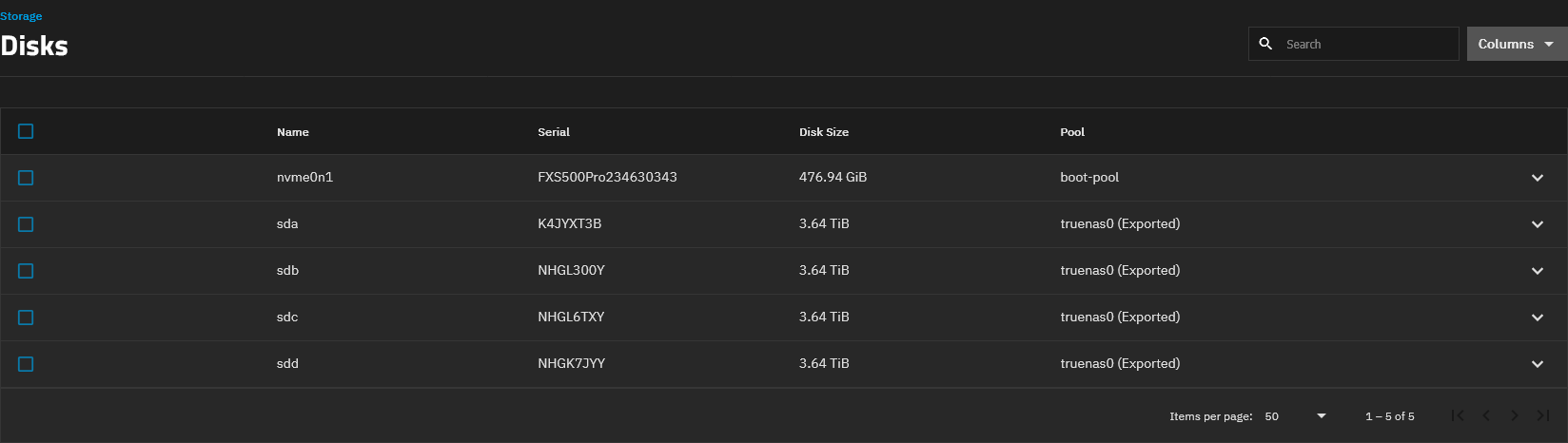
Also this is what the Storage>Disks looks like in the TrueNAS browser interface:

That result would be expected, as it is likely that their is a partition number too.

This is where it gets even more complicated. We need to find the partition of the “truenas0” pool’s disks. It is likely 2, but we can check with;

sudo lsblk -o NAME,SERIAL,LABEL,UUID,PARTUUID,TYPE

Please run that command and post the output.

Then we can modify your 4 ZFS zdb commands to include the partition number.

That worked. It showed a number “1” for the disk partition:

admin@truenas[~]$ sudo lsblk -o NAME,SERIAL,LABEL,UUID,PARTUUID,TYPE
[sudo] password for admin:
NAME SERIAL LABEL UUID PARTUUID TYPE
sda NHGL300Y disk
└─sda1 truenas0 14434060225059854200 bd9bab8b-6512-4838-9370-67e10c15ba75 part
sdb NHGL6TXY disk
└─sdb1 truenas0 14434060225059854200 13114f33-83e6-4d17-8c35-3394bcc848f4 part
sdc K4JYXT3B disk
└─sdc1 truenas0 14434060225059854200 7302f31c-8cae-4364-ba71-76abfa2efa9f part
sdd NHGK7JYY disk
└─sdd1 truenas0 14434060225059854200 c6b6eefc-0902-4de9-a9b6-7d5366813bdc part
nvme0n1 FXS500Pro234630343 disk
├─nvme0n1p1 71d854d8-5faf-4e13-b817-1ad53ebb317f part
├─nvme0n1p2 EFI FCD7-832B de23d16e-33a7-4d1f-83d7-75eac8d3c140 part
├─nvme0n1p3 boot-pool 9187083223105703887 7460aef3-c044-457b-b707-086a3b63aec3 part
└─nvme0n1p4 03b6388f-97c5-43e4-ae7e-622317563e17 part
admin@truenas[~]$

I think you’re going to tell me to add 1 to each of the disks and rerun the sudo zdb -l /dev/DISK_PART | grep txg | head -1 command but I’ll wait for your reply.

Yes, try these commands:

sudo zdb -l /dev/sda1 | grep txg | head -1
sudo zdb -l /dev/sdb1 | grep txg | head -1
sudo zdb -l /dev/sdc1 | grep txg | head -1
sudo zdb -l /dev/sdd1 | grep txg | head -1

Ok ran the commands here’s what I got:

admin@truenas[~]$ sudo zdb -l /dev/sda1 | grep txg | head -1
[sudo] password for admin:
txg: 6144290
admin@truenas[~]$ sudo zdb -l /dev/sdb1 | grep txg | head -1
txg: 6144290
admin@truenas[~]$ sudo zdb -l /dev/sdc1 | grep txg | head -1
txg: 6144290
admin@truenas[~]$ sudo zdb -l /dev/sdd1 | grep txg | head -1
txg: 6144290
admin@truenas[~]$