
Long story short: I run an 8 HDD RaidZ2 pool (on recommended hardware before anyone asks - LSI SAS HBA and server grade motherboard with ECC) and one of my disks failed. After replacing it and going to the pool management section in the UI to start the resilvering process, I noticed the UI lists the same disk twice, as shown in these screenshots (notice how the entries have the same mountpoint and serial listed).
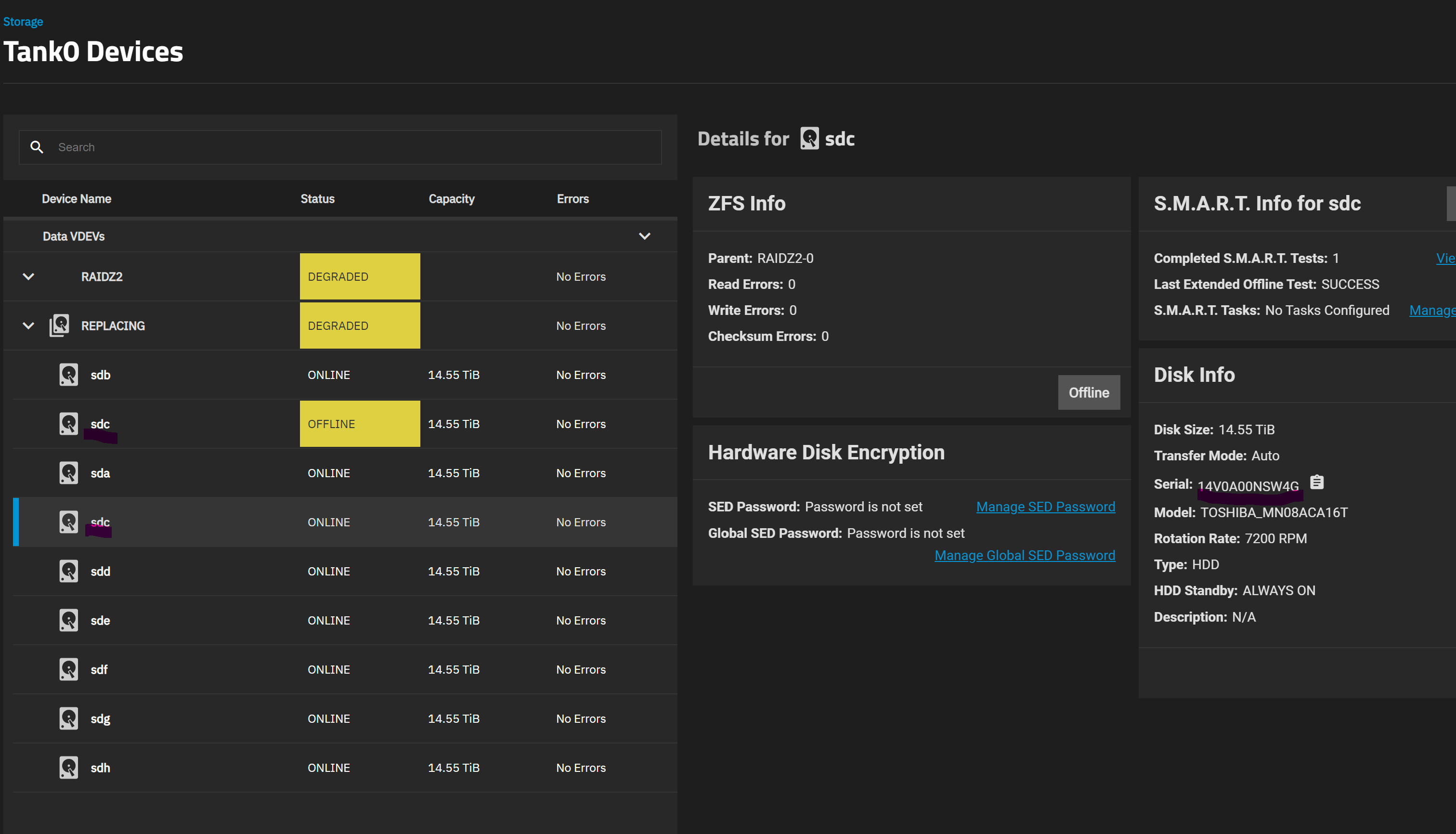
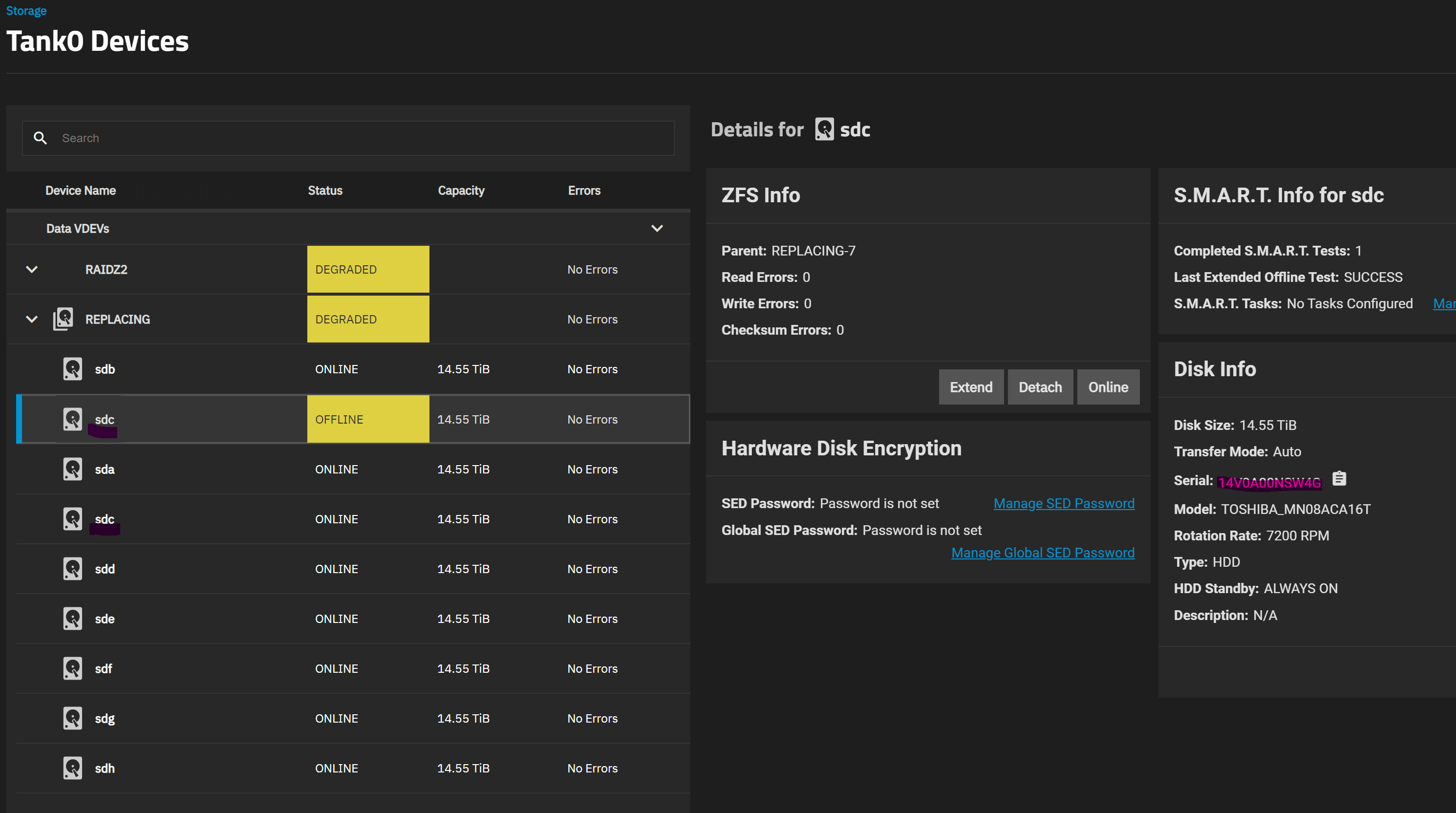
Initially the duplicate entry that is showing as Offline was Faulted, so my first action was to offline it. When I did so, however, the other, healthy /sdc was offlined instead. Setting it back to online started a short resilver.
I could get the system to the state shown in the screenshots - i.e. offlining the right disk - via the command line by doing zpool offline tank0 13937917368367220981.
After that, not finding anything relevant online but still wanting to get my pool back to normal, I used the replace button in the GUI for the Offline entry and selected the new disk. And prayed it would actually target the right disk instead of offlining the other, healthy sdc and resilver with no redundancy.
First of all, given this output from zpool status, is my pool safe? My guess would be yes, the UI thankfully selected the right pool member disk for replacement and the new disk has been added to the pool and is resilvering.
# zpool status tank0
  pool: tank0
 state: DEGRADED
status: One or more devices is currently being resilvered.  The pool will
        continue to function, possibly in a degraded state.
action: Wait for the resilver to complete.
  scan: resilver in progress since Fri Jun 21 10:57:12 2024
        1.33T / 89.8T scanned at 1.53G/s, 310G / 89.8T issued at 354M/s
        37.9G resilvered, 0.34% done, 3 days 01:32:05 to go
config:

        NAME                                        STATE     READ WRITE CKSUM
        tank0                                       DEGRADED     0     0     0
          raidz2-0                                  DEGRADED     0     0     0
            sdh2                                    ONLINE       0     0     0
            sde2                                    ONLINE       0     0     0
            sdc2                                    ONLINE       0     0     0
            sdf2                                    ONLINE       0     0     0
            sdd2                                    ONLINE       0     0     0
            sdg2                                    ONLINE       0     0     0
            sda2                                    ONLINE       0     0     0
            replacing-7                             DEGRADED     0     0     0
              13937917368367220981                  OFFLINE      0     0     0  was /dev/sdc2
              bbd7d447-0374-4cf5-a74d-bfc19d86358f  ONLINE       0     0     0  (resilvering)

errors: No known data errors
Secondly, how can I get Truenas to list my disks properly? And ideally to use GUIDs instead of mount points for pool definition? Would exporting and importing the pool once I’m done resilvering fix this? I also noticed the disks - when looking at the reported serial numbers - seem to be getting different mount points every reboot, even though I am not moving them to different SATA ports.
Finally, how is this happening? Is it because I migrated the system from Truenas Core, where the pool was created? I followed the recommended procedure: backing up the config in Core, do a clean Scale install and reload it - there was no mention of needing to export the pool beforehand and so I did not.