I upgraded from CORE to SCALE 25.04.2.6 by performing a fresh install of TrueNAS SCALE after saving the configuration from CORE 13 (can’t remember the version, but it was the latest one as of a week ago).
I have eight SMB shares, each connected to a separate Dataset (i.e. 8 datasets in total), all within one pool.
After restoring the configuration, all eight SMB shares are working (and all files present) but curiously only six of the datasets are shown in the GUI’s dataset pool listing. All eight SMB Shares are shown in the GUI, and they reference the expected paths under /mnt/pool0. If I ssh into the box, all eight datasets are present in /mnt/pool0 - it’s just that two of them are missing in the GUI’s dataset list.
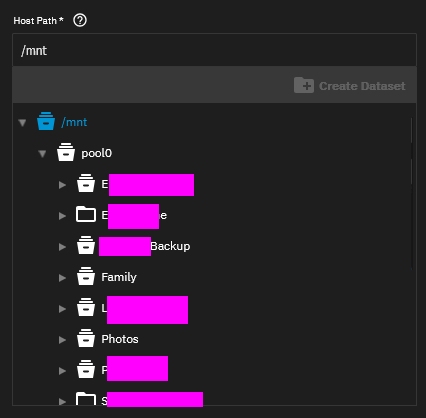
I have one app installed (Syncthing). When configuring Syncthing, there is a drop-down to select the Host Path. When using this selection box, two different icons are displayed next to the eight datasets under /mnt/pool0… The two that are missing from the GUI dataset list show as folder/directory icons, whereas the six that are present in the GUI dataset list show as filing cabinet icons (note that Syncthing is pointed at pool1, so unrelated to this issue - I’m just noting this difference between how the datasets are displayed).
Why are these two datasets “missing”? Though the system seems to be fully functional, it’s obviously disconcerting that two datasets are not shown. Should I be worried?
If relevant, I had no encryption running under CORE (GELI or otherwise). SCALE is offering a new zfs version, but I have not yet upgraded just in case the current state of the machine is unstable and I need to revert to CORE. Behaviour is the same whether using the root account (which came over from CORE configuration) or a new admin account.
and in both cases, the two datasets of concern are missing from the output.
I’m beginning to wonder if TrueNAS is truly unaware of these datasets, yet the SMB shares still work because, for whatever reason, the mount points in /mnt/pool0 are still present.
Are you sure that those two are actually datasets, not folders within a parent dataset?
You could start the add cloud sync task dialogue and go to advanced, there you have a tree view of your pools with different icons for folders and datasets.
Screenshots would help everyone know what you are seeing on the Datasets, folders and shares issues. Seeing the structure of the pool, root dataset and children helps too
Several people have suggested that the two datasets were, in fact, set up as shared folders within other datasets. This is not the case - they were separate datasets under CORE. All eight shares reference folders in /mnt/pool0, not subfolders. If the two items are not datasets, how are they ending up as directories in /mnt/pool0?
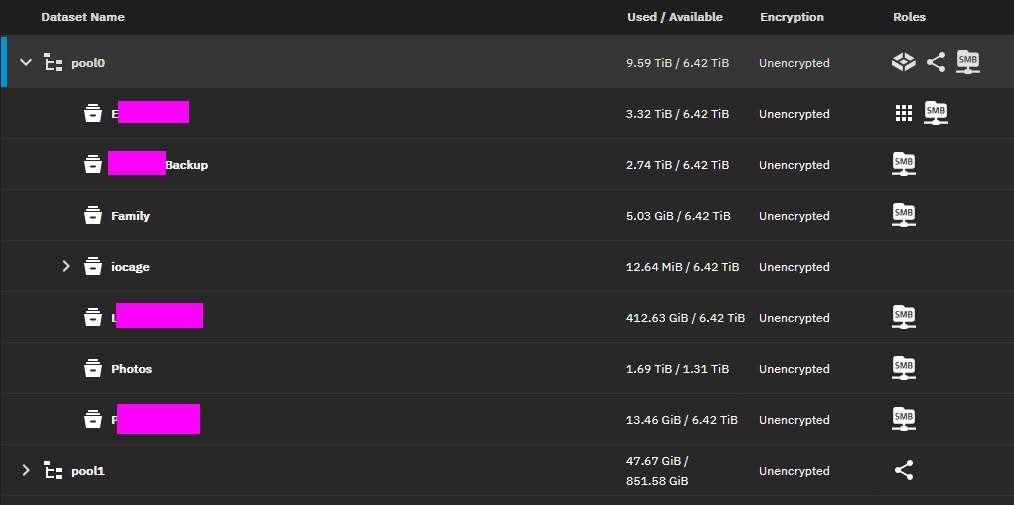
Here is the list of datasets on the machine. There are 6 datasets that I created (though I believe two are missing). I believe that iocage is a legacy dataset from CORE.
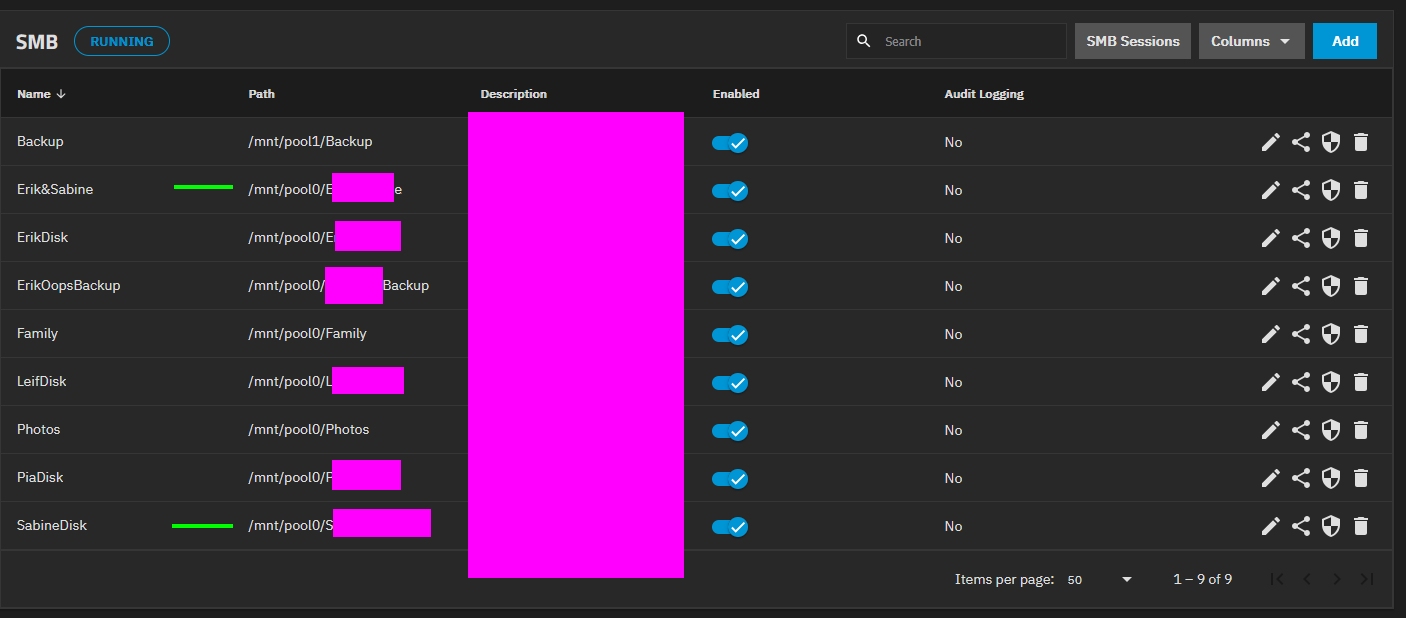
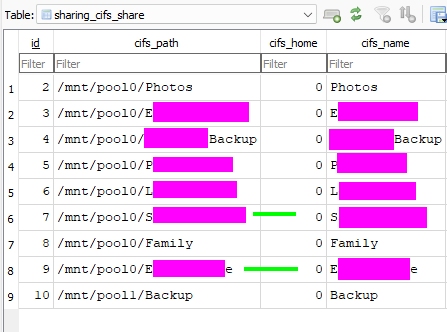
Here is the list of shares. Note the two items of concern: the share beginning with “S” and beginning/ending with “E” (tagged with green). Their mount points are directly in /mnt/pool0 (not subfolders).
Because you created them as directories in /mnt/pool0? What makes you think these two things have any connection to each other?
The fact that they don’t show up in zfs list pretty much conclusively proves they are not (and were not, because moving from CORE to SCALE doesn’t change these things) datasets. So instead you created two directories (not datasets) in pool0, and shared them. That was a valid configuration under CORE, and it remains a valid configuration under SCALE.
Datasets look like folders but have more attributes under ZFS like record size, etc. There is a lot of confusion when users see the GUI reporting datasets only on the Dataset tab and what shows up as directories in the CLI.
It’s a bit funny that you censored the Path. Doesn’t the Name and Path contain about the same name?
I could understand if you had ‘HideFromSpouse’ and other weird names but none of your naming schemes seems offensive.
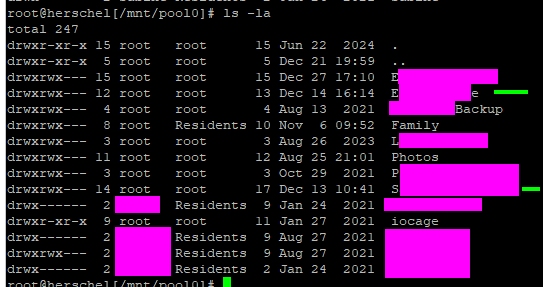
The oldest two folders/datasets were created in January 2021. That’s a long time ago so I have no memory of what I did, but I would be surprised if I used CLI mkdir to create a folder and the web interface to create a dataset - I would presume that I created two datasets. Nevertheless, perhaps that is what I did.
I am reassured that there does not seem to be anything broken.
There was some logic in Core (going back to the FreeNAS 8 days) whereby if you specified an SMB path that did not exist it would create the directories for you rather than raising ENOENT or some sensible error.
Datasets and directories aren’t the same thing, and directories shouldn’t be shown in a dataset management form.
Generally there are two different views of storage on the NAS:
ZFS dataset / zvol management. This is internal to ZFS and does not depend on how things are wired up to mounts.
Path selector. This shows the current filesystem like you see if from shell. There are different icons for files, directories, and dataset mountpoints to aid the admin in selecting reasonable things for operations.