RAIDz2 with 6 disks and wanted to expand to all being 8TB as smallest defines max.
Bought 2 new WD NAS 8TB drives.
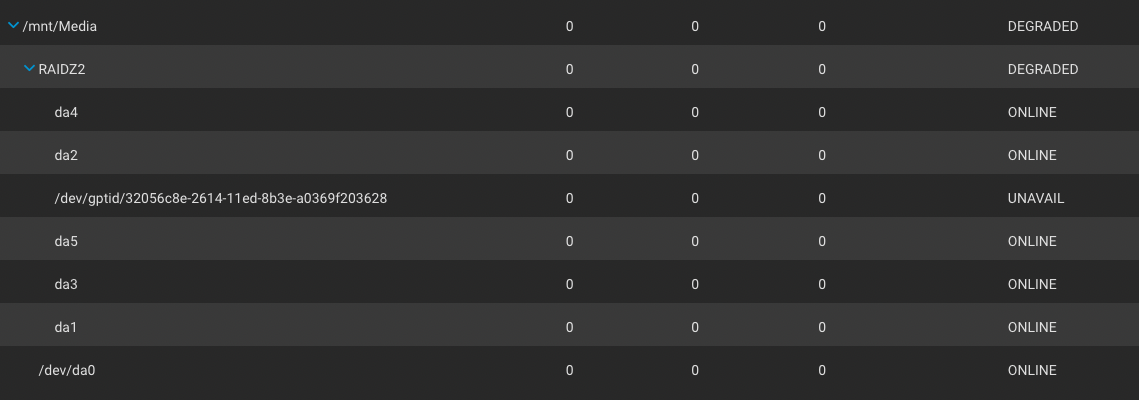
First I offlined the 4TB drive, powered down, replaced it with an 8TB drive, booted up, and did a GUI replace of the old with the new, and it resilvered with no errors. But pool came back with 5 8TB drives plus an “unavailable” drive that could not be onlined.
Figured a cable came out or similar so again offlined it, rinse and repeat, and when it came back up for the 2nd time, I still only see 5 8TB drives but zpool status shows them and again an unavailable drive.
With dmesg I see ,0x5060-0x507f mem 0x92414000-0x92415fff,0x9241b000-0x9241b0ff,0x9241a000-0x9241a7ff irq 16 at device 23.0 on pci0
ahci0: AHCI v1.31 with 8 6Gbps ports, Port Multiplier not supported
ahcich0 - ahcich7 shows as AHCI channel at channels 0 thru 8 which seems right for my backplane SAS adapter with 2 x 4 SATA cables 1-4 on each of 2 lines for 8 drives.
So not sure how to get TrueNAS to see all drives and allow for a replace. Again these are new drives so should not have data on them at all.
Much appreciate any help.
My system is TrueNAS-13.0-U6.8 on a Supermicro board, 32GB RAM and a SAS backplane.
If you have enough SATA ports, next time I would recommend you next time, power down, add one new drive, boot, click on replacing the smallest with the new one, let it resilver. After that is done, rinse and repeat for the next drive.
I don’t have a spare SATA port on the mobo nor the SAS controller but that is the preferred way if I did. This is the pool status showing the unavail yet dmesg shows all 8 ports of the SAS controller have drives.
First I will reboot the server so I can see if the SAS controller sees that. It used to see all 8 drives connected to it, so what is happened is perhaps a DOA 8TB but I will post if it sees all drives but TrueNAS does not.
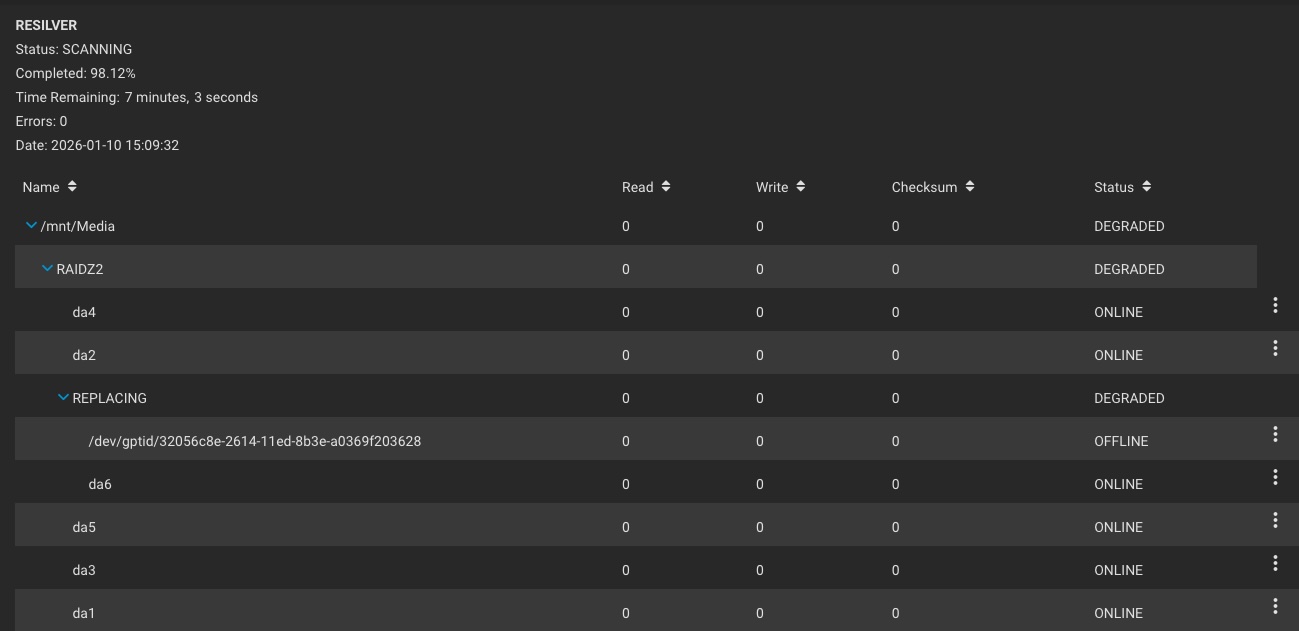
I took a screen shot of the drives with serial numbers, then shut it down and removed an 8TB which was not showing as well as a 4TB drive that also was not showing. Rebooted and zero changes to pool so definitely bad drives as put back in a 6TB drive and it was recognized. Now have the pool resilvering with 5 8TB + 1 6TB. I will be sending back the new 8TB to Amazon for a new one and then offline the 6TB and replace with the new new 8TB.
Yes, of the 2 8TB drives, one was DOA - sent back, got a new one and currently resilvering ~58% done 0 errors and now have 6 x 8TB drives (or will once done resilvering and expanding).
I cannot do copy from my shell (disallowed) nor do I have remote ability. I can show you the image I took of a comparable (if you don’t mind the GUI) command.
Well, the GUI does not show that “extra” disk in the pool. So it is probably okay.
At times detailed troubleshooting from the command line will be done, because the GUI may lack details. Or have a bug in how it displays the information.
Right, there are 2 VDEVs - Media and spare. DA0 was from the spare, not the Media pool.
Media has 6 x 8TB drives, and is now 99.4% resilvered. I know from experience the last 2% takes awhile. But I have no errors in resilvering or zpool status -v and my only other pool is the boot pool of mirrored 256GB SSDs that also have the system running on that pool not the Media pool.
Finished and zpool status -v has no errors on either Media nor boot pool. Resized happened on Media so it’s got 21.05 TB free and 11.47 TB used. That is 32.52 TB total which is pretty close to 8.13 TB per 4 disks of the RAIDZ2 (6 * 8TB) since 2 are lost to spare and if damaged the pool hangs on.
When under FreeNAS (years ago) the system had a number of issues needing correction:
Unintentionally a new VDEV was created when adding a new drive using CLI. Understandably, if using RAIDZn you cannot remove a top-level VDEV even if that is simply a mirror. Pending 12TB of backup and destroy pool and remake but no rush with 20TB+ remaining on the main VDEV Media.
Boot was a USB drive - fixed in 2025 to be mirrored 256GB SSDs as boot pool
System was running on the Media pool - fixed in 2025 and moved to boot pool
Media pool was using 6 drives of varying 2TB, 3TB, and 4TB - fixed in 2025 to be 6 * 8TB drives.
Home is on Fios 1GB internet but prewired with Cat6A for 10GB. Changed NIC from motherboard to PCI X2 from Intel for up to 10GB. Pending firewall moving from SPF to SPF+ but switch supports 5GB already and many PCs are using a 1/10GB card for ethernet. Will be fixing in 2026 to make things faster in the home (e.g., LAN side).