
Are data on hard disks encrypted/locked? If not, it may be possible to take them off and plug them into other machine or fresh reinstall TrueNAS. In that case, you will not depend on the old password.
I think so, one pool was unencrypted, the other by passphrase and I think one by the automatic truenas encryption.
Sadly any live distros ZFS I got are older than what truenas uses, tried updating them, but they are still too old…
So I guess I will boot into the truenas once again with init=/bin/bash and then do the remount thing and try and go from there.
Why is it even that the passwd command does not work?
Is there maybe a variable in the DB that I can set for the menu requiring the password?
following the GUI System - Advanced - Console - Show Text Console without Password Prompt, to me seems reasonable that the field adv_consolemenu in the system_advanced table is the the one to put to 1 (in my case is 1, in yours should be 0 if im correct)
Thanks!
What command would I use (if available) to edit the DB on the trunas system directly, or do I need to get a live OS working?
What you need is a way to copy and paste (or something similar) this password. Since the system isn’t up on the network, that rules out the obvious (i.e., ssh). But maybe via some kind of remote console? Serial console? IPMI? Keyboard macro?
That was my thinking too. There are devices that help with long string entry, like a yubikey, but even those can have a limit and 100+ characters is beyond what yubikey specifically supports. Keep in mind that such a device can also be used maliciously.
The hole you dug for yourself here is impressive.
Edit: Do you happen to own an arduino or similar device? One ought to be able to program one for brute force entry duty.
1 Like
Alright, solution for my case found (I think).
I have pangolins newt client running on it and as I saw the network interface blink, even though I can not access it seemed like it’s doing something.
So I tried to make a connection via the pangolin proxy after I saw that the newt client is apparently connected, and it WORKED!!
So let me try and log in and change the network settings and see if that changes anything.
2 Likes
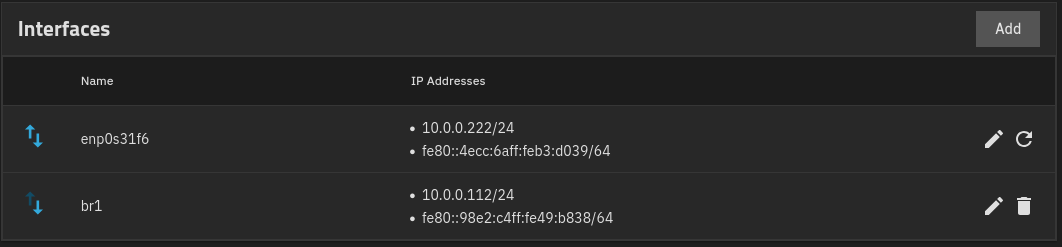
I deleted the bridge I had set up, it appears that was the source of all problems that just started to take effect after a reboot even though before it worked seamless for weeks…
But yeah, solved through my own backdoor xD
Thanks, actually that was what I was just about to do, I have plenty of devices that can emulate USB keyboards that would have been a solution too.
And yeah, the hole I dug myself is quite impressive as I noticed haha.
I will leave the menu locked but shorten my PW to some 32 chars or so as that is safe enough as far as I’m concerned for physical protection.
Thanks for everyone’s help & solutions!
Also, I just noticed that I have the encryption key backed up in my password manager so i also just could have reinstalled the system 
1 Like