After upgrading to the latest version of SCALE, my NAS no longer connects to my LAN (static IP).
I can’t log in from the console because my root password is long, and the CLI refreshes before I can finish typing it.
Tried the usual recovery steps:
Booted with init=/bin/bash in GRUB

Ran mount -o remount,rw /

Tried passwd
But I get: Authentication token manipulation error
I’m guessing this is because SCALE uses ZFS and I’m not mounting the right datasets. I have a saved config from a previous update, but I’d prefer to fix this install instead of restoring.
Anyone know the proper way to mount the filesystem or another way to reset the root password?
If i remember well, password is not required if you want just reset net config… why not reset net and rely on dhcp, just for the time you need to solve your issue?
Don’t know, a bit risky (not that I see many other alternatives), but maybe if is somehow possible open the sqllite db from the shell and you have another user with a short password, you can try to update the ash of your user with the one of the other - reboot and try login again; or if the setting to protect the shell is here, trying disable it
Hmm, I don’t have a user with a shorter PW, so either I can somehow reset mine or maybe there is a way I could copy the most recent config + encryption keys of the current install and just reinstall then?
the problem is that he doesn’t have the nas connected to the lan, ssh is not reachable for sure.
I honestly don’t remember where the freenas-v1.db is stored, to grab it, and i don’t have any idea where the encryptionh keys are (maybe a wrong assumption, they are the same from the previous config backup?).
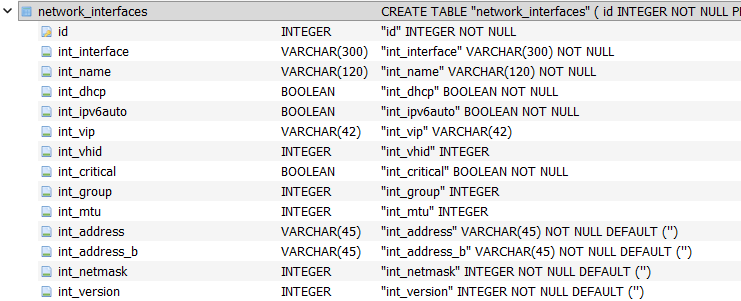
I have opened the sql lite db, maybe will be easy an update to the network_interface table, like
UPDATE network_interfaces
SET
  int_dhcp    = 1,
  int_address = '',
  int_address_b = '',
  int_netmask = ''
WHERE int_interface = '{changeme}'; -- (or ID = *)
take a copy of it before, to restore in case something goes wrong
I guess you’re seeing why this wasn’t a good setup. Have you tried rebooting into a previous boot environment? If the network problem started with an update, reverting to the previous environment seems likely to solve it.
I did try that it did not fix it sadly.
I have one more idea that I just got before ill proceed with trying the manual network change.
The only thing I did before the update is install a few apps which are on a certain pool, ill disconnect the drives and see if that could be the issue as I think one of the apps could be causing it, maybe.
This did not fix it either, ill reconnect the disks and boot into a live ISO to try and access the dB file and proceed from there trying manually changing the network config.