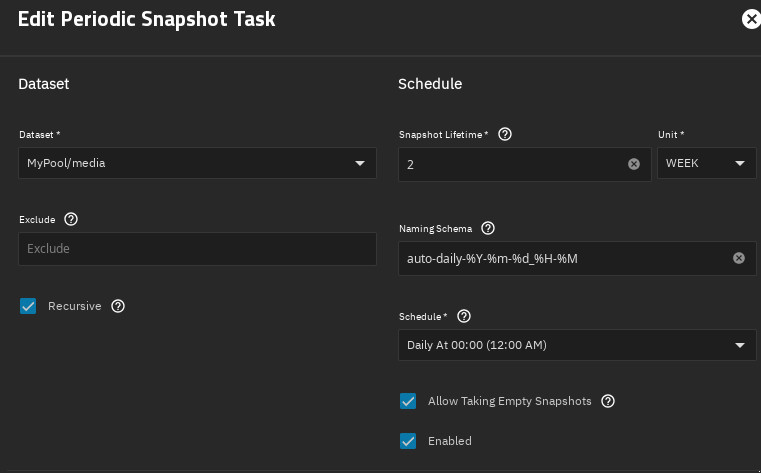
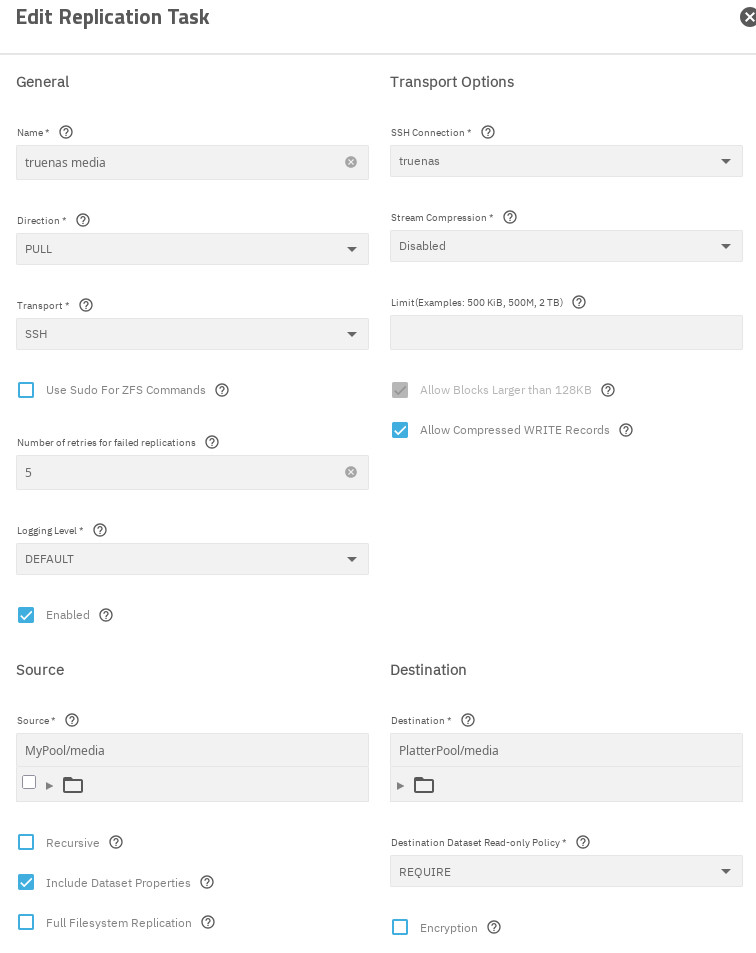
I have 2 TrueNAS systems: a primary and secondary. The secondary uses replication tasks to backup (pull) snapshots from the primary. It mostly works, but every now and then the secondary issues an alert with the replication. It only seems to happen with one dataset.
[EFAULT] warning: cannot send ‘MyPool/media@auto-weekly-2026-08-09_00-00’: not an earlier snapshot from the same fs Replication cannot continue because existing snapshot auto-daily-2026-09-07_00-00 is newer than MyPool/media@auto-weekly-2026-08-09_00-00, but has an older date in the snapshot name. To resolve the error, rename MyPool/media@auto-weekly-2026-08-09_00-00 with a date that is older than auto-daily-2026-09-07_00-00 or delete snapshot MyPool/media@auto-weekly-2026-08-09_00-00 from both the source and destination. cannot receive: failed to read from stream.
The error message does not make any sense to me. I verified that the date/time in all the snapshot names matches the date created field. The rename suggestion is basically a NOP.
When this last happened, I had to keep deleting snapshots on primary till the replication task completed without error. But I don’t understand why.
I also noticed with this dataset, the secondary has only a small subset of the snapshots of the primary. That is not the case for my other replicated datasets.
Either I am very confused or TrueNAS is. Perhaps both.
The only reason any snapshots should exist on the destination is because they were pulled in, whether fully or incrementally, from the source. No snapshot on “secondary” should come from anywhere else. No snapshot on “secondary” should be created.
Looks like all my snapshots (for all datasets and both daily and weekly) all happen at the same time (00:00). I can try delaying one (weekly) a few minutes.
I don’t create any snapshots on secondary, just primary. They all get pulled by secondary to primary. In some cases I do see older snapshots on secondary that are no longer on the primary.
You’re going to have a headache with this setup because your source contains two different snapshot tasks with different frequencies, naming schemas, and expirations. This works without issues for managing snapshots, but things get messy when you try to include more than one Snapshot Task or naming schema in a Replication Task. ZFS incremental replications cannot backtrack to leap over existing snapshots that were already replicated.
This is not a problem for plain zfs. You can either do it manually or make a script that reads the latest common snapshot on both ends and use that snapshot with the option -I to do an incremental replication up to the absolute latest snapshot that exists on the source.
AFAIK, TrueNAS (zetarepl) does not use this method. It attempts sequential replications using one snapshot after the other in the order they exist, as defined by the selected Snapshot Task or naming schema.
Based on that I split the replication task into two (daily & weekly versions). Ran both, and the alert went away. Status is success. Last snapshot (in Replication Tasks page) says “No snapshots sent yet”. Normal until there is a new snapshot tonight?
Some day in the future, zetarepl (TrueNAS replication engine) will attempt to do an incremental send of weekly snapshots, but it will fail because the destination will already have newer daily snapshots by this time.
This is probably because of the different expirations, which leaves you with snapshots on the destination that have been pruned from the source.
If the servers are not 100% online together 24/7, it’s possible that zetarepl (from your Snapshot Tasks) will prune expired snapshots only on the source.
Your original setup is better than splitting it into two replication tasks, but you have to be mindful of your snapshots going out of sync because of varying expirations and the possibility of pruning happening on only one side.
List your snapshots on both sides and you might find a descrepancy.
Source:
zfs list -t snap -o name -H MyPool/media
Destination:
zfs list -t snap -o name -H PlatterPool/media
You destination must not have a snapshot that is missing from the source.
Use SSH in a terminal if needed.
EDIT: I should have ask this earlier. Have you ever manually took a snapshot on the source? Have you ever had a snapshot created on the source that was not from either of the two Snapshot Tasks?
That looks correct so far. Your original replication task (with both schemas) will work until the datasets go out of sync again.
If a common snapshot gets pruned from one side only, maybe because zetarepl ran when one of the servers was not online or reachable, then it will break the incremental replication.
I notice you have “Replication From Scratch” enabled, which means you’re telling TrueNAS to destroy the dataset on the destination and start all over if needed. This is not ideal.
EDIT: It’s too late now, but I wanted to see the list of snapshots before your latest replication from the split task.
I wasn’t sure what to do for that setting. I would like both systems to be in sync.
Last night (midnight) a new daily snapshot was created. The replication task(s) ran several hours later. When I split the replication tasks into daily/weekly (matching the ‘daily’/‘weekly’ naming schema), I left the frequency to run to once per day. The weekly one didn’t do anything.