I started a replication task from a RAIDZ1 pool of 3x8Tb drives with 4Tb of data (all drives are on the MB SATA ports) to a mirrored 2x8Tb pool (attached to a HBA card). I expected the transfer to take a few hours, but it is on the second day and chugging along, 3/4 completed. It says “Sending 32 of 90: hdd-pool/media@auto-2025-07-18_02-00 (19.84 GiB / 43.77 GiB) [total 2.99 TiB of 4.13 TiB]”.
I searched the forum and everyone says, their pool to pool replication is fast (unlike rsync, which I get).
(EDIT: In the Reporting tab, it says that the mean write speed is 29.9MiB/s with top speed 166 for the target drives. The speed is not sustained, very spikey).
None. CPU load is zero to 10% (used by minio once in a while). The GUI says there is 6.6GiB RAM free and 18.5 used as ZFS cache.
Now, that gave me an idea - maybe the apps (immich, jellyfin, minio and syncthing) are periodically interrupting the replication by querying the main pool?
I turned them off for now.
I think what is happening, the system is copying each snapshot in sequence, then, if the data had changed, moves it around when it copies the next snapshot.
So, if I deleted a chunk of data (like, I did delete some media files, then re-uploaded them), the system will be archiving those, then deleting them from the archive as it replicates the newer snapshot. That would mean it has to move way more than the current, live 4.1TiB.
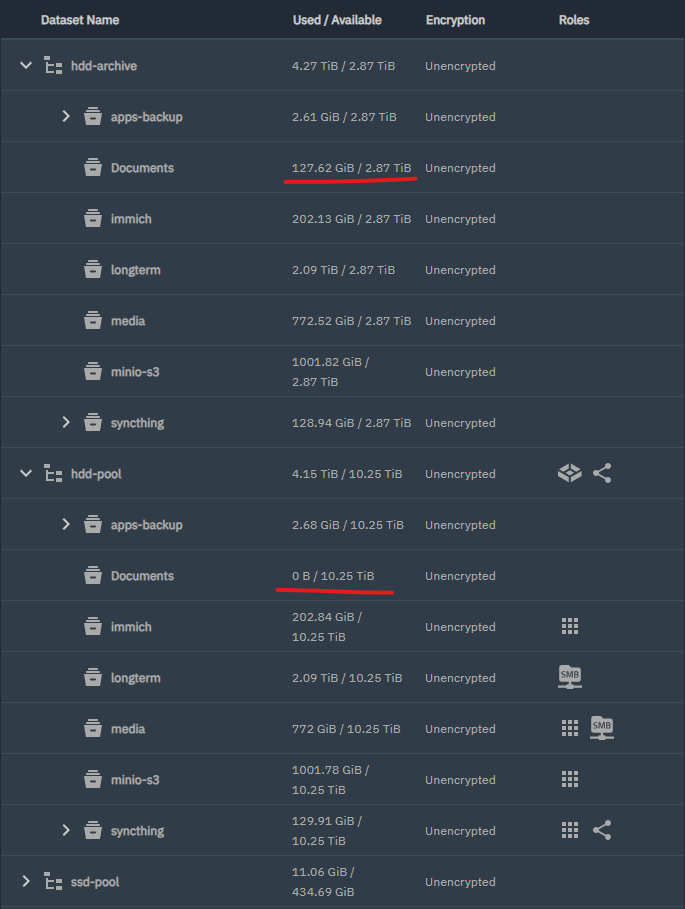
As an example, I am seeing a Documents dataset on the target pool that has since moved into another dataset in the source pool, but it is populated with 130Gb of data. It has been since moved to another dataset (for use by Syncthing), but it has not yet moved on the Archive pool.
Snapshots can add a lot of workload / data to a dataset if stuff in there is getting deleted / re-uploaded, or changed in general. There is no harm in generating a lot of snapshots though it will make your pool data capacity needs go up pretty dramatically, ditto replication times.
I found this out the hard way when I tried to make Time Machine adhere to disk quotas and used the wrong approach.
Instead of self-imposing a quota inside Time Machine, I tried doing it on the server. That doesn’t work because the NAS produces a lot of snapshots as Time Machine does its thing, so you need to set a lot more space aside than just the Time Machine quota to handle all the snapshots. Better yet, set the quota in Time Machine itself and stop worrying about it.
Anyhow, best of luck - I found that enabling the netcat option really sped things up - but since data is being sent in the clear, netcat should only be used in trusted networks or via a VPN like Tailscale or wireguard.
I have more observations to share. Hope it may help someone who tries to:
Make an initial backup of a pool
Maintain ongoing incremental backups of that pool
My long and slow replication stopped again overnight. It said it encountered a corrupted snapshot from a long time ago (turns out, daily snapshot retention was 4 weeks, not two; I changed that to two weeks now). I inspected the bad snapshot, and it was inconsequential, as the change tracked in it was not needed.
I went and deleted a lot of old snapshots, and restarted the replication job. It is cranking now, with write speeds sustained at 160MB/s. Apparently, it was the many snapshots that the replication job was copying, that caused thousands of back and forths across datasets in the source and target pools (this is my conclusion based on observation, not on the knowledge of inner workings of TNScale or ZFS).
The goal of my replication was to start the archive pool from the current state of the source pool, which I was happy with, not to replicate the entire history of when the source pool was being populated. So, if I were to start now, I would:
Make a manual snapshot of the source pool with a certain name;
Create a manual replication task, and tell it to replicate the specific snapshot that I just created, referencing its name;
After it is finished (should be fast), create another, recurring replication task;
Set up snapshot retention for the destination pool in that recurring task.
The replication finished successfully. There is one thing in the result that I don’t understand: the Documents dataset. In the source hdd-pool, Documents started out as a SMB share for, well, documents. Later I set up Syncthing on the NAS and relpicated Documents into a folder inside the “syncthing” dataset. As a result, in hdd-pool the Documents dataset is unused and empty (I haven’t deleted it yet). But it is not empty in the replica (hdd-archive), which means it is duplicate data. I don’t understand why. I will let it be and see if the snapshot retention will clean it up eventually.