
I was too tired so triple check was worthless. I am sorry for that. I was now able to retrieve the db files.
Post the output of ip a while connected to the network.
I can’t be 100% sure (because of xxx), but it seems that enp7s0 and br-423636bdba51 have the ip in the same subnet. That is not good. How (and why) did you create the br-423636bdba51?
Side info:
About a month ago, my Truenas server had a hardware defect. I had to install all the hard disks in new hardware. I remember not being able to access the web GUI the first time I started it. Only after restarting the computer was I able to access the GUI.
It was a mistake of me.
edit: I created the bridge through the gui.
Ok. Remove it then.
You don’t need separate ip for docker container/app. Just expose port 53 (used by DNS). Your dns-server will be accessible by xxx.24.
So remove br-423636bdba51.
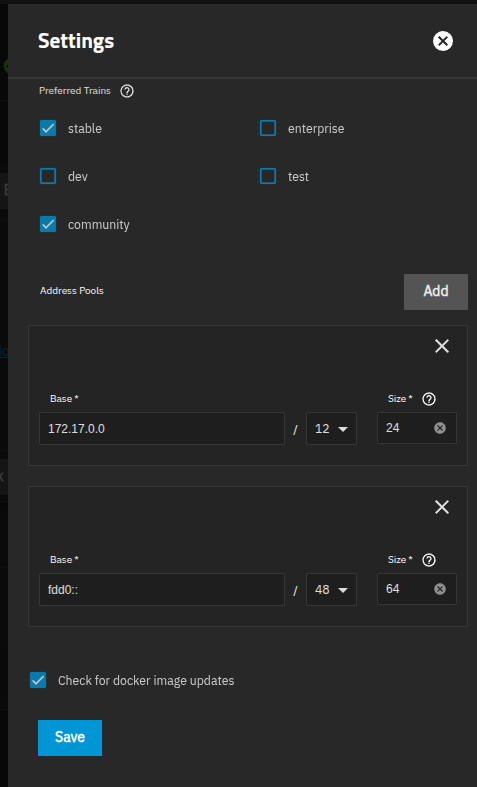
My guess is that it’s a network defined in the Apps → Configuration → Settings, look at the addresspool and pick something that doesn’t overlap with your physical LAN.
It defaults to 172.17.0.0/12 with a size of 24 assigned to each docker network.
It’s not listed in the gui.
I change my router ip to 210, like you mentioned. Now we can see, why truenas and my router had trouble. The bridge has the old ip of my router.
Try sudo ip link delete br-423636bdba51.
Just in case you didn’t see this edit of mine.
OK.
I doubt it. It’s not possible (at least in version 24.10.2) to create a bridge with such a name in the truenas gui. Mb it was created by some app/container though.
Is there a way to start with a fresh installtion and not losing pools and apps?
Without losing pools – yes. I don’t use apps (in truenas), so I can’t be sure on this one.
You can try to import one of your previous configurations. I did it before – my pool stayed safe and sound. I’ve lost some shares settings though. Do not forget to backup your current configuration. Here is the doc.
I still think that fixing the network is easier. You virtually shouldn’t have issues after this bridge removal.
I will try that. Configuration is saved. Thx for your help so far. I will report how the start over went.
Btw: My system dataset was stored on my first storage pool. Is this default?
Yes.
Before you make any new pool the system dataset is on your boot-pool, but it is moved to the first pool you create, so typically that will be an ordinary storage pool.
This bridge reappears after every restart.
Can you stop all your apps and/or docker containers and then ensure that this bridge reappears after reboot?
Ok, I’m out of ideas. At least of the good ones.