
I’ve been getting these issues for a while with my TrueNAS failing to sync with the app catalog, and I had to keep restarting my system because of it. The only thing that I would do to try and troubleshoot was keep changing the nameservers around from 1.1.1.1 being the primary nameserver and 8.8.8.8 as the secondary, to 8.8.8.8 being the primary nameserver and 1.1.1.1 being the secondary. Then, after I realized the issue was still occurring, I went into the shell of the system and tried to do “ping 1.1.1.,1” and I found that I kept getting around 70% to 90% packet loss when pinging. So it’s kinda safe to say that I don’t think that the TrueNAS system is getting any internet. But sometimes when I would change the primary name server to, let’s say 8.8.8.8, and I try pinging 8.8.8.8, it would transmit and receive right after with no packet loss. Same thing with 1.1.1.1 with the same process, and it still pings to it fine with no problem. However, when I ping 8.8.8.8 and my primary name server is 8.8.8.8, that’s where the keeps going. packet loss for days. I’ve been trying to figure out why my qBittorrent downloads were so slow and trackers are saying either not working or not contacted yet, but I think it’s just he system not getting any internet. How can I fix this?

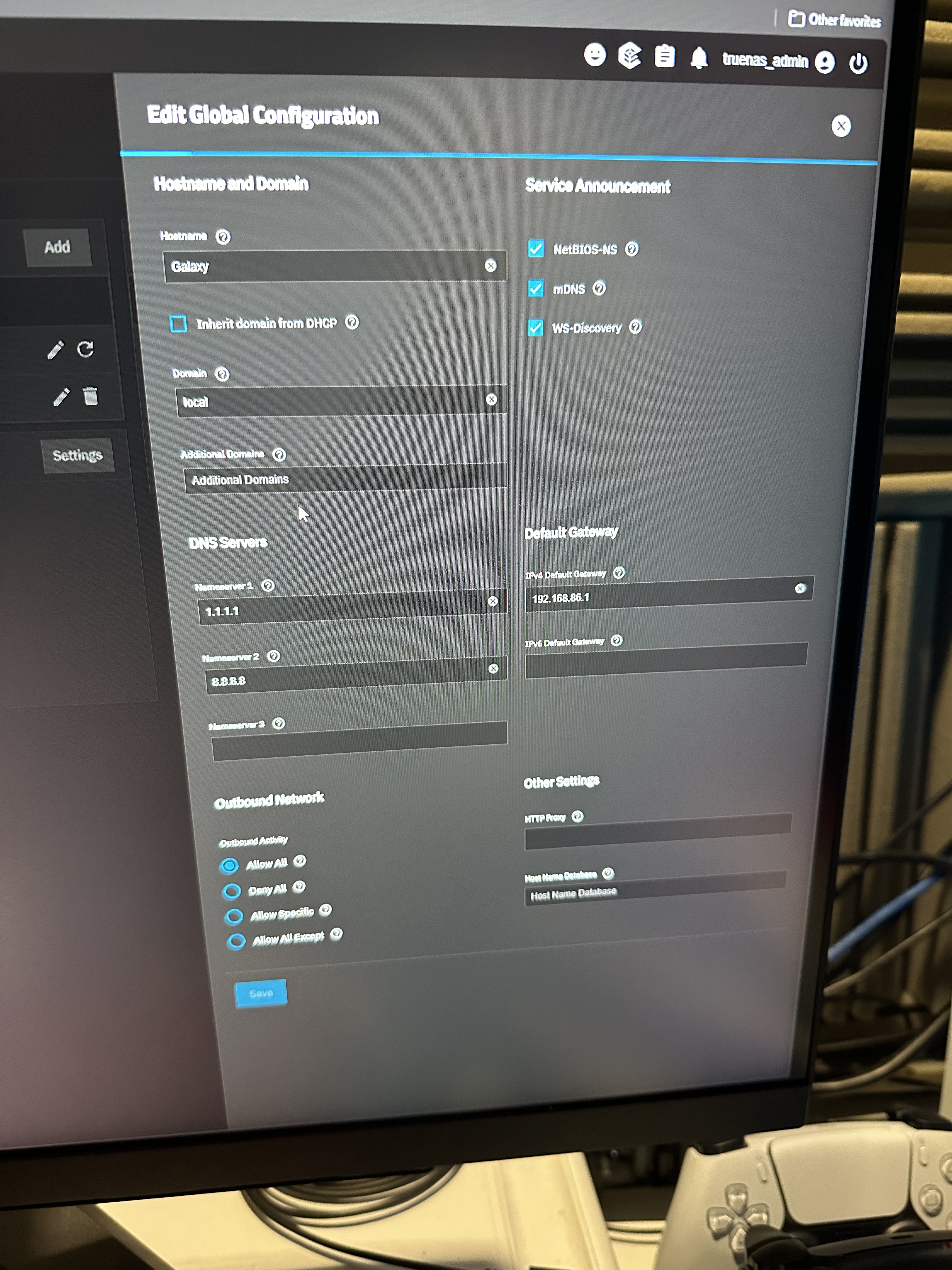

You have multiple posts for alike issues lately
When you get this 70-90% ping packet loss, what happens if you followup by pinging your gateway (likely your router) on IP 192.168.86.1?
Do you see the any dropped packets there?
I know I have that weird luck of stuff not working right 

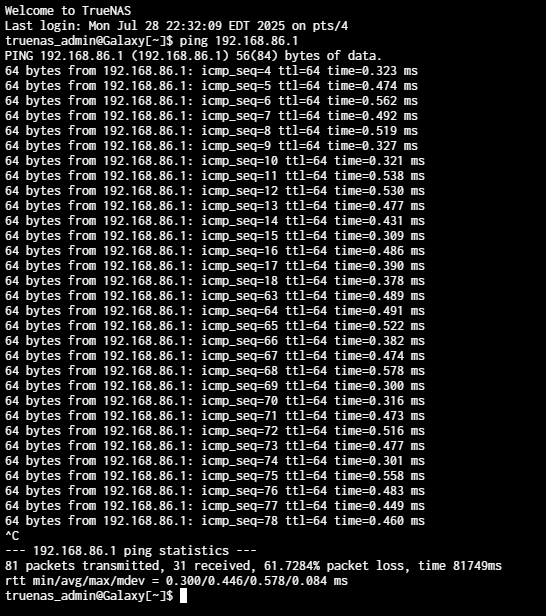
Yeah, that looks like a broken network card, cable or port.
Is your server connected directly to the router or is there some other device in between?
- Try a different cable.
- Try a different port on the switch or router.
- If it still happens, see if you can try a different port on the NIC and lastly a different NIC. (both these will result in your connection to the server failing and you will need to reconfigure the network settings)
so, I’m using the ethernet port directly off of my motherboard and that’s plugged into a network switch in my room that’s connected to my home network. the lights are working on the switch, but nothing really changes. It could be the ethernet port on the motherboard maybe faulty, but i’m still kind of thinking it could be a driver thing. Is there a way to download NIC drivers for TrueNAS or is it, supposedly, downloaded with the kernel OS of TureNAS?
You are not supposed to be touching the driver side of TrueNAS at all. I don’t recall if you ever posted what your motherboard was or what NIC it uses, but that doesn’t really change much. Even a Realtek card shouldn’t experience such massive packet loss, unless it’s broken.
I highly recommend ruling out hardware issues first.
A different cable and port on the switch is a no-brainer test. Bypassing the switch entirely is also something you could try but if your client PC is going through the same switch that is less likely to be the cause (since you mentioned your PC doesn’t have these issues).
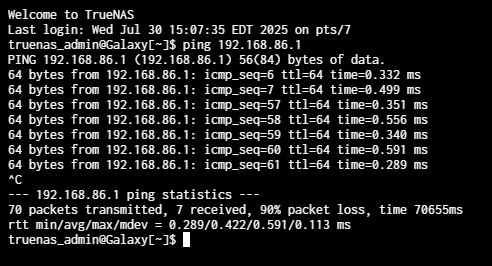
What does this mean?
Does it mean that you moved existing cables to different ports or that you put in different cables entirely and tested with those?
So I used a different cable that was to my Nintendo switch, essentially a different cable entirely, and that cable is connected to different port on my network switch. And yes it was working before
Okay, that leaves bypassing the switch as well as testing with a different NIC. The latter probably being the trickiest thing since it would require hardware you likely lack.
yes ill try that next
but which nic should I get (i would want at least 2.5gig) and would I have to need drivers for it?
Intel® Ethernet Controller X550 (up to 10GbE, 10GbE/5GbE/2.5GbE/1GbE/100Mb )
or
Intel® Ethernet Network Adapter I226 Series (up to 2.5GbE)
Drivers should already be in TrueNAS
great thank you for the suggestions. Question in the 10gbe one do I have to have like some sort of fan on it so it dosent over heat or can it run fine at 10gig without?
These usually go in servers. At worst, you have to check your cooling and add some to your setup.
Pretty much everything recommended is ‘for servers’. HBAs are the only devices I warn about having good cooling on. I have older Intex x520 NICS with fiber and I have not had any problems with transfering 13TB of data betwen TrueNAS and a Windows 11 computer. These are in, I think, mid tower cases with stock cooling. A lot will depend on the case and what you have in there.
Have you put together a detailed system listing yet? @neofusion has a very nice listing. Just expand the ‘Servers’ section by clicking on it under the posts. It lists about all the details I would ask about to start troubleshooting problems.
So you think that this whole thing could be an overheating problem?
If you were getting packet loss with the onboard NIC and an added NIC, you need to check your network settings. You probably have a conflict somewhere.
Are all the devices on your network using DHCP and taking the stock or standard settings for DNS, etc? You need to describe your network so we know what you have.
So my network is a google nest system with everything having DHCP. The DNS settings are set to automatic and I don’t have anything custom set to it, believe me I tried  , and the only thing I have that has a static IP is my TrueNAS machine. Both my TrueNAS and my PC are connected to the same network switch on my room and my PC is able to ping out to 1.1.1.1 with no packet loss. But with my TrueNAS server there is significant packet loss. However when I try pinging at a local machine, like my PC or router, from my TrueNAS machine it pings it fine with no packet loss. Someone said it could be a faulty switch but I don’t know if that’s the problem considering it works when pinging locally works but not to the internet. Should I just reinstall TrueNAS from scratch? If so how can I do that which keeping my pools intact?